Macaos Enterprise
Macaos Enterprise BruceMacaos Enterprise is a cloud-based system for working with printed circuit boards in real world applications and simplifying your PCB acquisition process. Whether you are part of a large organization or just a service provider in the supply chain, Macaos Enterprise will help you get the job done.
Macaos Enterprise is not a design tool for PCBs. There are many good tools available for designing a single PCB. However, most such tools stop there. You get an excellent PCB design converted to an output format (such as Gerber and drill files) which may then be sent to a fabricator.
However, a single bare printed circuit board is not a finished product. Modern electronics manufacturing makes use of automated assembly lines for component placement, soldering, depanelization, test and more. The various modules in Macaos Enterprise allow you to rapidly generate the data and tooling necessary for these assembly steps. Macaos Enterprise also eases the process of purchasing PCBs.
Macaos Enterprise is available for free download.
Macaos Enterprise includes the following tools and modules:
- Product Browser
View and organize your products. The graphic viewer allows you to view, inspect and measure any detail in the product. The browser also lists key product specifications, fabrication history and order history. - Import
Import a PCB product from Gerber/Drill or ODB++ data (and Pick&Place data if available). Select or define stackup, specify mask colors and other parameters, and then publish to the Product Browser. - Panel
Step up a PCB board to an array (panel) suitable for assembly in a matter of seconds. Place break-off tabs automatically, or exactly as you wish. Add fiducial marks, tooling holes, bad marks, copper fill, bar codes, text, and test coupons to the panel frame. - Solder Paste Stencil
Create a solder paste stencil product, from an existing PCB product or a gerber file. Choose a stencil frame or upload your own. Specify adjustments to pad openings, split or modify the shape of openings, define stepped (thinner) regions, add text and more. - Assembly Mask
Add assembly mask data (such as peel-off, glue or solder paste) to an existing PCB or panel without needing to go back to the original CAD Layout system. - Assembly Data
Add or edit the Pick and Place (PnP) and Bill of Materials (BOM) data for a PCB. Send a Request for Quotation (RFQ) to participating Electronics Manufacturing Service (EMS) providers. - Pallet creation
Design a wave solder pallet or selective wave solder pallet. You only need to define pallet dimensions and parameters and place board fasteners. For a selective wave solder pallet simply draw the solder openings and component pockets. The rest is calculated automatically. - Depanelization
Generate a milling file (in G-code) for removing break-off tabs from a panel. Design a fixture to hold all boards in place during tab removal. - Test fixture
Design a "Bed of Nails" test fixture for a PCB. Click on holes or pads to place guide pins or test pins. Test jigs and test pins for a complete in-circuit test setup are available for purchase from the Test accessories folder. - Online Prices and Ordering
Instant online quotations are available for most products. Select a price and add to the shopping basket to place an order. - Technical Documentation
Generate technical drawings in PDF format. - Mechanical Parts
Upload a 3D object and purchase it in plastic or aluminum. - Connectors, Accessories and Machines
Purchase connectors, test jigs and accessories, ESD accessories, stencil stretching frames, milling machines, laser engraving machines, and more. - Collaboration (Product Sharing)
The product sharing features of Macaos Enterprise allow a board owner to share the board with an EMS supplier. The EMS supplier can then panelize the board, add assembly mask data, and create solder paste stencils optimized for their own assembly processes, either for quotation purposes or to place an order for production.
We are constantly working to improve and expand Macaos Enterprise. Expanded component management, transport pallet designer, laser engraving of serial numbers, and output to solder paste printers are among the features we have under development. Your input to our development process is welcome. You can contact us at support@macaos.com
More info:
Product Browser
Product Browser BruceWith Macaos Enterprise you can easily manage information about your PCBs and related products. Product information, production data, order and fabrication history, etc. is at your fingertips.
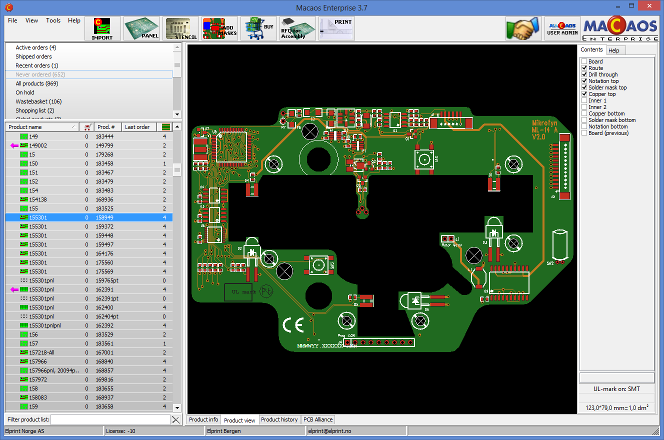
The Product Browser allows you to browse all of your products for product specifications, fabrication history, order history, etc. Products may be sorted into customizable project folders for easy searching. You can also put products "on hold" to temporarily disable them. A Recent Activity list lets you quickly find your company's most recent quotations, orders, shipments and more.
The Product Viewer allows you to view and inspect the product's Gerber, drill and pick & place data in detail. Features include pan, zoom, measure and complete layer selection. Documentation files, including automatically generated stackup drawings and panel drawings, may be viewed or saved locally. You may also add additional documentation to the product, if necessary.
The print utility may be used to generate high quality technical drawings in PDF format. Layout drawings for each layer, stackup drawings and drill template drawings may be generated.
More info
Import
Import Bruce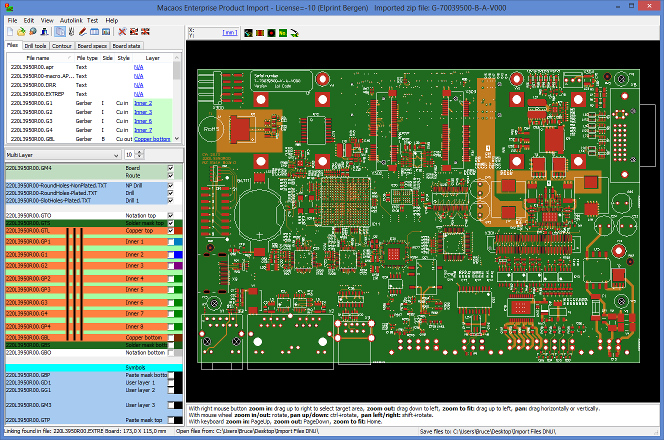 The Import Module is used to read Gerber or ODB++ data, as well as pick & place data and documentation, into the system and "package" the data into a PCB product. Each input file is automatically mapped to it's board layer, based on an AI-based filename analysis or by using pre-defined or customizable filename filters. A WYSIWYG viewer shows your board just as it will be interpreted by the manufacturer. Once the PCB has been "published" to the system it will appear in the Product Browser, ready for panelization and/or purchase.
The following data formats are supported:
- Gerber (from the current version to most legacy versions)
- Drill (XNC, Excellon, Sieb&Meyer, most NC Drill formats)
- Rout (XNC, Excellon, Sieb&Meyer)
- ODB++ (most versions, except XML-based)
- Pick and Place (most ECAD-generated formats)
- DXF (limited support, for documentation purposes)
- HP-GL (limited support, for documentation purposes)
Stackups
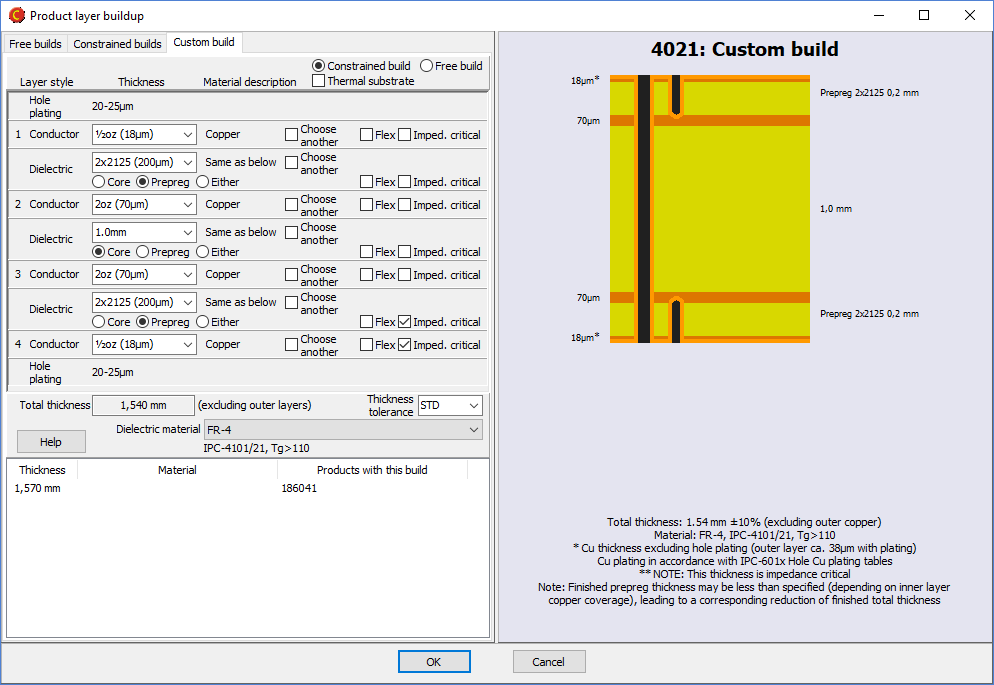 When defining your board, you may choose from a large selection of pre-defined stackups, or define your own buildup. Either way, a high quality technical drawing of the stackup is automatically generated in PDF format.
The custom stackup editor supports flexible, flex-rigid and metal-based stackups. The most common material types (defined by IPC-4xxx slash sheets) are available for selection. If desired, you may query the CircuitData materials database when specifying dielectric materials for special needs. Your previously used stackups are also listed for re-use.
Symbols
 A unique feature of the import module is the ability to add symbols or fiducial marks to the component legend or solder mask layers. Available symbols include: Lead-free, CE-mark, WEEE, Recycle, ESD, RoHS, text, bar code, fiducial and the fabricator's UL-mark.
There is also a function to generate an IPC/JEDEC J-STD-609A compliant text string specifying the materials used in the PCB.
More info
Panel
Panel BruceMacaos has developed an intuitive, yet flexible, rapid PCB panelizer tool.
Assembly arrays/panels
The Panelizer Module allows you to quickly step up a PCB board to an array (panel) suitable for assembly. The panel may be generated automatically from a script or you may specify panel parameters and add features to the panel frame as desired. Downloadable scripts from EMS providers may be used or modified to meet your own needs.
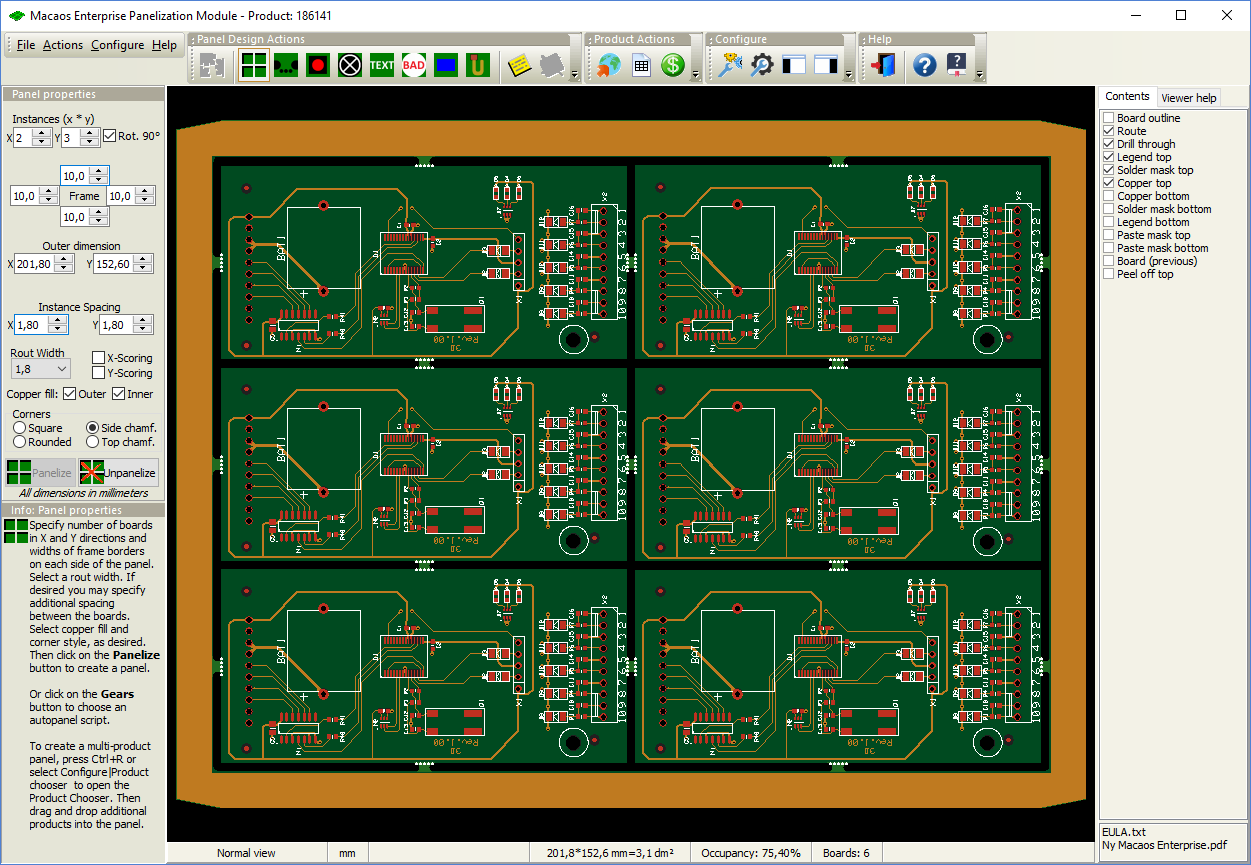
You can easily add features to the panel, such as:
- Break-off tabs: corner tabs or edge tabs with or without mousebite holes
- Fiducial marks: round, square or cross, placed relative to panel or board corners or centers
- Tooling holes or slots, placed relative to panel corners or center
- Break-off holes
- Bad marks
- Copper fill in frame and between boards
- Text
- Bar code, Code 128B or Datamatrix
- Annotation field
- Peel-off, glue or other assembly mask data
- Registration control coupon
- Impedance test coupon (IPC-2221B type Z)
- Any small board as a coupon
Most of these features may be specified in a panel script, so that they are automatically added to any panel that you create using that script.
A WYSIWYG viewer shows your panel just as it will be interpreted by the manufacturer. A high-quality technical drawing of the panel in PDF format is automatically generated when the panel is saved.
Pick and place data (if included in the board product) is stepped together with the boards.
Multi-product panels
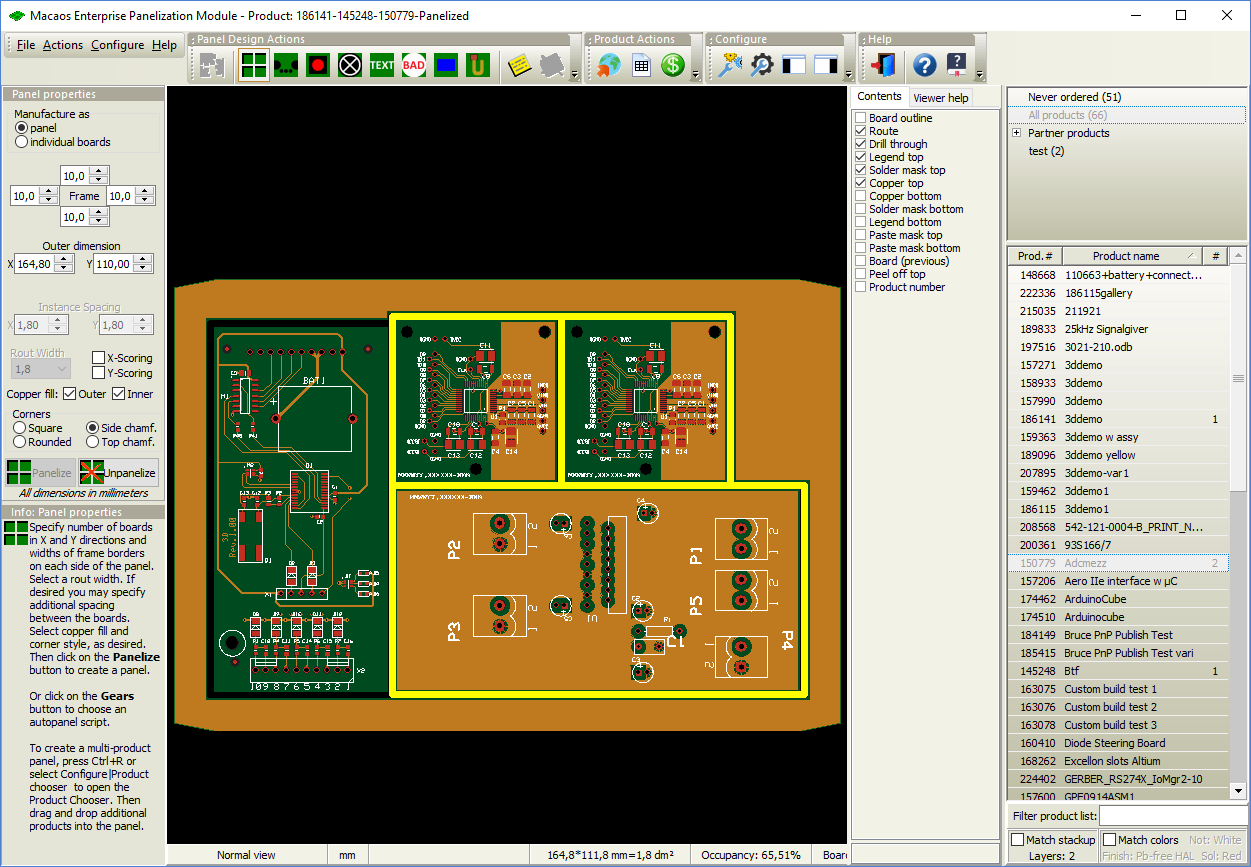
Panels that combine several different products are also supported. Start by selecting a single product in the product browser and open the panelization module.
Open the product chooser with the Configure|Product chooser command. The product chooser lists all products that are compatible (stackup, finish, mask colors) with the first product. You may then add products to the panel by dragging them into the panel.A multi-product panel may be delivered either as a panel or as individual boards. If individual boards is selected then there will be no panel frame or break-off tabs.
More info
Solder Paste Stencil
Solder Paste Stencil BruceThe Stencil Product Creator Module allows you to quickly define a solder paste stencil for your PCB.
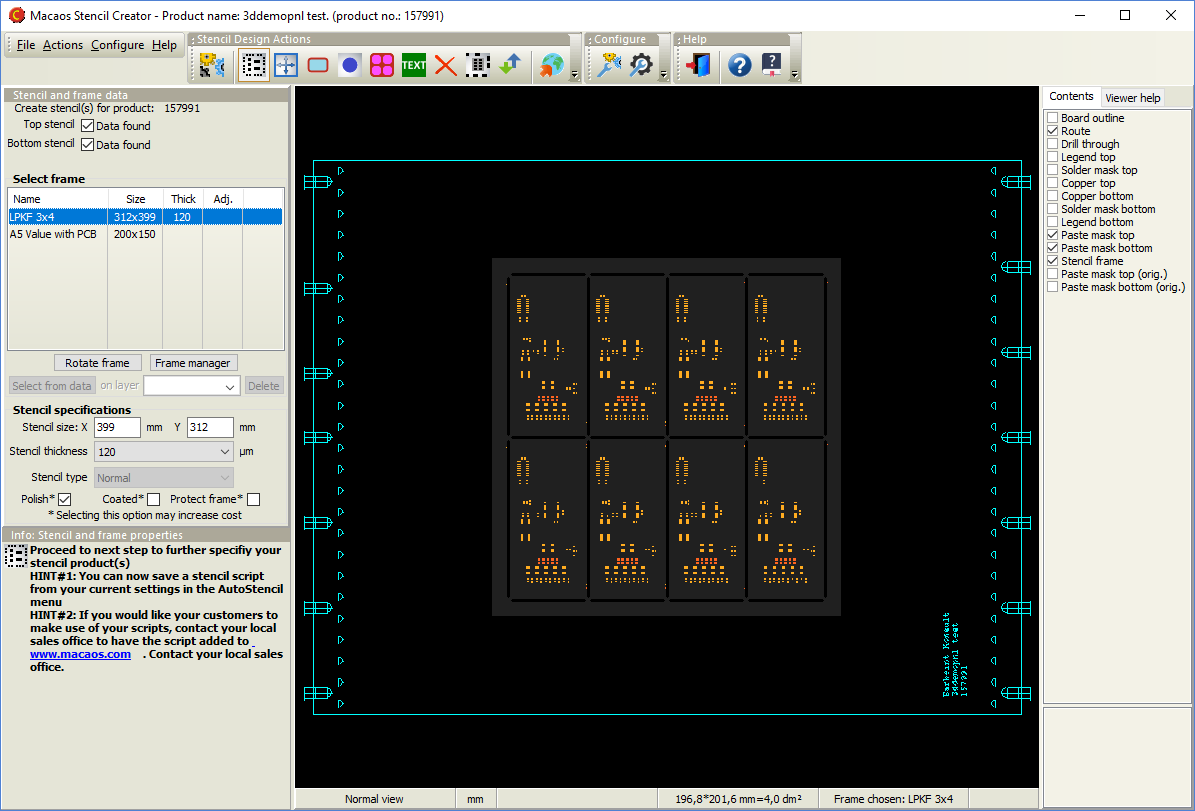
Using the copper layer and paste mask layer data from the PCB, you can do the following:
- Select a frame from among pre-defined or uploaded frame data
- Adjust all opening sizes by a percentage of area
- Adjust the corner rounding of all openings
- Fine tune individual opening sizes to correct for process issues
- Mark fiducials for etching (rather than cutting)
- Add text
- Place top and bottom openings side by side on the same stencil
- Split a large opening into an array of smaller openings
- Define regions of the stencil to be built up or etched down to a different thickness
All opening size adjustments are defined as a percentage of the copper pad area (when copper data is available). The WYSIWYG viewer lets you see how your adjusted openings compare to the copper pads.
A frame manager and editor allows you to upload frames or build new frames based on pre-defined templates. Frames may be defined with variable texts (company name, product number, etc) which automatically get substituted in the Stencil Product Creator.
Once a stencil product has been published, you can get prices and order the stencil in the same manner as for PCB products.
More info
Assembly Masks
Assembly Masks BruceFrequently, the necessary data for assembly masks is missing from the Gerber files created by the board designer. Especially in cases where assembly is being done by an EMS provider, this missing data can be a problem. It is the EMS provider who knows the processes and needs to specify the masks, but getting this information to the board designer early enough to be included in the design is usually not possible.
With this feature, mask areas may be specified by the production engineer from within Macaos Enterprise. Mask areas may be specified either to fill a rectangle drawn by the user, or to fill all solder mask openings within a rectangle drawn by the user. The following masks may be defined:
- Peel-off mask (Blue mask)
- Paste mask
- Glue mask
- Hard gold
- Carbon
- Kapton tape
- Legend
- Solder mask
By adding paste mask data to the desired solder mask openings of a panel, it is possible to create a solder paste stencil when paste mask data was missing at the time the product was created. Although the solder mask openings are usually somewhat larger than the copper pads, this is easily corrected in the Stencil module, which adjusts openings relative to the original copper pad size (when available) rather than the specified paste mask pad size.
More info
Assembly Data Manager (ADM)
Assembly Data Manager (ADM) BruceThe Assembly Data Manager (ADM) is an integrated BOM Tool and Pick and Place Data Manager for PCBs. It provides an environment for managing and reviewing Pick and Place (PnP) and Bill of Materials (BOM) data.
An integrated, standards-based solution
The ADM helps dramatically reduce time and effort in preparing assembly data, by combining the following features in a single module:
- Graphic viewer with component editing functionality
- Structured component overview with properties editor
- Component search facility
- Send RFQ for assembly to participating EMS providers (Basic version only)
- Component price estimator (Pro version only)
- Component rotation, height and solder temperature editor
- Export PnP and BOM data (Pro version only)
The ADM makes use of the recently released X3 extensions1 to the Gerber Format to combine PnP, BOM and Assembly Drawing data into an integrated component layer of a PCB product. As CAD systems2 implement these extensions, a rapid and error-resistant path from designer to manufacturer may be achieved.
The component layer displays the location, rotation, size and key pin location of each component together with properties such as manufacturer part number, supplier SKUs, height, max solder temperature, etc. The use of a standards-based structure for this information allows purchasers, supplers, process line operators, etc to automate their systems and thereby reduce costs.
1 Macaos actively participates in the development of these standards.
2 Some CAD systems, such as kicad, already support Gerber X3 output.
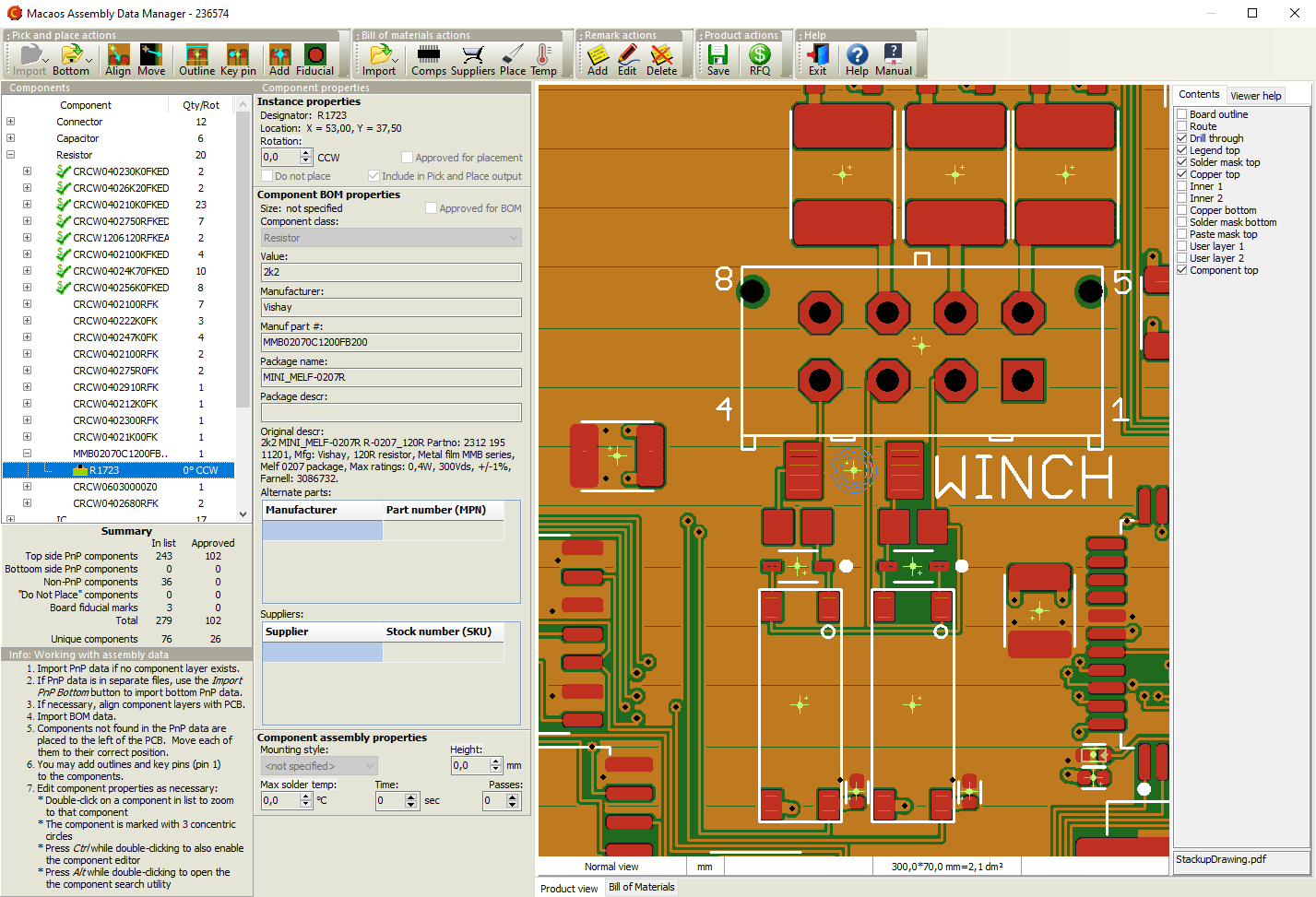 An efficient and straightforward workflow
- Import PnP data. (This may already have been done when the PCB product was imported.) This should be done prior to importing BOM data.
- If necessary, align the PnP data with the PCB data.
- Import BOM data. (This may already have been done when the PCB product was imported.)
- If necessary, move new components to their correct position. BOM components are matched to PnP components by their designators. BOM components which are not found in the PnP data are placed to the left of the PCB. Each of these should be moved to its correct position on the PCB.
- Draw outlines and mark Key Pins. For assembly purposes, it is desirable to graphically display the size and orientation of each component. This information is typically not included in the imported PnP or BOM data, but it can easily be added by drawing outlines and marking key (1 or A1) pins.
- Check/edit the properties of each component. Ideally, a complete manufacturer part number should be specified for each component. At the minimum, each component description should be unambiguous. The edit module includes an online component search function (powered by Octopart) to aid in quickly specifying unambiguous manufacturer part numbers.
- Save changes to the product and generate reports as desired.
Request a quotation for assembly
Once the BOM list is complete, Macaos Enterprise users can send an RFQ for assembly to participating EMS providers. This makes the PCB data and assembly data visible in the EMS provider's Macaos Enterprise so that they can prepare their quotation without you needing send data by unsecure means (such as e-mail).
For more info about becoming an EMS provider listed in this module, click here.
More info
Solder Pallets
Solder Pallets BruceA wave solder pallet is a reliable and inexpensive fixture for soldering through-hole components. The pallet is typically made from a synthetic material, such as Durapol or Durostone®. Macaos supports the design of both full and selective wave solder pallets.
The Macaos Pallet Creation module allows you to easily and quickly design the following types of pallets:
-
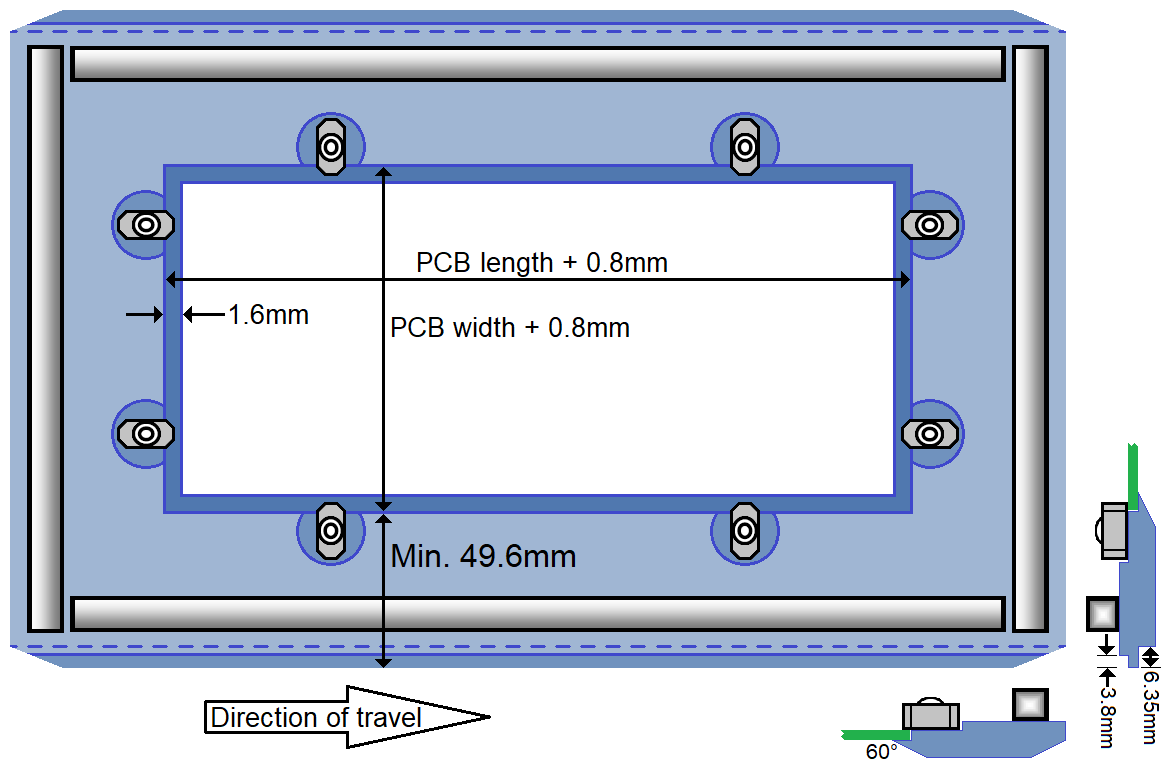
A wave solder pallet exposes the entire solder side of the PCB to the solder wave. For panels, there is an opening for each board in the panel. This would typically be used to support small, thin or irregularly shaped PCBs as they travel through the wave soldering machine.
-
A selective wave solder pallet exposes only regions with plated through-hole (PTH) components to the solder wave, while protecting other regions from the solder wave. This would typically be used when soldering PTH components on a board which also has surface-mounted (SMT) components, gold fingers, ground planes, heat-sensitive or other areas needing protection on the solder side of the PCB.

Both styles of wave solder pallets have the same frame, with stiffener/solder-dam on all four edges of the top side, and rotary PCB fasteners. The bottom edge of the rail fingers is flush with the bottom side of the PCB. The leading and trailing edges, as well as all four corners, are chamfered.
In Macaos much of the pallet design is calculated automatically. You need only define the following:
-
outer dimensions and material parameters
-
placement of PCB fasteners
-
solder wave openings (selective wave solder pallets only)
-
component pockets (selective wave solder pallets only)
More info
Depanel
Depanel BruceDepanelization is the process of removing individual boards from a panel, after the boards have been populated with components. Traditionally, boards have been depanelized by breaking or cutting the the break-off tabs which hold the panel together. However, the mechanical forces (particularly bending) which can take place may weaken or damage the solder joints of fine-pitch SMT components near the board edges. This problem can be mitigated by using a milling machine to remove the break-off tabs.
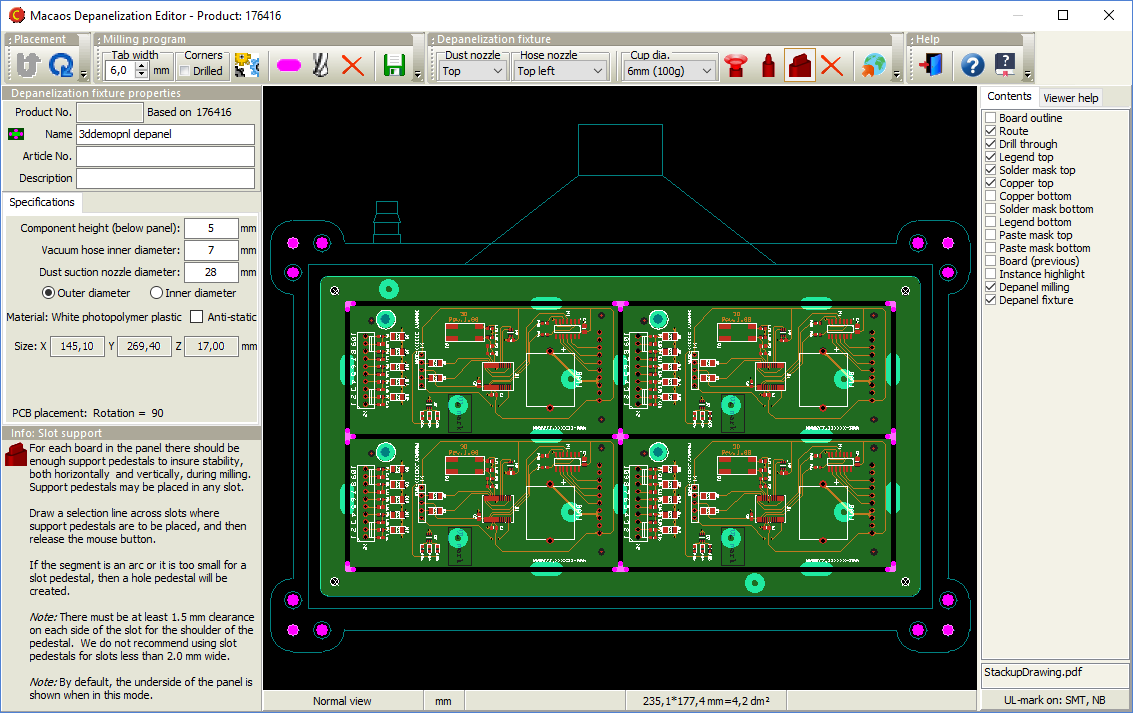
The Macaos Depanelizer module allows you to easily and quickly accomplish the two specific tasks required for depanelization by milling machine:
-
Generate a milling program for removing the break-off tabs from a panel. A milling program contains the numerical instructions for operating a CNC milling machine which removes the break-off tabs from the panel.
-
Design a fixture for holding the panel frame and boards in place during the milling process. The depanelization fixture holds the boards in place, so that they do not move or otherwise get damaged during the milling process. Macaos has developed an inexpensive and reliable fixture style for this purpose. The fixture uses registration “pedestals” and vacuum suction to hold the boards in place as they are loosened from the panel, as well as a suction nozzle to remove dust from the milling process.
More info
Test
Test Bruce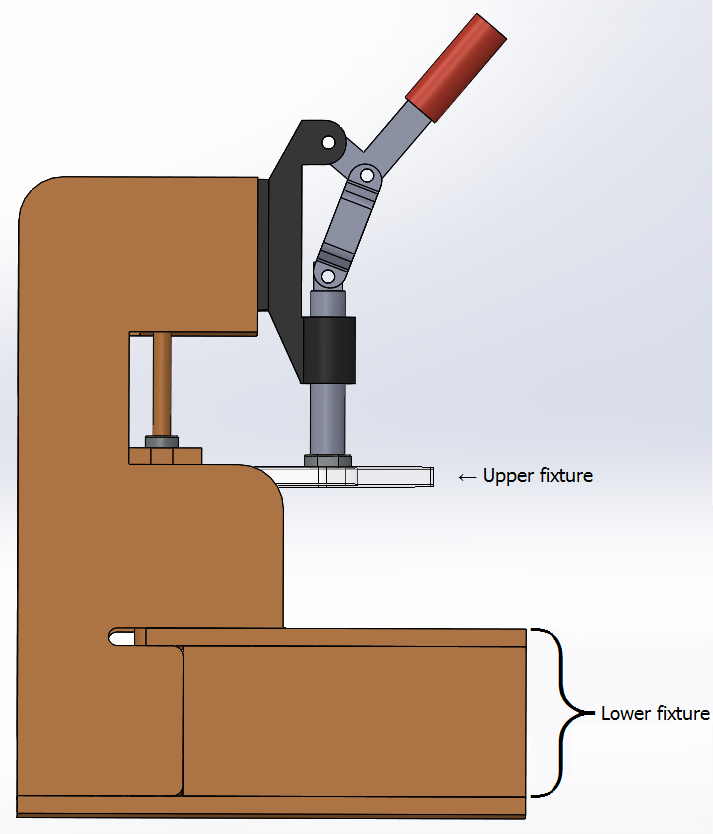 Macaos has developed a simple and cost-effective jig for in-circuit testing. The test fixture module allows you to design a test fixture by simply clicking on the test points in your board, and assigning each pint with a pin type (and appropriate labels for a wiring list, if desired).
Test fixtures
A "Bed of Nails" test fixture is a plate with an array of spring-loaded test pins (or Pogopins) which are mounted in the fixture so that they will make contact with desired test points on the PCB. In addition, a few guide pins are placed at mounting hole locations in order to properly align the PCB with the test pins. The PCB is placed on top of the pins and then pressed down so that the pins make good contact with the test points. Ideally, all test points should be accessible from the bottom side of the PCB.
The lower fixture of our standard test jig is a box with hinged top and bottom. It is delivered with holes drilled for the test pins, guide pins, connectors, etc. as specified in the test fixture module. Test pins and other accessories may be ordered together with the test jig and fixture, directly in Macaos Enterprise.
The standard jig is delivered with an upper fixture with slots that allow you to place press pins where appropriate. For boards with test points on both sides, it is possible to design an upper fixture with test pins.
Test pins
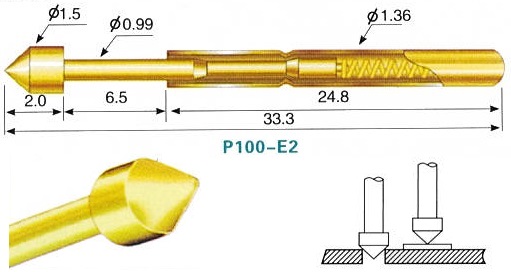
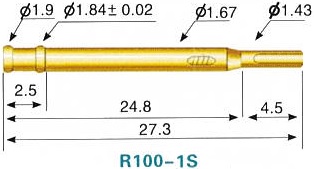
Typically, test pins consist of two parts: 1) a receptacle which is mounted in the fixture plate and wired to a connector, and 2) a spring loaded pin which is inserted into the receptacle. The spring-loaded pins are available with a variety of different pin heads, which are chosen according to the type of test point contact to be made (via hole, solder pad, component pin, etc).
More info
Online prices and ordering
Online prices and ordering Bruce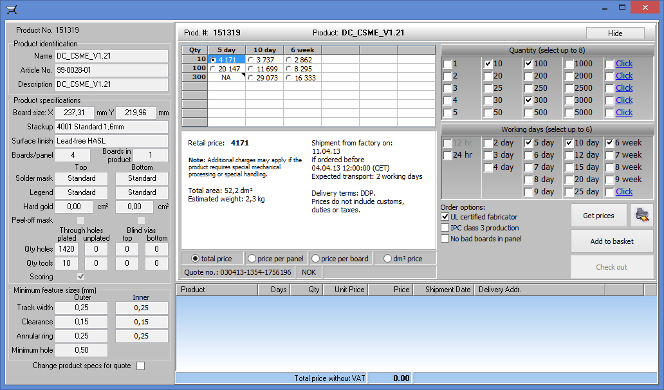 The Quotation Module gives you access to online price quotations from participating suppliers. Select multiple board quantities and delivery times in order to choose the quantity/delivery/price combination that suits your needs. Once you have selected your desired price, your order can be placed with just a few mouse clicks.
Suppliers participating in the Macaos Enterprise System have sales offices in Denmark, Norway, and Sweden, which serve customers througout the European Economic Zone and elsewhere.
Note: If you are interested in participating as a supplier or reseller, you can join the Macaos Enterprise System.
More info
Macaos Enterprise user guide: Quotations and the Shopping Basket
Technical Documentation
Technical Documentation BruceMacaos Enterprise can generate technical drawings in PDF format for your products. Three kinds documents can be generated. All drawings have an ISO standard title block with user-specified content.
Layout documentation set
A layout documentation set is a PDF file with several drawings, one drawing per page. The contents of the set are
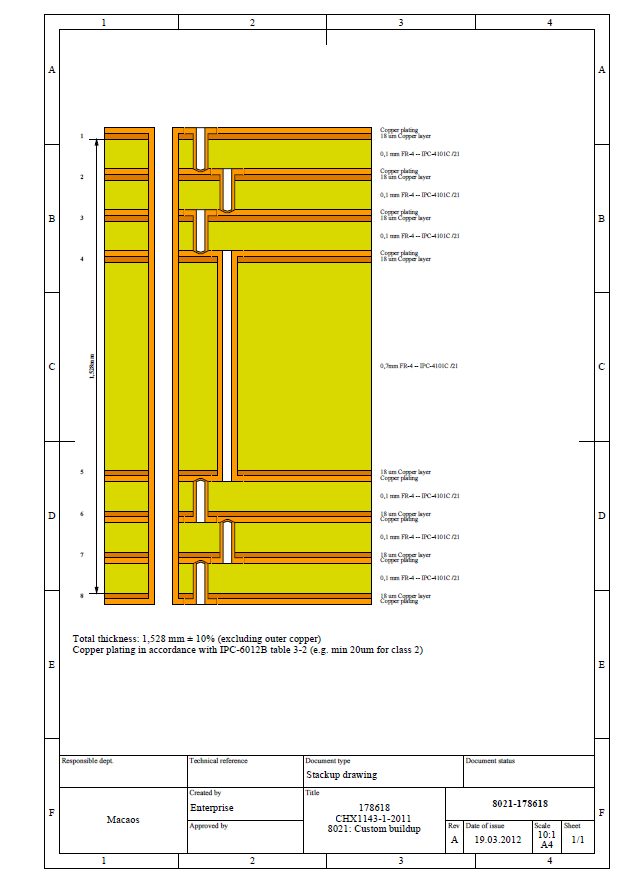
- An overview of product properties
- A layout drawing for each layer in the product
- A stackup drawing (for PCB products)
- A drill template drawing for each drill layer in the product
Stackup drawing
A stackup drawing shows the dimensions and materials of the copper and dielectric layers of a PCB product. It also shows the depths of through, blind and buried holes, if any.
Panel drawing
A panel drawing shows the placement of boards and frame objects in a panel.
More info
Mechanical parts
Mechanical parts BruceThe Mechanical Part Import Module is used to import a 3D mechanical part from an STL file.
The object dimensions are displayed. If necessary, click on one of the units buttons so that the dimensions are correct. The volume, weight and total surface area of the object are also displayed.
Material properties
Select the desired material for the mechanical part. A selection of photopolymer or stereolithographic plastics are available for 3D printing. It is also possible to select aluminum (with a variety of finishes) for machining.
If a non-transparent plastic material is selected, then you may choose a paint color and finish.
Publishing
Once dimensions and properties are correct, click on the Publish button to publish the product.
When publishing the mechanical part product, you will be asked to include a STEP file with the imported product. A STEP file gives more accurate machining information than an STL file, especially if the object contains many detailed curved surfaces. For machined aluminum parts, a STEP file must be included.
Macaos Enterprise needs an STL file to display and calculate the dimensions of a mechanical part. And for simpler parts, the STL file is sufficient for manufacture. However, best results are obtained by importing both files to the product.
More info
Connectors, Accessories and Machines
Connectors, Accessories and Machines BruceWhile PCBs, stencils and test fixtures are products which may only be purchased by their owner (and partners), Macaos Enterprise also supports purchasing “ownerless” products. There are several categories of “ownerless” products:
- Global products are PCB products which may be purchased by anyone. These are typically kits for student projects.
- Connectors A wide variety of connectors styles are available, and each style has several parameter options. Use the Connector Chooser to browse and select a connector.
- ESD accessories are anti-static bags, tape, labels and related products.
- Machines are milling machines, laser engraving machines, label dispensers and more.
- Software is software licenses, maintenance agreements and related products.
- Stencil frames are stencil stretch frames and other stencil related accessories.
- Test accessories are test jigs, test pins and related products.
- Other off-the-shelf products are any off-the-shelf products not included in the preceding categories.
Off-the-shelf products may be purchased in much the same manner as PCB, stencil or fixture products.
In cases where an online price is not available, placing an order is in essence a Request for Quotation (RFQ). The sales office will get back to you with price and availability details and then await your confirmation before processing the order.
Connector chooser
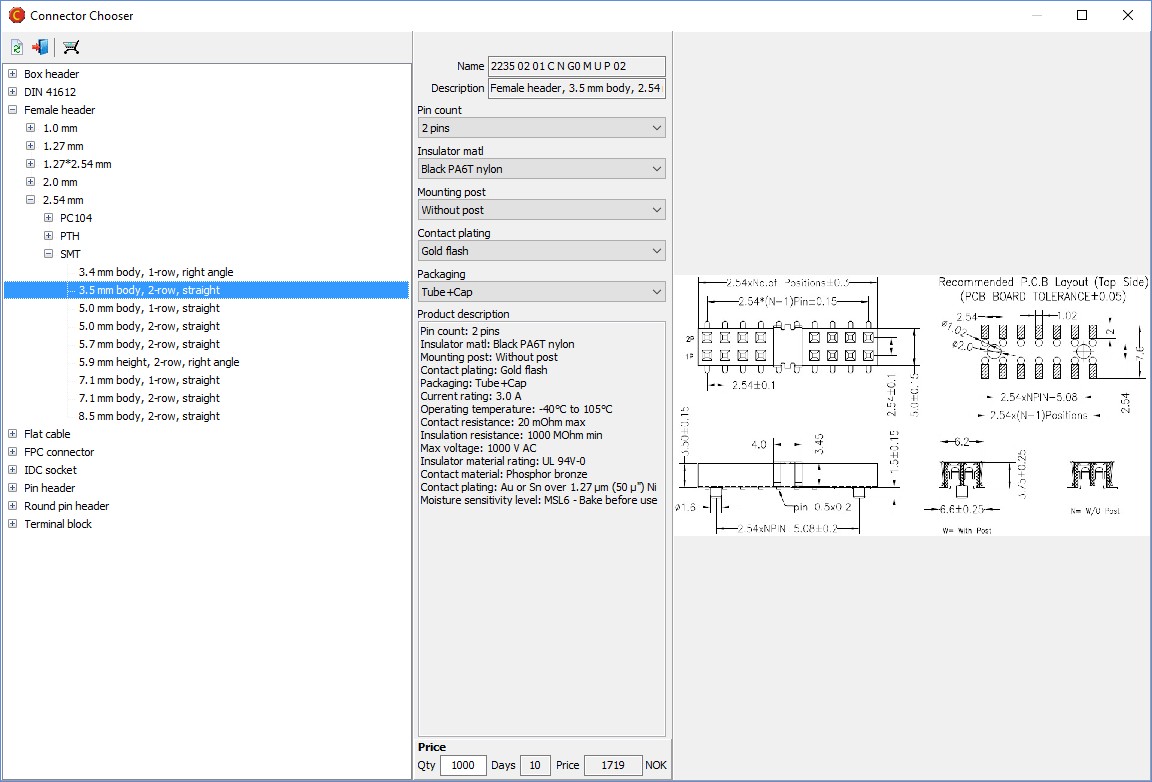
The Connector Chooser is used to browse the catalog of available connectors and select a connector for purchase.
Selecting a connector family from the category tree loads its description and options, and displays a drawing and/or photograph of the connector family. You may then select the specific parameters, such as pin count or contact plating, of the desired connector. Clicking on the purchase button loads the selected connector into the Quotation module.
More info
Collaborate
Collaborate BruceMacaos Enterprise is designed for collaboration. You can share your products with your design bureau, fabricator, EMS, purchaser, etc so that each partner has access to the data they need without compromising product security.
For example, a product might go forward like this:
- When the design bureau finishes the board layout, they load the Gerber, drill and pick & place data, together with drawings and other documentation, into the Import Module.
- Once the product has been specified in the Import Module, the design bureau publishes the product, assigning ownership to the product's owner.
- The product owner locates the product in the Product Browser and clicks on the RFQ for Assembly button to generate RFQs for populated boards. This module automatically "shares" the product with participating EMS providers, and then asks them for a quote for a batch of populated boards. Alternatively, the product may be shared manually and any EMS provider may be directly contacted for a quotation.
- The EMS production engineer analyzes the board and adds assembly mask data (such as peel-off mask, glue mask, paste mask, etc) to the board product (or panel), as needed.
- The EMS panelizes the board as best suited to their own processes and uses the quotation module to estimate their cost for the bare boards. This, together with the product's pick & place data and BOM allows them to make a quotation.
- Once the EMS gets the order, they can order the panels and solder paste stencils via Macaos Enterprise.
- When the bare boards are finished, the fabricator uploads quality documentation and shipment tracking number, so that it is visible in the Product Browser.
- The EMS may use the Depanel module to generate a milling program for depanelization. They may also use the Test fixture module to design a test fixture for the populated boards.
- When the populated boards are finished, the EMS uploads quality documentation and shipment tracking number, so that it is visible in the Product Browser.
Macaos Enterprise has several levels of access and visibility, so that the product owner can control access to their data.
More info
Macaos Enterprise user guide: Product sharing
What's new in Macaos Enterprise
What's new in Macaos Enterprise BruceMacaos Enterprise 5.6.19
BOM import improvements
- Alternate MPNs: Support has been added for importing alternate MPN/Manufacturer pairs. This is done in the same manner as with Supplier/SKU pairs. Pairs must either come in paired columns, or with a specified delimiter character.
- BOM Import column mapping: Columns are now mapped by selecting the type of column in the column header. This change makes it possible to map an unlimited number of columns to the Value, Package, Description, Additional info, Supplier/SKU and Alternate MPN/Manufacturer fields.
- Default mounting style: It is now possible to specify the default mounting style for connectors separately from other components. The default mounting styles are only used if no Mount style column has been mapped.
Other Assembly Data Manager improvements
- Change component class: Select one or more components in the component list, right-click and choose Change component class to, and select the desired component class for the selected components.
Macaos Enterprise 5.6
IPC-D-356 Test Pad Data
With this release, we add support for bare-board test pad data. Most CAD systems are able to generate test pad data in IPC-D-356 format. Including this data together with your Gerber and Drill files is not just an advantage for the manufacturer when testing bare PCBs, but it also makes several operations in Macaos Enterprise quicker and easier.
- Import module: If an IPC-D-356 file is included in the batch of files to be imported, it will be automatically detected, imported and linked to the Test pad top and Test pad bottom layers. Each testable point (typically bare copper pads and plated holes) is imported together with its designator, pin number and net name. If necessary, the test pad layers may easily be aligned with the Gerber layers.
- Assembly data manager: If test pad data was not imported at the time the product was created, it may be added to the product in the ADM. A Merge function matches test pad data to the product's components, automatically identifying component footprint outlines and key pins, where possible.
- Test fixture designer: When creating a test pin, if a test pad exists at that point, then the designator, pin number and signal name will be copied from the test pad.
- Solder paste stencil creator: When test pad data is available, then it is possible to match stencil openings to component footprints. The footprint editor can easily modify all shapes in a footprint symmetrically. This can also be done in a single operation on all components having the same footprint.
Assembly Data Manager improvements
In addition to adding support for test pad data, we have made additional tweaks to streamline ADM usability. Our goal is to make the process of verifying PnP and BOM data as quick and painless as possible. Here's a list of the tweaks:
- Ctrl+Alt+Click on a component in the viewer to locate that component in the component list
- Right-click on a component instance and select Change part number of instance to edit the manufacturer part number of that instance. This function is intended for use if an instance inadvertently gets grouped together with other non-matching components.
- Component alerts: In the PnP and BOM import dialog boxes, there are now check boxes in the component lists. Setting a check mark causes that component instance to be flagged with an "Alert." After import, the flagged components will show with bold red text in the component list. Right-click on a component instance to toggle the alert on or off.
- We have added buttons at the bottom of the Component Properties pane to highlight the selected component instance, or all instances of the selected component. If test pad data is available, then the instance's pads may also be highlighted.
- In the component search dialog box, we have added check boxes to the search results list, which are used for selecting the manufacturer part number and alternates.
- In the component search dialog box, we have added an additional search text field.
- When importing a BOM, if marking capacitors or resistors as Equivalent or better, it is now possible to specify individual components (by designator) which should not be marked.
Other improvements
- Import module: You can now right-click on a drill file (in the drill files list) to toggle all tools in the file between plated and non-plated.
- Test fixture designer: We have added Test fixture drawing and Test fixture annotation layers to improve fixture documentation. The Test fixture drawing layer shows all test pins with a symbol (for the receptacle size) and a text (for the pin head style, if specified). Guide pins are shown with a large cross and a letter indicating the pin function. The Test fixture annotation layer shows all test pins with a cross and a text with the Des-Pin of the test pin (if specified).
- Test fixture designer: It is now possible to export the test circuitry PCB in DXF format.
- Recent activity: Quotations in response to an RFQ are shown with a green and white dollar icon (rather than the gray and green icon used for quotations from online prices). If you view a quotation in the quotation viewer, you can double-click on a price to add it to the shopping basket.
What was new in previous versions
What was new in previous versions BruceMacaos Enterprise 5.5 (June 2021)
Macaos Enterprise 5.5 (June 2021) BruceTest Fixture improvements
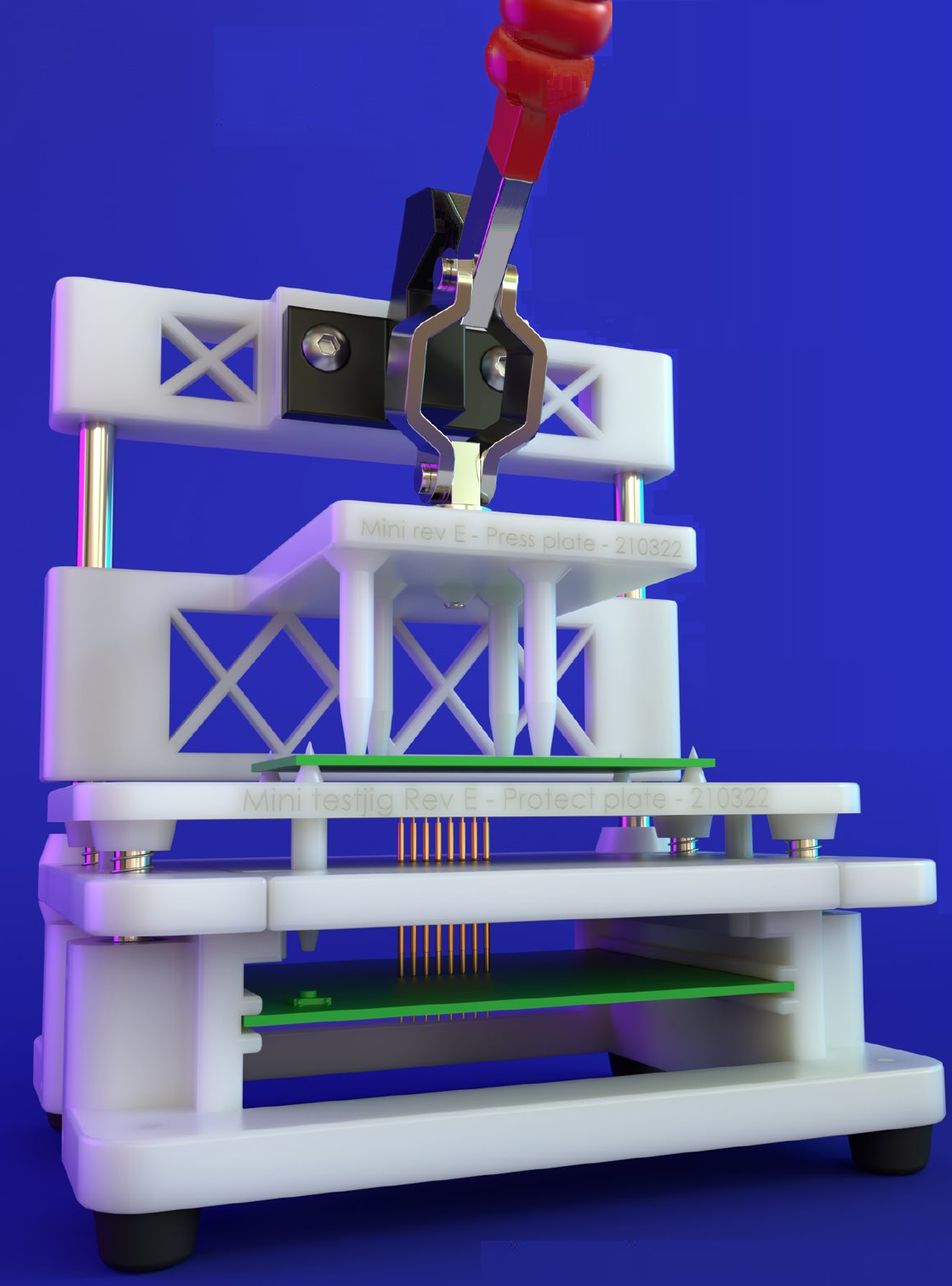
Macaos Integrated Test Jig
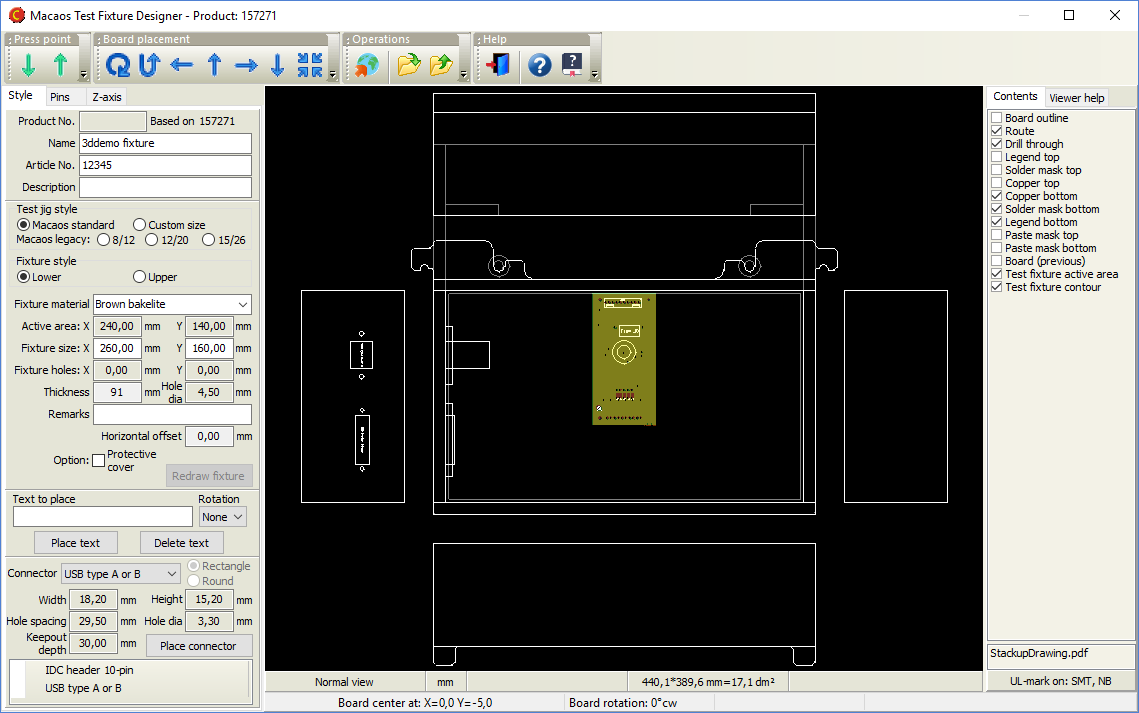
The test fixture designer module now supports design of the Macaos Integrated Test Jig, a new design which integrates test circuitry into a modular test jig. It is developed for increased reliability and ease of design, compared to other supported test jigs.
The Macaos Integrated Test Jig incorporates an upper press fixture, a protective cover, a receptacle plate, and a test circuitry PCB. This is delivered fully assembled, with pins/receptacles installed.
The user selects an active area size, and then specifies the locations and types of Guide Pins and Test Pins. From this information, the Upper Fixture, Protective Cover and Receptacle Plate (the three gray modules shown at the right) are generated and added to the jig.
Use the Gerber button to generate a Gerber file of the test circuitry PCB outline and pin locations, for import to your CAD system. Connectors and indicators may be placed at the front and/or back edge of the PCB. This PCB must be ordered together with the test jig.
Automatic test pin placement
Test points that have been defined in the Assembly Data Manager (with the Test Point component class) may be automatically imported as test pins. The user need only specify a receptacle size (diameter) and pin head style.
Other tweaks
When publishing a test fixture, it is now possible to attach a STEP file (3D model) of the PCBA to be tested. This is strongly recommended when publishing a Macaos Integrated Test Jig.
As test pins are added to the fixture, the centroid of the test pins is shown as a hexagon.
Assembly Data Manager improvements
We have made additional tweaks to streamline ADM usability. Our goal is to make the process of verifying PnP and BOM data as quick and painless as possible. Here's a list of the tweaks:
BOM Import
- If designators are separated by a comma, semicolon, or space, the separator character will be automatically identified in most cases.
- An option has been added to treat the hyphen (-) as a valid designator character, instead of treating as a designator range character.
- Up to three Value columns (in the source grid) may be specified.
- If desired, all capacitors and/or resistors may be marked as "equivalent or better" during import.
- Right-click on a column to search and replace text in the selected column.
- A button has been added to clear all BOM import configuration settings.
Other tweaks
- The shortcut key for opening the component search dialog has been changed from Ctrl+O to Ctrl+D in order to make it easier to use with only the left hand.
- Additional commands have been added to the right-click menu of the component tree, to remove approval state, remove alternate manufacturer part numbers, and more.
Macaos Enterprise 5.4 (February 2021)
Macaos Enterprise 5.4 (February 2021) BruceProduct Browser improvements
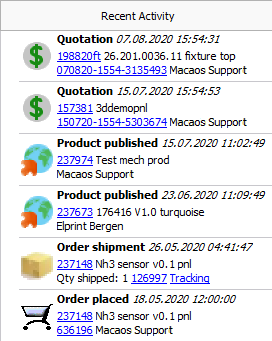 Recent Activity
We have added a Recent activity list, which lists the most recent events related to your company. For each event, you can click on the product number to view the product in the browser, or click on a document number to view the document details. The supported events are:
- Product published
- Quotation
- Request for quotation
- Order placed
- Order shipment
Other tweaks
A new Has assembly info folder has been added to the My products group of folders. This folder includes any product marked as having PnP or BOM data attached.
If you have products that you wish to delete from Macaos Enterprise, you may use the Remove from all folders (make dormant) command. This will prevent the product from being listed in the product browser for all users. The product may be restored, if necessary, by locating it with the View|List dormant products command.
Panel module improvements
Panel scripts
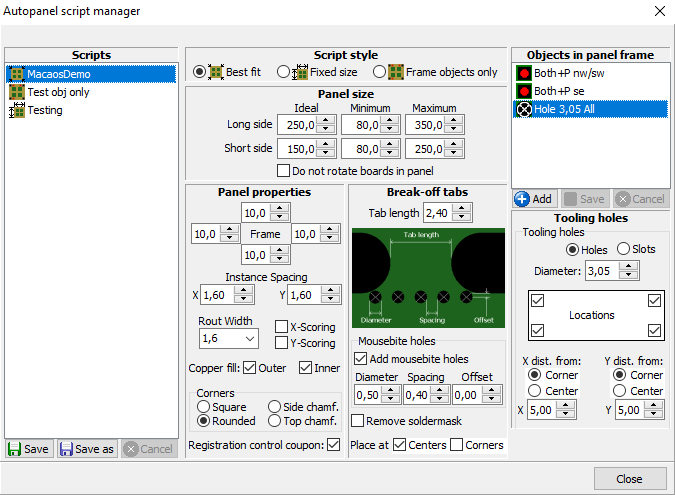
The panel script feature has been expanded to support fixed size frames, as well as scripts which only add frame objects to an existing panel. If desired, board rotation in a best fit script may be disabled.
It is now also possible to add text or a bar code to a panel script. You may specify any text, or right-click on the text field to insert the product number, name, article number, description or date of panelization.
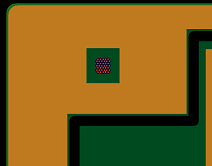 Add board as a test coupon
Any (small) board may be added to the panel frame as a coupon. By default the Board as coupon chooser allows you to select boards with width or height small enough to fit in the panel frame. For each layer in the panel, data from the board is copied to the desired location in the frame.
Other tweaks
A notch may be added to the panel frame by placing a tooling hole or slot at the edge of the frame.
Diamond and octagon have been added to the available shapes for fiducial marks.
When placing an impedance coupon, if the frame width is too small for the coupon you may choose to automatically enlarge the width of one or more frame sides to accommodate the coupon width.
Import module improvements
When importing an archive which contains both Gerber/Drill and ODB++ data, the user may choose which dataset to import. (The other dataset will be ignored.)
Layers have been added for Beveled edge, Coating top and Coating bottom.
It is now possible to mark drill tools as countersink. This is done in the same manner as for marking drill tools with via protection or as press-fit holes.
Assembly Data Manager improvements
We have made numerous tweaks to streamline ADM usability. Our goal is to make the process of verifying PnP and BOM data as quick and painless as possible. Here's a list of the tweaks:
ADM module
- New shortcut keys: Ctrl+Z=zoom to component; Ctrl+E=enter edit mode; Ctrl+S=save and exit edit mode
- Ctrl+Click on component in viewer (to see component properties) works when in Move mode (but not other graphic modes)
- BOM Placement list sorted in same order as component tree
- Added Viewer button beside BOM list buttons in toolbar
Add component/Add fiducial
- When adding a component, you may copy properties from the component selected in the component tree
- Warn if specified designator is a duplicate and show alternatives
- After adding a component or fiducial, the module remains in add component or add fiducial mode
- Does not reload view if focused component's layer is already visible
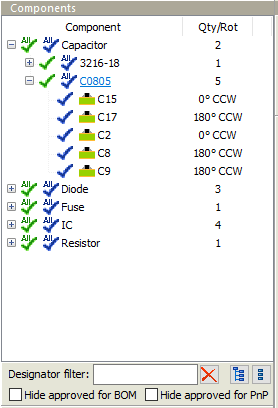 Component tree
- Filter list by designator
- "All approved" icons at parent level(s)
- Value or OrigDescr is shown in the tooltip of Component level items
- Hide approved components
- Buttons to expand or collapse all levels of tree
- Added Mechanical, Fuse, and Crystal component styles
- Set Equivalent or Better for selected components
- Set or remove Include in PnP Output for selected components
- Set zoom size for double-click on component
Component editor
- Check box for Allow Equivalent or Better
Import BOM
- Add column to source grid
- Edit text in selected cells (both grids)
- Edit text in all cells of selected column (both grids)
- Specify default mounting style when no column mapped for mounting style
Other improvements
A major change in this release is under the hood. We have increased the resolution of our internal database from 100 nm to 1 nm. Among other things, this will greatly reduce round-off errors in determining the center of arc objects.
Mechanical parts: It is now possible to choose Other material (see specification) and enter the material description in the Spec field.
User manager: We've added action buttons to the User manager, to make functionality more visible.
Viewer: When measuring, the angle from start to end point is also displayed.
Macaos Enterprise 5.3 (August 2020)
Macaos Enterprise 5.3 (August 2020) BruceAssembly Data Manager (ADM)
The new Macaos ADM is an integrated BOM Tool and Pick and Place Data Manager for PCBs. It provides an environment for managing and reviewing Pick and Place (PnP) and Bill of Materials (BOM) data.
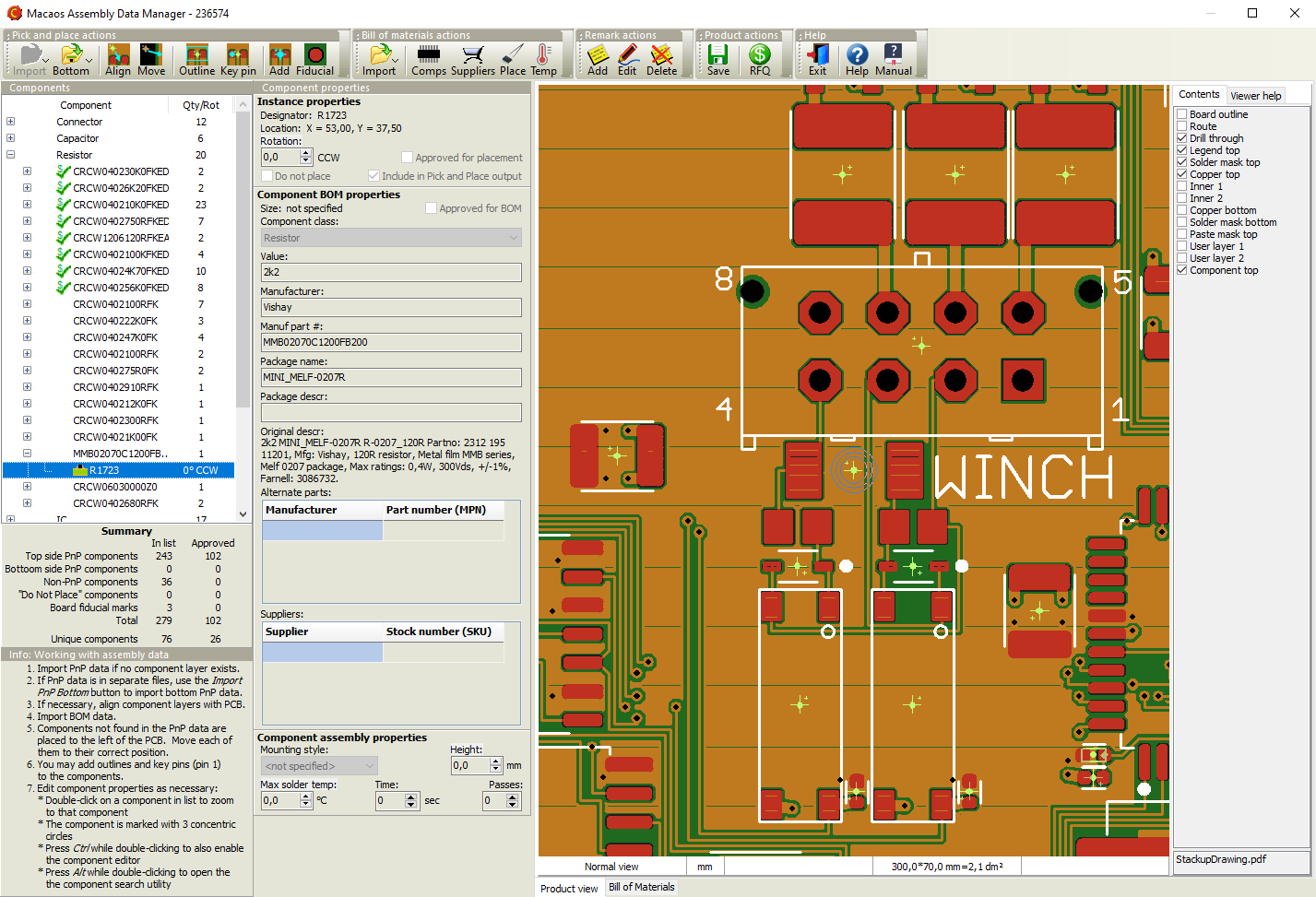
The ADM helps dramatically reduce time and effort in preparing assembly data, by combining the following features in a single module:
- Graphic viewer with component editing functionality
- Structured component overview with properties editor
- Component search facility
- Send RFQ for assembly to participating EMS providers (Basic version only)
- Component price estimator (Pro version only)
- Component rotation, height and solder temperature editor
- Export PnP and BOM data (Pro version only)
The ADM makes use of the recently released X3 extensions1 to the Gerber Format to combine PnP, BOM and Assembly Drawing data into an integrated component layer of a PCB product. As CAD systems2 implement these extensions, a rapid and error-resistant path from designer to manufacturer may be achieved.
The component layer displays the location, rotation, size and key pin location of each component together with properties such as manufacturer part number, supplier SKUs, height, max solder temperature, etc. The use of a standards-based structure for this information allows purchasers, supplers, process line operators, etc to automate their systems and thereby reduce costs.
1 Macaos actively participates in the development of these standards.
2 Some CAD systems, such as kicad, already support Gerber X3 output.
See the ADM user guide for more info.
Mechanical parts
When selecting the paint color for a mechanical part, it is now possible to specify exactly specify the color as RAL, NCS, RGB or HSL.
It is now possible to easily attach additional files, such as a STEP file or additional specification documents, to a mechanical part product.
Stencil module improvements
The stencil module now calculates the Aspect ratio and Area ratio for the smallest apertures in the stencil. This is used to recommend a maximum stencil thickness when creating a stencil. See Stencil ratios for more info.
DXF file import
Limited support for importing DXF files has been added. A DXF file may be imported to a user layer in the Import module. When loading a file directly in the Stencil module, you may load either a Gerber file or a DXF file.
Only those DXF entities which easily map to Gerber-style objects are imported. Other entities are ignored. For more info see DXF Files.
Other improvements
The biggest change in this release is under the hood. We have enhanced our Gerber reader and writer to be fully compliant with all features of the latest Gerber Format standards. This improves data reliability from your CAD system all the way to the manufacturing processes.
Macaos Enterprise 5.2 (November 2019)
Macaos Enterprise 5.2 (November 2019) BruceCreate wave solder pallets
With this new module, you can quickly design a pallet for transporting a board or panel through a solder wave. Solder pallets are useful when working with small, thin or irregular boards, as well as with boards that have both PTH components and solder-side SMT components.

Two styles of pallets are supported:
- A wave solder pallet exposes the entire board to the solder wave.
- A selective wave solder pallet exposes only specified regions of the board to the solder wave.
Creating a selective wave solder pallet is easy:
- Select a material and thickness and specify component pocket depths.
- Place board fasteners at desired locations around the board.
- Draw "opening" outlines around the components to be soldered.
- Draw "pocket" outlines around the solder-side components that are covered by the pallet.
- Generate a milling file for the pallet.
All other elements of the pallet are calculated automatically. This includes edge rails, bottom side bevels, pallet floor, seal walls, etc.
Creating a wave solder pallet is even easier, since steps 3 and 4 above are unnecessary.
Note: Selective wave soldering requires some planning during board layout, in order to have sufficient clearance between wave-soldered components, and components which must be shielded from the solder wave.
PCB as test fixture
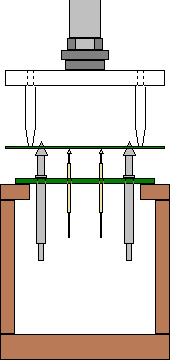 The Test Fixture Designer module has been expanded to allow creating a PCB test fixture.
Rather than using a sheet of fixture material as a holder for the test pins, it may sometimes be more useful to mount the test pins directly into a PCB.
For a standard test jig, choose Lower w/ PCB. For other jigs, choose Lower - flat and set the thickness to 3.2.
Use the Gerber button to export the fixture outline and holes to a Gerber file, which may then be imported to your CAD system for further design.
Import module improvements
PnP format specifier dialog box
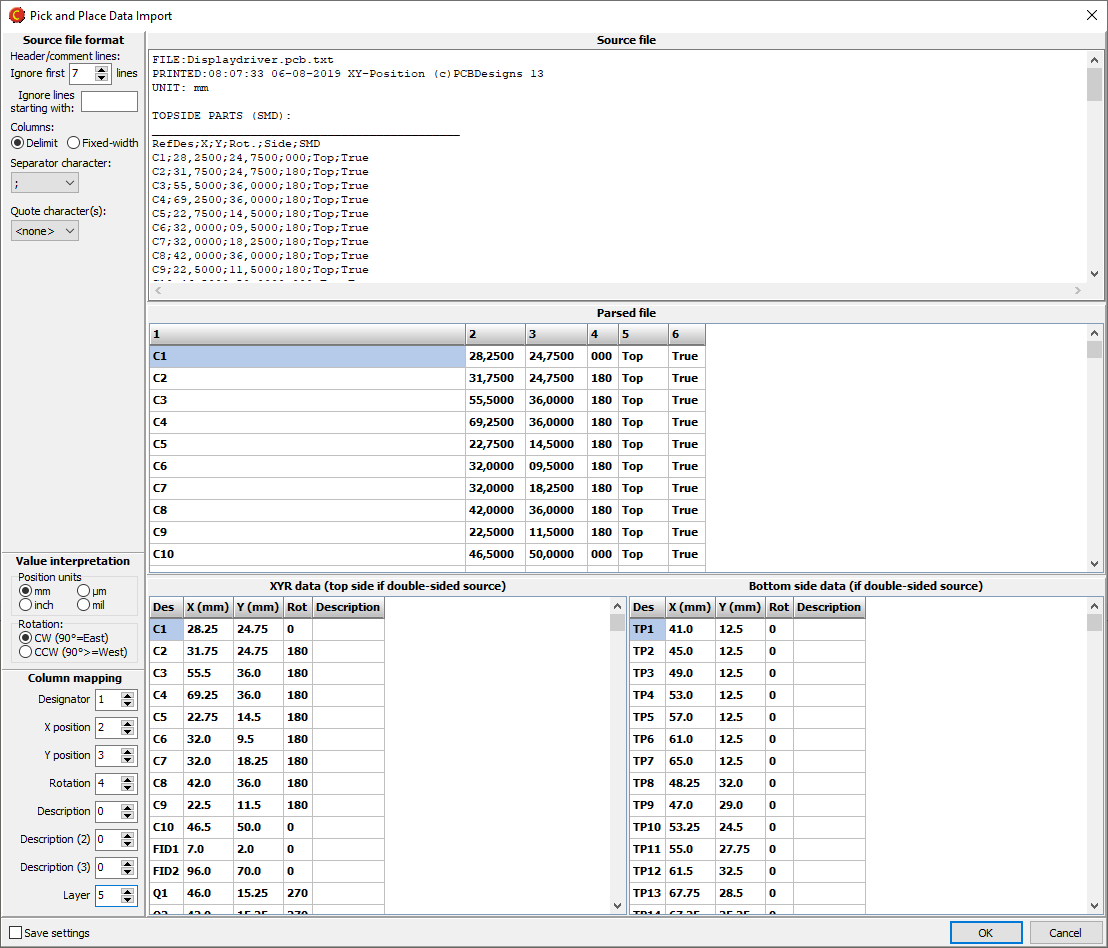
When importing a Pick and Place file, if the file format is not automatically recognized, you can specify the format as necessary.
Mark holes as press-fit
It is now possible to mark holes as press-fit. This is done by right-clicking on the appropriate tool(s) in the drill tool list, and selecting Via protection/Press-fit|Press-fit.
Laser cutter tool size for flex boards
For flex boards, it is possible to choose Laser as a cutter diameter. Note: Laser is only suitable for outer and inner contours.
Backdrill layers
Drill files may be assigned to backdrill layers.
Other improvements
New button bars in product browser
 A button bar above the folder list gives quick access to commonly used folders.
 A button bar at the bottom of the product list gives quick access to commonly used product operations (found in the right-click menu).
View list of active RFQs
Use the Operations|Active RFQs menu command to display a list of your active RFQs (if any). An RFQ may be created if you don't get an online price for a product.
Right-click on an RFQ and choose Cancel RFQ to cancel it.
Request interactive support
If you need help, an Elprint engineer can provide you with interactive support. Elprint uses TeamViewer technology, which allows the engineer to see your desktop and help you to quickly resolve your issue.
Click on the Interactive support button, which displays instructions for setting up a support session.
Note: Interactive support is only available for Elprint customers.
Macaos Enterprise 5.1 (January 2019)
Macaos Enterprise 5.1 (January 2019) BruceNew panel module features
Allow rout slots to cross scoring lines
Normally, rout slots end at scoring lines, in order to prevent notches in neighboring boards. This can lead to unwanted burrs or sharp corners at the routing/scoring interface. For symmetrical boards, the slot may cross the scoring line without entering the neighboring board.

When scoring is enabled, a padlock is shown. Click on the padlock to "unlock" the routing/scoring interface. When scoring is "unlocked" then the routing slots extend one radius beyond the scoring line. It is the user's responsibility to insure that any notches which may arise within neighboring boards are acceptable.
IPC-2221 Z-style Impedance test coupon
An impedance test coupon may easily be added to the margin of a panel. The user need only specify the signal style, layer and trace width (and spacing). The coupon is then automatically generated according to the specifications for a Z-style test coupon in IPC-2221.
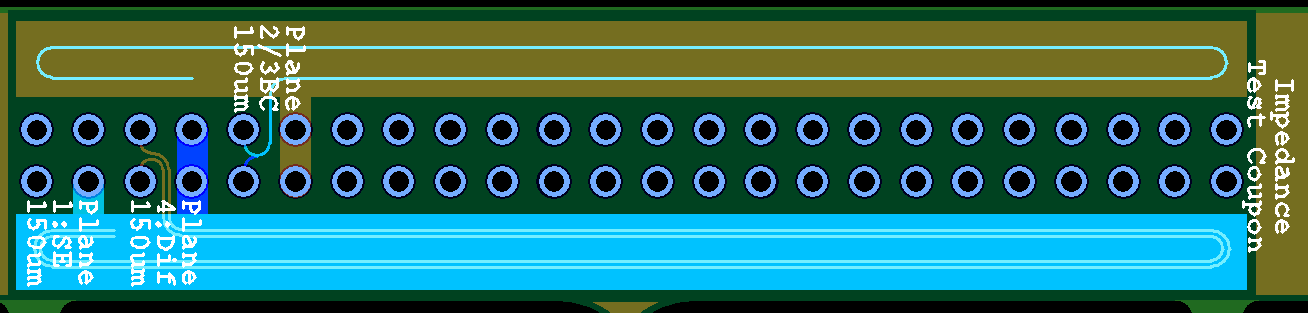
A test coupon may contain up to 12 signals, but no more than two signals on a layer. Single-ended striplines and microstrips, edge-coupled differential striplines, and edge-coupled or broadside-couple microstrips are supported.
See the test coupons help page for more info.
Test accessory catalog
A catalog of test accessories has been added to the Test Fixture module. The catalog lists all of the test pins, guide pins, test jigs and other test accessories available for purchase through Macaos Enterprise. Double-click on a product to see product specifications and drawings or photos.
Support for CircuitData language
The CircuitData language is an open language for communicating PCB specifications, requirements and capabilities. Macaos Enterprise supports both reading and generating PCB product specifications in CircuitData JSON format.
A CircuitData file may be imported in the Buy module, allowing you to get prices for a product without having imported the Gerber/Drill files to Macaos Enterprise.
A CircuitData file may be exported by right-clicking on a PCB product and choosing Download|Download CircuitData.org data.
See www.circuitdata.org for more information about the CircuitData language.
Other improvements
Search for products by customer's requisition number
In the Extended Product Search module, it is now possible to search for a product by requisition number.
RFQ to external supplier
If enabled, you may choose to send an RFQ to an external supplier. An e-mail containing your RFQ and product specifications is automatically generated and sent to the supplier, who should then respond with their quotation by e-mail. Note: The external supplier must subscribe to the Macaos RFQ service and then enable this feature for your company.
Prices from Gerber Job file
A Gerber Job file (.gbrjob) may be imported in the Buy module, allowing you to get prices for a product without having imported the Gerber/Drill files to Macaos Enterprise.
Macaos Enterprise 5.0 (October 2018)
Macaos Enterprise 5.0 (October 2018) Bruce
DepanelizationDepanelization is the process of removing individual boards from a panel, after the boards have been populated with components. Traditionally, boards have been depanelized by breaking or cutting the the break-off tabs which hold the panel together. However, the mechanical forces (particularly bending) which can take place may weaken or damage the solder joints of fine-pitch SMT components near the board edges. This problem can be mitigated by using a milling machine to remove the break-off tabs. The Depanelizer module allows you to easily and quickly accomplish the two specific tasks required for depanelization by milling machine:
|
Stackups with odd number of layersIt is now possible to define a multi-layer custom buildup with an odd number of copper layers. For example, to define a 3-layer buildup, start by defining a 4-layer buildup. Then, choose Omit as the copper thickness of one of the inner layers. |
Panelization improvementsIt is now possible to specify the outer dimensions of a panel. In this way, you can adjust the width of the outer frame to give the desired total panel width/height. The outer dimensions may only be adjusted after the Panelize operation has been executed. It is now possible to place tooling holes and fiducial marks relative to the center of the panel. When specifying the X/Y distances, you can choose whether the distance is measured from the panel corner or the panel center. |
Other improvementsLook and feelWe've given all modules a new look. Modules now have a more consistent layout, with parameters at the top left, info/help text at the lower left, and the graphical viewer's layer list to the right. Button bars across the top of each module give quick access to the most commonly used functions. The graphical viewer has several status panels along the bottom edge, which display useful information. Click on the view mode or units panel to change the view mode or unit of measure. Product variantIt is possible to change many more parameters of a PCB product when creating a variant of the product. Minimum copper to unplated edge clearancePressing the N key (with the mouse over the graphic viewer module while viewing a PCB product), highlights and zooms to the objects having the minimum distance between a copper feature and an unplated hole or contour edge. Connection managerThe connection manager has been expanded with Ping and DNS lookup functions, which can help when troubleshooting connection issues. |
Macaos Enterprise 4.5 (February 2018)
Macaos Enterprise 4.5 (February 2018) Bruce
Import module improvements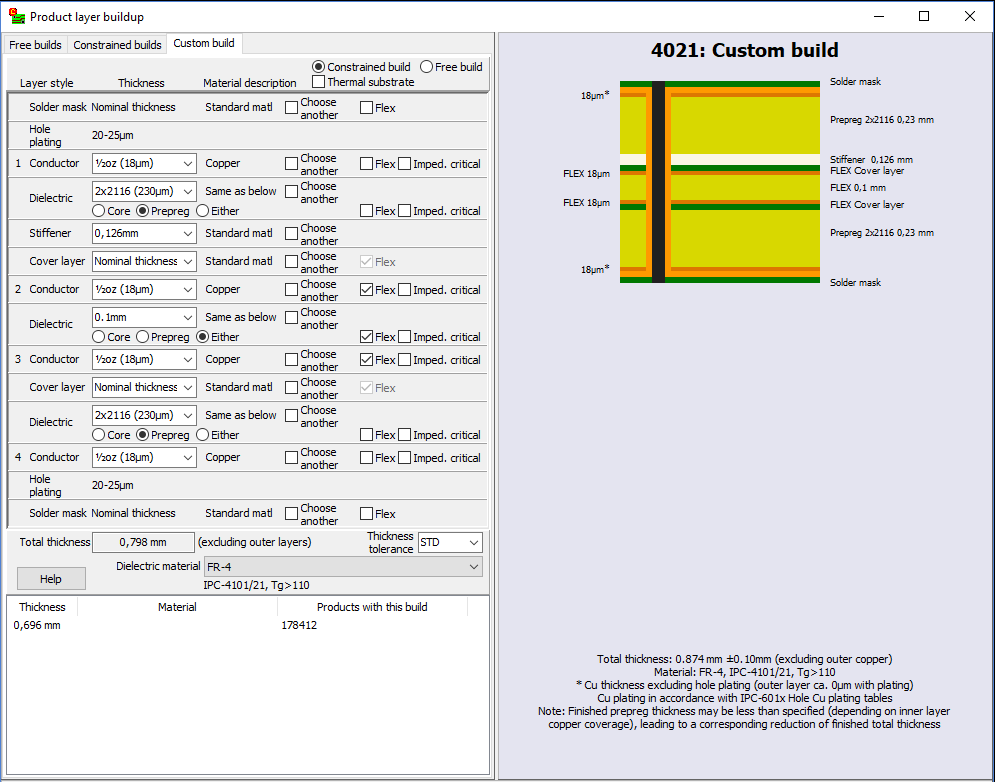
Expanded custom stackup definitionIn this version we have expanded the custom stackup definition module to better support flex and rigid-flex boards.
Refresh file during importIf while preparing a product for import, you discover that a layer needs to be updated, you can replace that layer without having to restart the entire import process. Right-click on the file name and choose Replace file. Note: It is not possible to replace the board/contour file. If this file needs to be updated then the entire product must be imported again. Gerber job fileIf the product you are importing contains a Gerber job file (*.gbrjob) then file linking information and product parameters will be extracted from the file. Note: The final format of the Gerber job file has not yet been published. Some Gerber job files may not be compatible with the current draft specification. We will update this feature when the final format is published. |
3D mechanical partsMechanical parts may now be specified with a selection of different materials and colors. An STL file is required for viewing the imported mechanical part, and may be used for manufacture of simpler parts in thermoplastic materials. For complex parts and parts with many curved surfaces, a STEP file should also be uploaded. You will be asked to upload the STEP file when you publish the part. |
Product browserSeveral new automatic folders have been added to the product browser, for single PCBs, panels, solder paste stencils, test fixtures, and purchased off-the-shelf products. This should make it easier to locate products. There are new browser options to hide empty or seldom used folders. Use the Tools|Options command to specify browser options. Browser columns have been added for surface finish, solder mask color and legend color. The icon in the "Buy" button shows the number of products in the shopping basket. |
|
|
Macaos Enterprise 4.4 (May 2017)
Macaos Enterprise 4.4 (May 2017) BruceTest fixture improvements
Macaos Standard Jig
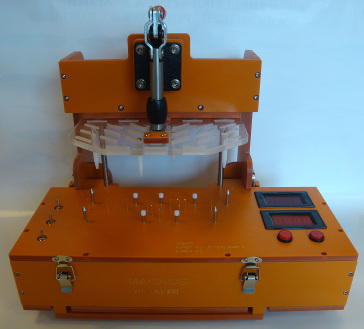
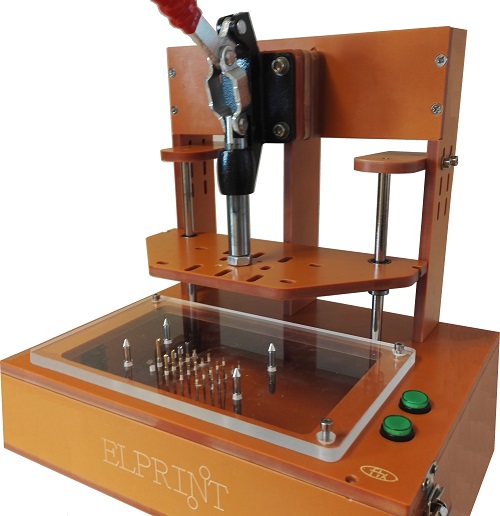
This version supports the Macaos standard test jig. The Macaos standard test jig is designed to use a lower fixture box with an internal height of 70mm, giving room for connectors, wiring and electronics in an easily swappable module.
The Macaos standard jigs issupplied with an easily removable generic upper fixture allowing for flexible placement of press pins. An adjustment screw and magnet make it possible to finely adjust the spacing between upper and lower fixtures.
Static guide pin placement
It is now possible to place static (non-deflecting) guide pins at any location along the edge of the PCB. Static guide pins are useful for insuring proper placement of boards that do not have holes with an appropriate diameter for normal guide pins.
Specify or edit pin coordinates
It is now possible to modify the pin coordinates and/or hole diameter when placing a test pin. It is also possible to edit these values after a pin has been placed.
The coordinates and diameter of holes for guide/support/press pins may also be edited, by first right-clicking on the pin list and showing guide pins.
View opposite test fixture
When creating a test fixture for the opposite side of an existing test fixture, the "other" test fixture may be viewed.
Note: The "other" fixture data is not saved with the new fixture.
Import 3D mechanical part in STL format.
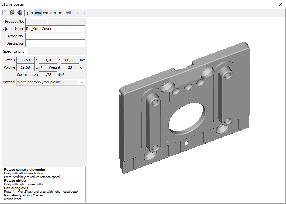
Three-dimensional data for mechanical parts may be imported. Only STL format may be imported.
Once a file has been loaded, it may viewed from any angle. The part size, weight, volume and surface area are also displayed.
Note: STL is a unit-less format. By default, STL files are assumed to be in mm. Buttons are provided for converting to other units, if necessary.
After publishing, the part may be purchased through the Macaos Enterprise quotation module.
Annotation fields
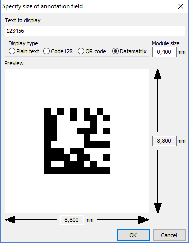
Annotation fields may be placed with an appropriate size for a text, bar code or 2-dimensional bar code. The define annotation field dialog box automatically calculates the size of a rectangle for the text or bar code for a specified number of digits or alphanumeric characters, including appropriate margins. This feature is useful for laser marking of date codes and/or serial numbers.
Annotation fields may be added to a new product in the Import module, or to a new panel in the Panel module. Annotation fields may also be added to an existing product with the Add Masks module.
Other new features
Prices in Connector Chooser
Where available, prices for connectors are shown in the Connector Chooser without needing to go to the Quotation Module. Prices update dynamically as connector properties are changed.
Cancel symbol placement
In the Import Module, when drawing or placing a symbol, right-click to cancel the operation.
Macaos Enterprise 4.3 (January 2017)
Macaos Enterprise 4.3 (January 2017) Bruce
Test fixture improvementsFixture specificationWhen creating a test fixture, you may choose a fixture suitable for one of the Macaos test jigs, or specify your own dimensions.
Macaos test jigs are supplied with a generic upper fixture allowing for flexible placement of press pins. In case of more specific needs, an upper fixture may be designed by selecting the lower fixture and then opening the test fixture designer. Text may be placed on the fixture as desired. Text may be rotated in 90° increments. When a box-style fixture is designed, then connector openings may be placed in the box walls as desired. Choose from pre-defined connector sizes, or specify your own opening. Connectors may be deleted by right-clicking on the list of connectors. Pin placementWhen placing pins you may choose a Macaos pin style, or specify your own hole diameter. Test pins must be placed on pads or holes. Guide pins must be placed on holes. Press pins and support pins may be placed at any location. When placing test pins, if more than one pad/hole is selected, the pin will be placed at the center of the selected pads/holes.
|
Quotation and order placement improvementsThe visual appearance of the quotation module has been changed somewhat. Check boxes for quantities and lead times have been moved to the left and top edges of the price grid. An expanded price engine allows for more flexible calculation of prices for a wider variety of product types and parameters. Discounts are automatically calculated when certain products are ordered for delivery together. If no price is available, it is still possible to place an order. You will be asked to confirm the price and delivery before the order is set in production. |
Import module improvementsContour specificationDepth routing: When specifying inner contours or track routing, a routing depth from the top or bottom side of the board may be specified. Quick contour selection: Press the "Q" selection button to create a contour object from a selection rectangle. This is a quick way to define a rectangular outer contour in cases where only corner marks have been provided. Select pads: Pads may be selected to define slots by holding down the Ctrl key while selecting. It is not possible to select pads and lines in the same operation. Minimum features warningWhen publishing, a warning will be generated if the estimated minimum features are less than the warning threshold. This threshold may be set in the Edit|Options dialog box. Ferrite layersFerrite Top and Ferrite Bottom have been defined for use with sheets of ferrite material to be added to a PCB. Proteus link filterAn additional link filter has been added for use with newer versions of Proteus. |
Stencil module improvementsAdjust stencil opening size by height and/or widthOpenings may be adjusted by a percentage of their height and/or width (instead of or in addition to adjusting them by a percentage of their area). Stencil typesA number of additional stencil types (for licensed frame patterns, etc) have been added. Stencil optionsOptions for polished hole walls, coating of hole walls and protecting/strengthening stencil edges have been added. |
Other new featuresViewer: Rotation/mirror statusA status bar at the bottom of the product viewer indicates if the view has been rotated or mirrored. Login: Manage multiple passwordsThe File|Manage multiple passwords command opens a list of the login-name/password combinations you have used. Set a check mark by those you wish to delete and then click the OK button to delete them. Note: Multiple passwords are only stored if the File|Remember multiple passwords function is activated. |
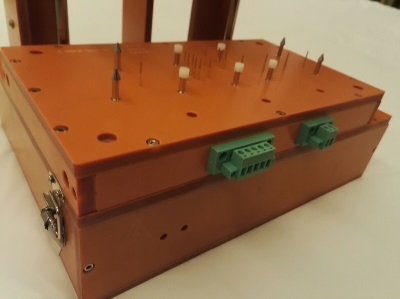 The fixture designer supports two kinds of lower fixtures:
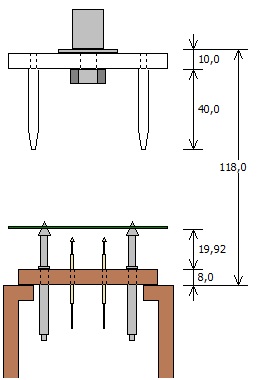 Z-axis visualizer
Macaos Enterprise 4.2 (June 2016)
Macaos Enterprise 4.2 (June 2016) Bruce
"Bed of Nails" test fixture creation
A "bed of nails" test jig is used for in-circuit testing of a PCB with components. Typically, the jig consists of a bottom fixture with many spring-loaded test pins (pogopins) that are placed to make contact with test points on the PCB. An upper fixture presses the board onto the bed of nails so that all of the pins make good contact. A test program may then be run to confirm the operation of the PCB. A test fixture is a plastic plate with holes drilled at each of the test point positions. Each test point hole will have a base (or receptacle) mounted in it. For each receptacle diameter, a spring-loaded pin head is inserted. You may choose from several different pin head styles, depending on the type of test point the pin will contact.
Test fixture creator moduleOpen a PCB product in the test fixture creator module and specify the parameters of the fixture plate. Then click on holes to place alignment pins, and click on holes or pads to place test pins. Once all pins have been placed, adjust the position of the press point and then center the PCB under the press point. The published test fixture product includes a drill file for the fixture plate and wiring list documentation. Top side fixtureIdeally, all of the test points should be on the bottom side of the PCB. However, if necessary, a top side fixture may also be created. If a test fixture already exists for a PCB, then you may choose to use that fixture to specify the placement of the PCB in the new fixture. Test accessoriesThe Test accessories folder in the product browser lists test jigs, test pins and related accessories available for purchase. |
"Off the shelf" productsMacaos Enterprise now supports ordering off-the-shelf products, such as test accessories, stencil frames, connectors, software, etc. These products may be purchased in the same manner as your PCB and stencil products. Not all products have prices available online. In cases where the price is not available, you will be notified of price and availability and asked to confirm your purchase before the order will be processed. |
Connectors
Macaos Enterprise supports a wide variety of connector types, each with multiple options. The Connector Chooser module helps you to browse through the possibilities and select the appropriate connector. Only connectors which your organization has previously purchased are listed in the Connectors folder, making it easier for you to find the same connector again. |
Other new featuresProduct Browser: Folder iconsStandard folders now have icons, to make them easier to locate in the folder list. Product Browser: Stackup number columnA stackup number column has been added to the product browser. Use the View|Show/Hide columns|Product stackup menu command to view this column. Viewer: Lock cursor to axisPress Alt+X or Alt-Y to lock the cursor position to the current X or Y coordinate. Press Esc to release the lock. Move Macaos Enterprise to a new PCUse the Tools|Move Macaos Enterprise to new PC command to copy all Macaos Enterprise program and settings files to a flash drive (or other storage location). These files may then be copied to the desired program folder on a new PC. When you start Macaos Enterprise on the new PC, the settings files will be relocated to the appropriate folder. |
Macaos Enterprise 4.1 (March 2016)
Macaos Enterprise 4.1 (March 2016) Bruce
Product Browser ImprovementsNew product specifications and statisticsNumerous product parameters have been added to the Macaos system. This will improve online pricing and quality control. See the Import Module section (below) for a complete list. Specify time interval for "Recent" foldersThe time interval (in weeks) for a product to be included in the Recent Orders, Shipped Orders or Recently Published folders may be specified in the Tools|Options dialog box. Product sharesIf a product is shared, the product share information is shown at the bottom of the Product Specifications column. The Shares context (right-click) menu has been restructured to make share management easier. Drill tool listFor PCB products, a complete drill tool list is shown together with the product specifications and stackup diagram. Video tutorialsVideo tutorials for using Macaos Enterprise may be found with the Help|YouTube video tutorials menu command New viewer functions
|
Order placement improvementsOrder packaging optionsTwo packaging options have been added to the Macaos system.
Place textAllow text on notation layers to be placed within boards in a panel Quotation quantitiesWhen getting price quotes or placing orders for panels, the order quantity is always the number of panels. But it is now possible to specify number of boards, which will automatically be converted to number of panels in the price grid |
Import module improvementsNew product specifications:
New product statistics:
Product options
New viewer functions
Custom stackup definition
Alignment of pick and place filesWhen aligning pick and place files, only the visible layer(s) will be moved. In this way, it is possible to make separate adjustments for top and bottom sides. |
Panelization improvementsPlace textAllow text on notation layers to be placed within boards in a panel Graphical remarksAdd graphical remarks to a panel. |
Stencil improvementsShow potential errorsThe stencil creator checks for stencil openings that do not appear to be consistent with the original stencil data. This could be due to the original openings having been reduced by the board designer, or because the stencil creator was not able to locate the correct reference pad on the copper layer. If potential errors are found, they can be highlighted for inspection. Automatic fiducial detectionIf the stencil data contains objects that appear to be fiducials, these are automatically detected and can be easily marked as fiducial or deleted. The same is true for stencil fiducials in a panel frame defined in the panel module. Edit/split rotated shapesThe pad shape editor now works on shapes with any rotation factor. Transfer objects from any layerIt is possible to copy objects from any layer to a stencil layer. |
Assembly Data ManagerThe Quick Help button opens a web page with step-by-step guidelines for generating an RFQ for Assembly. Bill of Materials (BOM)Before processing, a hint window reminds the user to specify column headers. After processing, the rows of the output BOM are green if a single match is found, or yellow if multiple product matches are found. Pick and Place Data Export(Available only in Pro version for participating EMS providers)Specify column order, coordinate units and separator character when exporting PnP data. May include part number and package footprint from BOM. |
Macaos Enterprise 4.0 (July 2014)
Macaos Enterprise 4.0 (July 2014) Bruce
Assembly Data ManagerThe new Assembly Data Manager Module allows you and your partners to work with component purchasing and placement data for a PCB. Once suitable Pick and Place data and a Bill of Materials have been provided, then it is possible to send a request for quotation to the Electronics Manufacturing Services providers of your choice. You may also create and modify graphical remarks for a product. Pick and Place Data (PnP)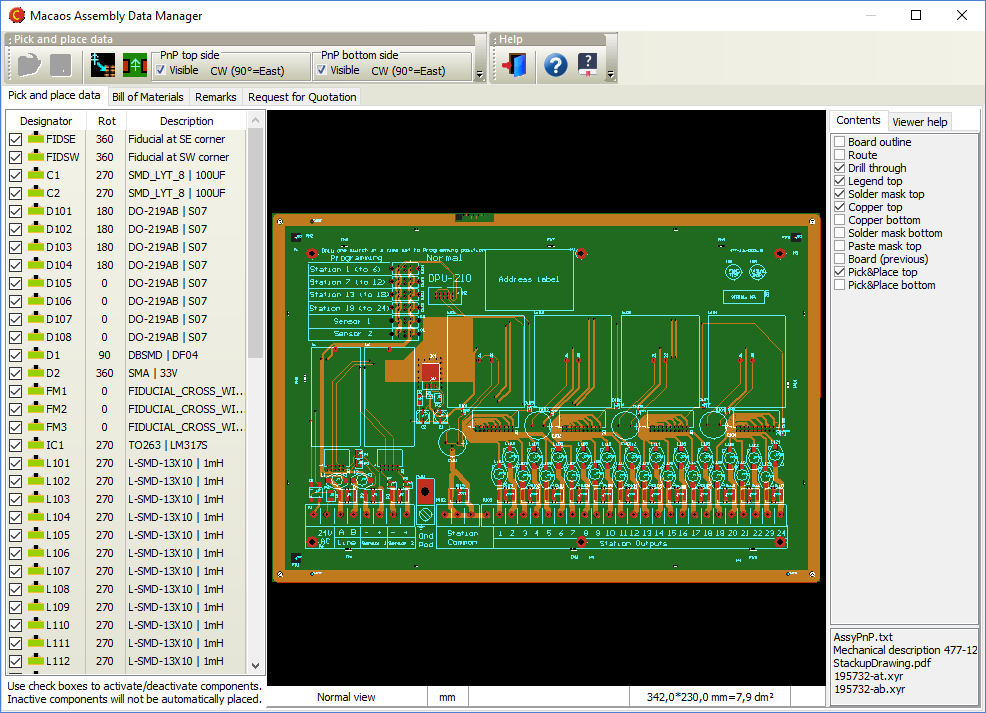
PnP data specifies the designator, location and rotation of components that will be automatically placed for (usually) reflow solderinig. There are, unfortunately, a multitude of different PnP data formats. Macaos Enterprise is able to read more than a dozen of these formats. (See the user manual for details about the most common formats supported.) With the Assembly Data Manager, you can do the following:
Bill of Materials (BOM)A BOM is a list of the components that are to be used with the printed circuit board. The BOM is used to select and purchase the correct components as well as to specify where each component should be placed on the printed circuit board. In many cases, a BOM contains component descriptions that require some interpretation by the purchaser, due to inconsistent or incomplete specifications. The Assembly Data Manager attempts to improve the usability of the BOM by applying a number of parameter recognition techniques and attempting to match components in the user's BOM to a database of known components. The procedure is as follows:
Graphical remarks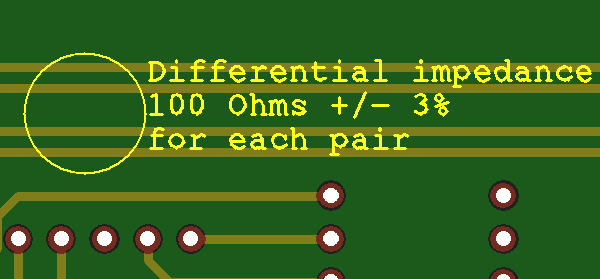
Graphical remarks may be added to any product. Existing graphical remarks may be deleted or replaced, if desired. A remark may be created as follows:
To delete a remark, click on the Delete button and draw a selection rectangle around the entire remark. If you need to change the text of a remark, you can click on the Edit button and change a single line of text at a time. Note: This can only be done with remarks created during the current session. For older remarks, you must delete and re-create the remark. Request for Quotation (RFQ)Once you have processed your PnP data and BOM, you can send a Request for Quotation (RFQ) to an Electronics Manufacturing Services (EMS) provider. The RFQ module in the Assembly Data Manager provides a simple checklist for creating an RFQ. Once you send an RFQ, the EMS provider will be notified that all of the data they need is available to them in Macaos Enterprise. |
Stencil improvements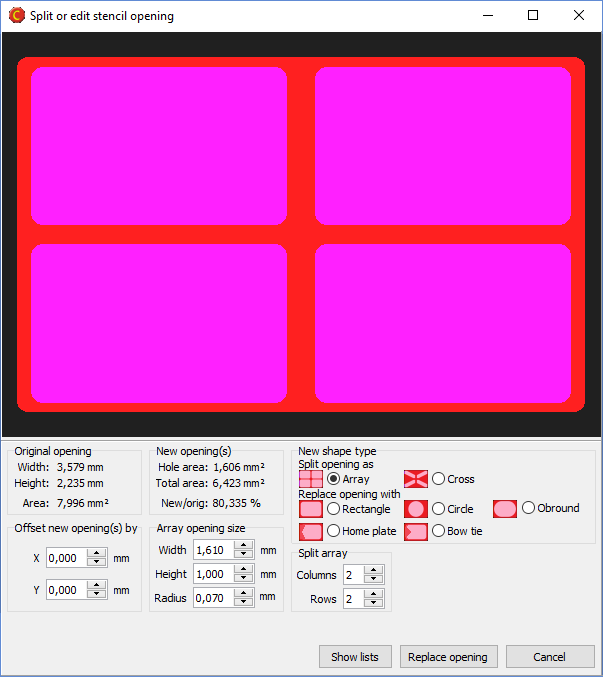
Split/replace openingsThe module for splitting a large stencil opening into an array of smaller openings has been improved. It is now possible to choose between several split patterns or replacement opening shapes. You have full control over the size and shape of the new opening(s), as well as statistics to indicate how the change will affect total solder delivery. Although this feature is primarily intended for working with large (heat sink) openings, it may be used to modify the shape of any opening in the stencil. Highlight large padsThis feature allows you to easily locate stencil openings whose height and width are larger than the size you specify. This way you can quickly find opening that should be split. Place board data relative to frame edge or frame centerIt is now possible to specify the position of the board relative to the edge of the stencil frame, or relative to the center of the frame. Top and bottom side data may be offset horizontally or vertically, as desired. Mirror bottom side dataBottom side data is automatically mirrored, so that the squeegee side of the stencil will always be the top side of the stencil. |
Import module improvementsSupport for up to 30 copper layersMacaos Enterprise now supports boards with up to 30 copper layers. This is an increase from the previous limit of 22 copper layers. Full support for the latest Extended Gerber format (Gerber X2)A new version of the Extended Gerber file format was released in the spring of 2014. This version adds a structure for identifying the file format version, board layer or function of the file, and classes of features within the file. Macaos Enterprise fully supports reading and interpreting these extensions. Support for Pick and Place files generated by CadstarPick and place files generated by Cadstar may now be imported, either in the Import Module or in the Assembly Data Manager. |
Panelization improvementsPlace tabs in lineWhen placing break-off tabs on a panel, if you click and drag the mouse then a horizontal or vertical line is shown. When you release the mouse, a break-off tab will be placed at each point where the line crosses a board edge. Panel drawing improvementsA table in the upper left corner of the panel drawing specifies the size of fiducials and bad marks. For a single-product panel, this table also specifies the X and Y step distance of the boards in the panel. Product chooser improvements for multi-product panelsWhen working with multi-product panels, the product chooser now displays the number of boards in the panel for each product in the list. You can also right-click on a product to view the product and its specifications. The product list now includes a filter function (at the bottom of the list) to aid in locating products. |
Macaos Enterprise 3.8 (December 2013)
Macaos Enterprise 3.8 (December 2013) Bruce
Import module improvementsPlace a text string on the PCBA text string may be placed on a notation layer of the PCB as follows:
Add IPC/JEDEC J-STD-609A compliant marking to the PCB
The IPC/JEDEC J-STD-609A stanard defines how PCBs should be marked to identify the the presence (or absence) of lead and/or other attributes in a PCB or PCB assembly. The import module includes a simple dialog box where you can create a compliant text string and add it to a PCB by answering up to 6 questions about the laminate material, surface finish and (optionally) the required assembly processes. Once the text string has been generated, it may be placed at any location on the notation layer of the PCB. While in Add text mode, click on the J-STD-609A button to open the dialog box. Select the appropriate parameters for the text string, and then click OK. Place the text string as described above. Add remarks to the PCB graphically
You can add remarks to a PCB at a specific location. This is useful when a remark is tied to some feature or location of the PCB. A remark may be created as follows:
Remarks are added to the Remarks layer. A circle will be drawn around the selected feature(s) and the remark text placed to the right of the circle. Via protection (plugging, filling, etc) |
Panelization improvementsFlip board in panelAn individual board in a panel may be flipped upside-down. When a board is flipped, it is mirrored and all of its layers are swapped from top to bottom (and vice versa). This is useful when creating a panel where it is desirable to use the same solder paste stencil for both sides of the panel, or when necessary to improve the copper balance of the panel. To flip a board, press Shift+Space while the mouse cursor is above the board to be flipped. (The board does not need to be selected. Clear zone for fiducialsThe clear zone around a fiducial mark may be specified as the diameter or width of a circle or square (depending on the soldermask shape). When copper fill is selected for outer layers, then the copper fill will be removed from the clear zone of each fiducial. Pull scoring line back from panel edges |
Stencil improvementsDefine reduced thickness region based on objects from any layerWhen defining a reduced thickness region based on selected objects, the objects may be selected from any layer. The reduced thickness region may either be a rectangle surrounding the selected objects, or may follow the shape(s) of the selected objects plus an "oversize" dimension. |
Viewer improvementsView from belowPress the M key to toggle the view between view from above and view from below. When viewed from below, the board is mirrored and only the bottom side layers are visible. This is useful if you wish to see what the bottom side of the product will look like. Rotate viewPress the R key to toggle the view between unrotated and rotated by 90 degrees. This is useful when viewing a tall, narrow board to make it fit better into the available screen space. Screen dumpPress Ctrl+V to copy the product viewer image to the clipboard. Press Ctrl+Shift+V to save the product viewer image as a file in PNG (Portable Network Graphics) format. Padstack detailsPress Ctrl+Alt and click on a drill hole to display a list of hole and pad diameters. |
Other changesRecently published folderA new standard folder has been added to the product browser. The Recently published folder lists all products which have been published within the past month. Filter order history and statisticsThe order history viewer, accessible with the Tools|Order history menu command, may be filtered to show statistics for a single product or for a selected time frame. Upload certification documentsIf you wish, you may upload documentation about yourself to the server. Typically, this would be done by a PCB designer who wishes to attach their professional certificates (such as an IPC CID+ certificate) to the products which they have designed. Your uploaded documents may be viewed when viewing the product history for any product that you have published. To upload a document, choose the Tools|Upload certification document menu command, and select the file you wish to upload. You may upload more than one file (but only one at a time). |
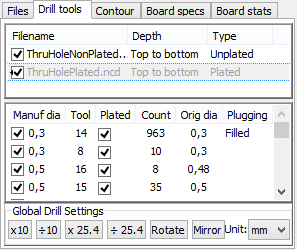
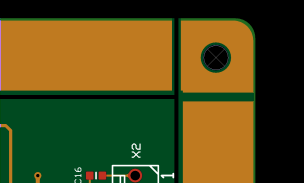
Macaos Enterprise 3.7 (March 2013)
Macaos Enterprise 3.7 (March 2013) Bruce
Product browser improvementsModify product specifications |
Panelization improvementsAutomatic panelizationPanels may be automatically generated from scripts. A script specifies an ideal panel size, as well as maximum and minimum dimensions. The automatic panel generator steps the board as close as feasible to the ideal size. A script may also specify panel parameters such as frame width, corners, copper fill, routing or scoring, break-off tab style, bad marks and break-off holes. In addition, any number of fiducials, tooling holes or slots and annotation fields may be added to the panel frame. The Autopanel menu lists the available panelization scripts. Clicking on a script name in the menu runs the script and generates the panel.
Scripts may be created or modified in the panelization module's script manager, accessed by the Autopanel|Script manager menu command. It is also possible to download scripts that have been created by EMS providers and import them into the script manager. Right-click on the list of scripts and choose Downloadable scripts to open the download site in your web browser. Scoring in multi-product panelsScoring may be selected for a multi-product panel. This is only possible if all of the boards in each row (or column) of a panel have the same height (or width). It is not possible to select or move boards once scoring has been specified. Therefore, all boards should be placed prior to selecting X-scoring or Y-scoring. Break-off holesThe break-off hole generator has been improved to better follow the contour of each board in the panel. Alignment linesWhen moving boards within a panel, vertical and/or horizontal lines show when the board is aligned with the edge(s) of other boards i the panel. 2-dimensional barcodes (Data Matrix ECC 200)A Data Matrix 2-D bar code may be added to the frame of a panel. Registration control couponA registration control coupon may be added to the frame of a panel. The coupon has a combination of thin lines and plated holes, for use with cross-section or registration testing of the finished panel. The product number is encoded as a Data Matrix at either end of the coupon. Rotate a board in a panel with scoringA board in a panel with scoring may be rotated 180 degrees by pressing the space key while the mouse cursor is above the board to rotate. |
Import module improvementsImproved linking of files to layersThe import module incorporates a new functionality for automatically linking files to their corresponding layers. This approach uses a simplified artificial intelligence engine to analyze all filenames together with the contents of text files (if any) and assign the files to layers. This approach is most useful for users who import files from multiple sources. The link filters functionality is also still available for use. This approach is more suitable for users who import files from only one or two CAD systems. A new Autolink menu has been added to ease switching between the autolink modes. Import board specifications from an existing productThe board specifications and mimimum feature sizes may be imported from an existing product and used when publishing a new product. Use the Edit|Import board specs from existing product menu command, and enter the product number. Be sure to edit any specifications that are not identical to the existing product, especially the board name. This feature is especially useful when importing a new product that is a revision of an existing product. Let contour follow inside of linesIf the lines that describe an outer contour are larger than 0.6 mm, then the user may choose whether the center of the lines or the inner edge of the lines will be used to define the board contour. 2-dimensional barcodes (Data Matrix ECC 200)A Data Matrix 2-D bar code may be added to a board. |
Stencil module improvementsAutomatic stencil creationStencils may be automatically generated from scripts. A script specifies the stencil frame and thickness, placement of data in the stencil, detection of fiducial and default reduction of openings. The autostencil menu lists the available scripts. Clicking on a script name in the menu runs the script and generates the stencil. Additional modifications may be made as necessary before publishing the stencil. Scripts may be created or modified in the stencil module's script manager, accessed by the Autostencil|Script manager menu command. It is also possible to download scripts that have been created by EMS providers and import them into the script manager. Right-click on the list of scripts and choose Downloadable scripts to open the download site in your web browser. If a panel is generated from a panel script and a stencil script with the same name exists, then a stencil may be automatically created immediately after publishing the panel. Problem report facilityThe problem report facility has been added to the Stencil module, under the Help menu. |
Viewer improvementsSnap to feature when measuringWhen making measurements, you can press the X key to snap the cursor to the nearest object endpoint. The procedure is as follows:
An object endpoint is the start or endpoint of a line or arc, the center point of a hole or pad, or any vertex of a polygon. Note that some CAD systems create what may appear to be a pad or polygon as a set of lines and arcs. In this case, the cursor will snap to the line or arc endpoint. |
Other changesView order history and statisticsUse the Tools|Order history menu command to open the order history and statistics summary for your company.
Pro versionAll functionality that was previously reserved for users with Pro licenses is now available for all users. There is no "pro version" of Macaos Enterprise release 3.7. User manualThere are no longer separate user manuals for the import and panelization modules. All information is contained in one user manual, which may be opened from the Help menu in the product browser, import module or panelization module. What's newUse the Help|What's new in this version menu command to open this web page. |
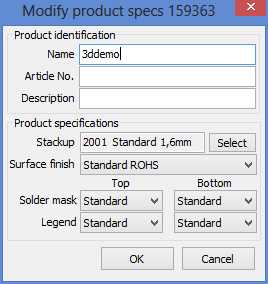
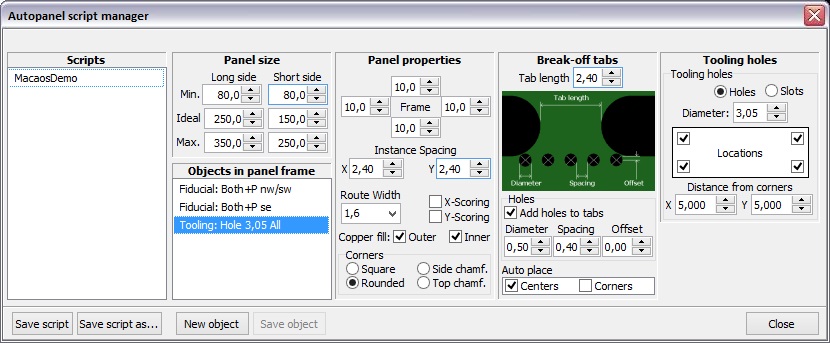
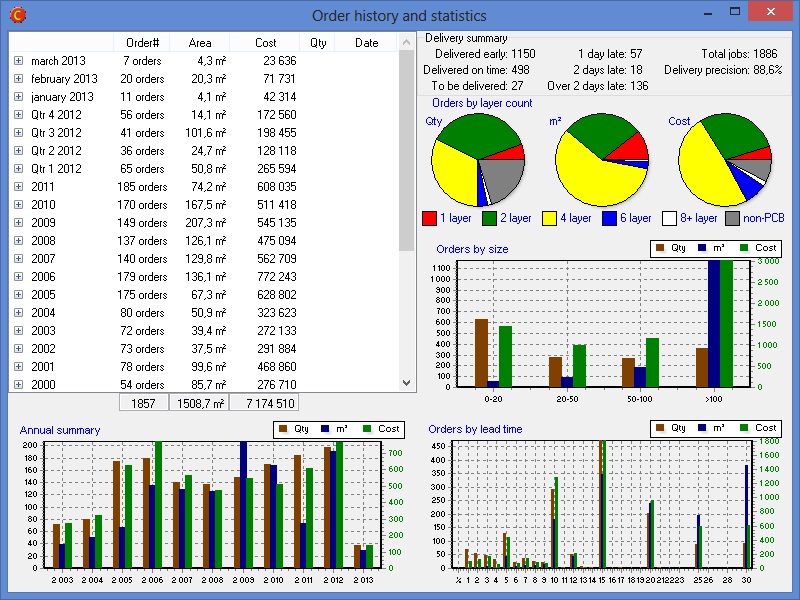
Macaos Enterprise 3.6 (March 2012)
Macaos Enterprise 3.6 (March 2012) Bruce
Print a documentation setGenerate a PDF document with technical drawings of each layer in a PCB or paste mask product. A stackup drawing and drill template drawings are also included. The title block texts (such as owner, title, date and drawing number) for the document may be specified as desired. |
Panelization improvementsScoring in multi-product panelsScoring may be selected for a multi-product panel. This is only possible if all of the boards in each row (or column) of a panel have the same height (or width). Break-off holesThe break-off hole generator has been improved to better follow the contour of each board in the panel. Alignment linesWhen moving boards within a panel, vertical and/or horizontal lines show when the board is aligned with the edge(s) of other boards i the panel. |
Macaos Enterprise 3.5 (December 2011)
Macaos Enterprise 3.5 (December 2011) Bruce
Import module improvementsAutomation improvements when importing filesWe have made a number of changes further automate the import process. Automated drill file scalingIn many cases, the drill files will automatically be scaled to match the scale of the Gerber files. Boards with very few drill holes, or where only a small portion of the board has drill holes, may not be scaled automatically. Automated contour selectionOuter and inner contours are automatically detected/created in many cases. Track routing and scoring must still be specified manually. Note: If the Gerber file for the board layer contains a drawing frame or title block, then contours will not be automatically detected. Unpack .rar filesCompressed archives in rar format can be opened in the same manner as zip files. Link filter sharingUser defined link filters are stored online, so that they may be shared with other users in your company. We are also constantly looking at ways to improve and expand the link filters built into the system. Paste drill tool specifications into the tool list |
Improved stackup drawing |
Panelization improvementsStackup drawingA product stackup drawing is automatically generated when a panel is published. If the panel has blind or buried vias, these are shown in the stackup drawing. The product stackup drawing may be viewed or printed from the Macaos Enterprise product viewer. Available only with pro license Macaos Pro users have the option of entering their own text into the various fields of the title block. This feature applies both to the panel drawing and the product stackup drawing. In this manner technical drawings for project documentation may be easily created, with title, drawing number, revision, etc. in accordance with the requirements of your organization. Default panel settingsWith the Tools|Settings menu command, you can choose between specifying the default panelization settings at program startup, or automatically remembering the specifications used last time the program was run. |
Other improvementsRequest a quotation for assembly of a PCB |
Commit order dialog box |
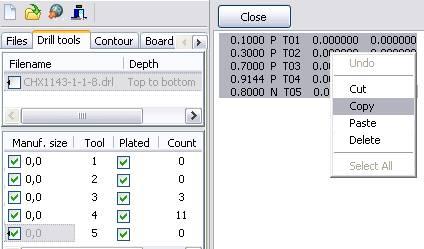
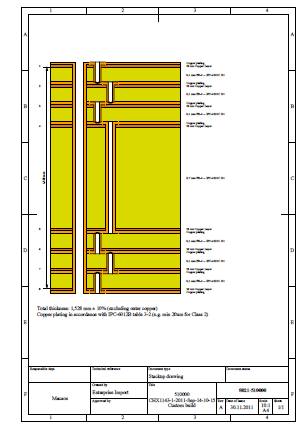
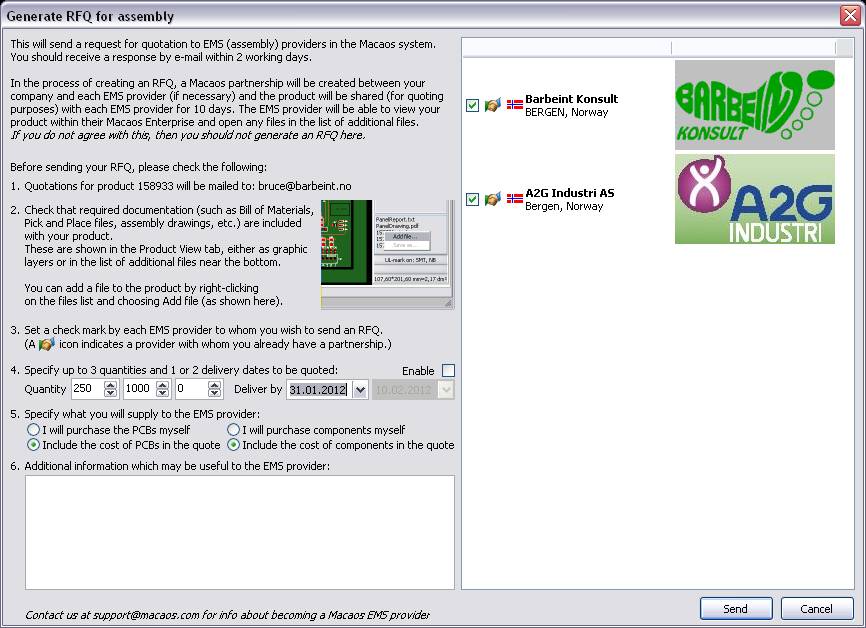

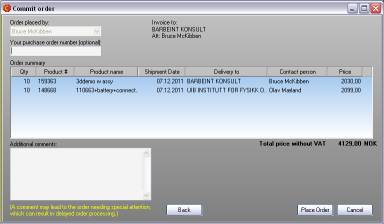
Macaos Enterprise 3.4 (December 2010)
Macaos Enterprise 3.4 (December 2010) Bruce
Panelization module improvementsMulti-product panels
Select a board in the product browser and open the panelization module. Press Ctrl+R to open the product chooser, which lists all board products that match the stackup (or number of layers) and finish/colors (if selected) of the first product. Drag a product from the product list into the panel to add the board to the panel. Move the board to the desired location and click to place the board. All boards should be placed on the panel before adding tabs, fiducials, drill holes, etc. If no tabs are added to the panel, then the boards will be delivered as individual boards. Move and rotate boards within a panelAny board in a panel may be moved or rotated as desired. Draw a selection rectangle over part of a board's contour to select the board. The board will move with the mouse, but will automatically snap to align with the edges of neighboring boards. Press Ctrl to disable snap. Press the space bar to rotate 90 degrees. Click to place the board into the panel. Add assembly masks to a panel |
Import module improvements |
Fiducial marks at specified coordinates.Fiducials may be added to a board at specified coordinates by pressing Ctrl+Alt and then clicking on the board. |
Stencil module improvements |
Product browser improvementsAdd assembly masks to existing productsAvailable only with pro license Add data for peel-off mask (blue mask), paste mask, glue mask, carbon or hard gold to an existing product by selecting the product and clicking the Add masks button. Assembly mask data is added in the same manner as for panels (described above). |
Standard foldersFour new standard folders have been added to the product browser.
|
Product searchIt is now possible to choose between "begins with", "ends with", "equals" and "contains" when searching for a product. |
Product historyA new progress indicator shows the status of active orders. |
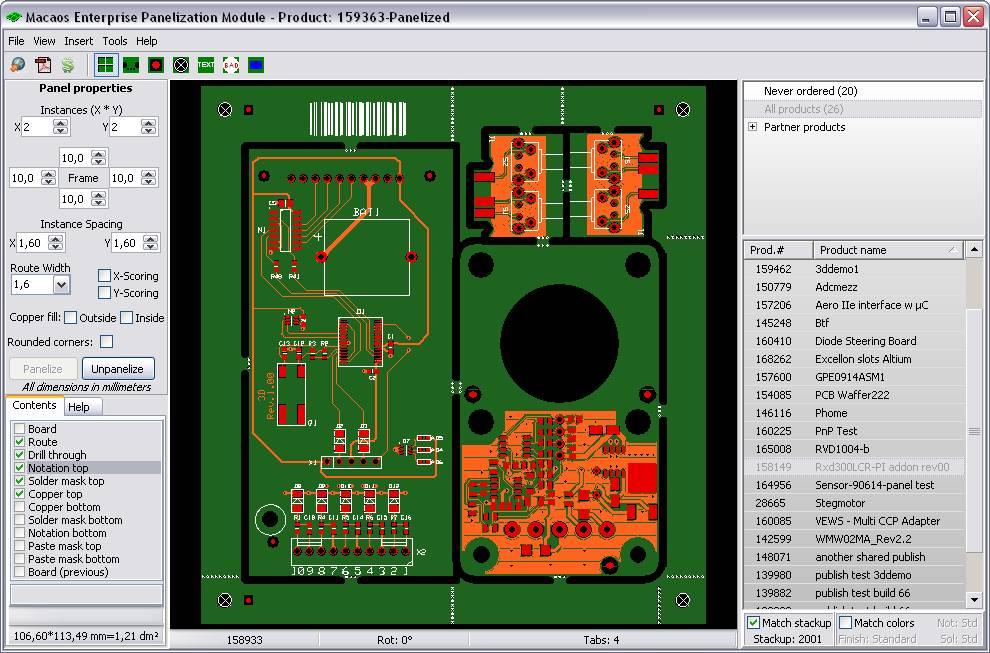 In many cases, it may be desirable to put several different boards together into a panel. For example, by putting the different boards in a system together into a panel, it would be possible to order one panel per system. Often, the price of a multi-product panel will be substantially lower than the price of the same quantity of boards ordered individually.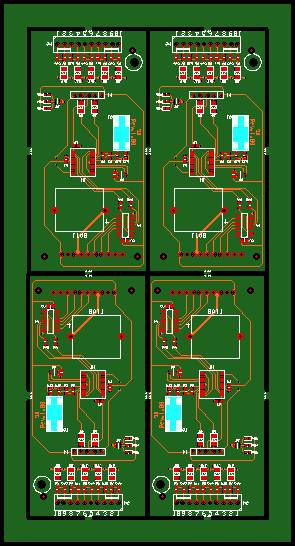
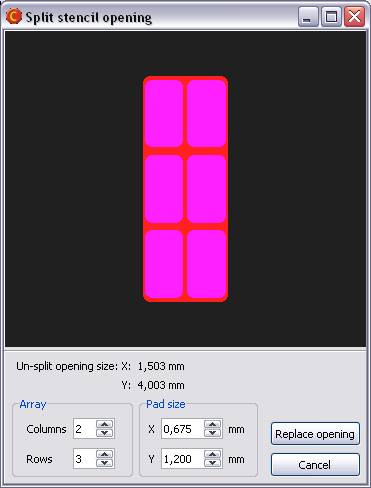
Macaos Enterprise 3.3 (March 2010)
Macaos Enterprise 3.3 (March 2010) Bruce
Import module improvementsMore silkscreen symbols
Add ESD-susceptibliity and RoHs symbols to the component legend or solder mask layer of your board. You can also add an annotation field (a filled rectangle) for adding serial numbers or other handwritten information. |
Bar code
Add a bar code to the component legend layer of your board. Bar codes are generated in standard Code128-B format. |
Define custom stackups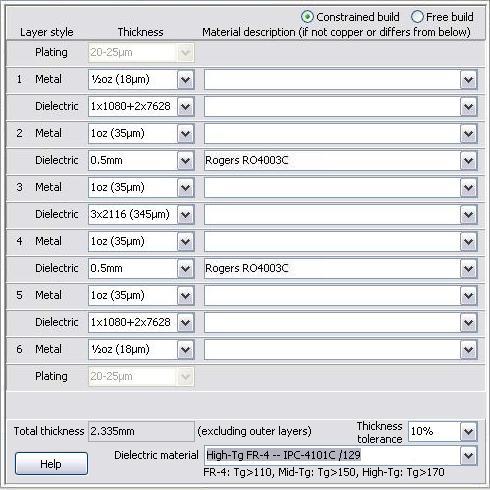
Specify custom layer buildups in detail with the new custom build definition module in the stackup selection dialog box. Or choose one of your previously defined custom stackups. Right-click on the stackup viewer to open a detailed stackup diagram in PDF format. Fiducial marksAdd fiducial marks to your board. If Pick and place data or paste mask data exist, then fiducials are added to those layers as well. New autolink filtersPre-defined autolink filters have been added for Proteus and CADint 4.x |
Panelization module improvementsBar code
Add a bar code to the component legend layer of the panel frame. Bar codes are generated in standard Code128-B format. |
Annotation fieldAdd an annotation field (a filled rectangle) for adding serial numbers or other handwritten information to the frame of a panel. |
Stencil module improvementsImproved shape manipulationsSelect and highlight objects before adjusting them. Select all objects having the same size/shape. Shapes adjustments are made relative to the size of the corresponding copper pad. Corner rounding may be specified. |
Objects may be deletedSelect and delete unwanted objects from the stencil data. Delete unused frames from the frame manager. |
Product browser improvementsProduct browser columnsTwo new configurable columns (Article and Description) have been added to the product browser. Use Show/hide columns in the View menu to turn them on or off. |
Product infoRight-click on the stackup viewer to open a detailed stackup diagram in PDF format or to copy a simple stackup diagram to the clipboard in text format. Product viewerAdd documentation files to a product. Right-click on the file list (below the layer list) to add a file to the product. This feature is intended for keeping component assembly documentation together with the product. (Note: Documents added to a product after an order has been placed will not necessarily be used by the manufacturer.) If a product contains a UL-mark, this is indicated with a text just above the cursor coordinates. Product historyAn expected shipment date column has been added to the product history view. |
Macaos Enterprise 3.2 (December 2009)
Macaos Enterprise 3.2 (December 2009) Bruce
Stencil Product Creator
|
Pick and Place data |
More silkscreen symbols |
Improved product searchingThe product search dialog now lists the names of folders where the product may be found. You may now assign your own article and description to products which have been shared to you by partners. This should make it easier to organize and locate partner products. |
Autolink filter for ProteusA pre-defined link filter has been added for Proteus files. You may need to open the link filter manager (Edit|Link filters) to enable the new filter. |
Rounded corners on panelsWhen panelizing a product, it is possible to specify that the corners of the panel frame should be rounded. This makes it easier to load panels into processing machines. |
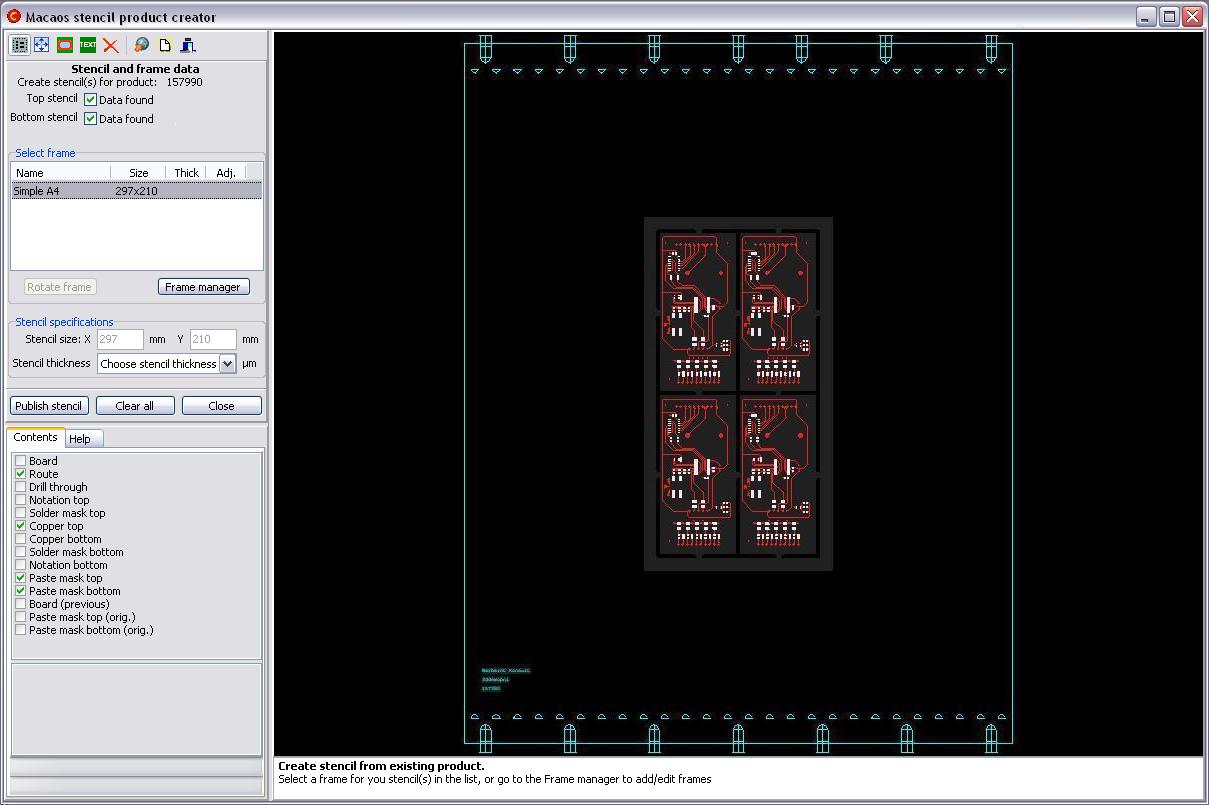
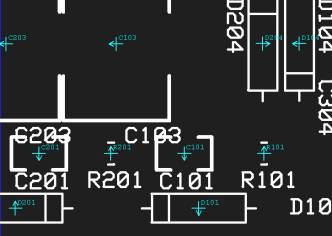

Macaos Enterprise 3.1 (October 2009)
Macaos Enterprise 3.1 (October 2009) Bruce
New panelization featuresThree new features have been added to the Panelization Module:
|
Silkscreen symbols |
Complex Contour Editor
|


Macaos Enterprise 3.0 (July 2009)
Macaos Enterprise 3.0 (July 2009) Bruce
Panelization Module
|
New viewer featuresCursor coordinates and board size are displayed at the bottom of the layer list. Left-click and drag to measure distances in the viewer. |
New import featuresSupport has been added to the Import Module for the following:
|
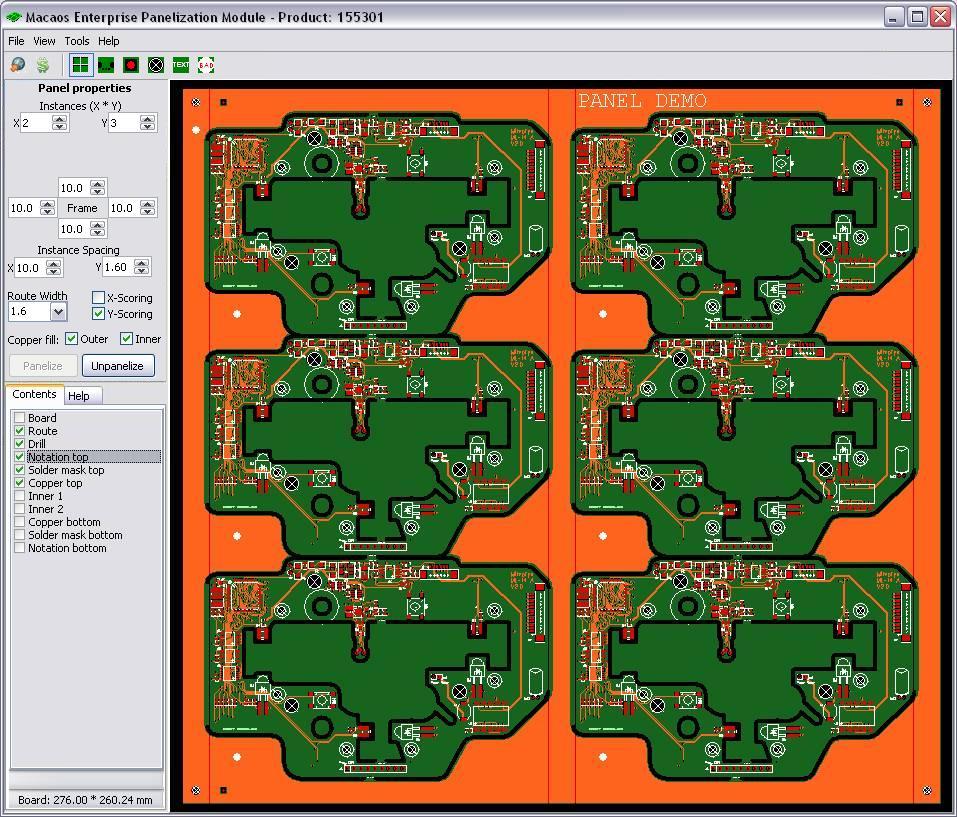
Macaos Enterprise Release Notes
Macaos Enterprise Release Notes BruceLatest version: Macaos Enterprise - 5.6.15.459
For a description of new features, see What's new.
Macaos Enterprise 5.x
Macaos Enterprise 5.x BruceMacaos Enterprise 5.6
Build 5.6.19.463 (18-03-2024)
New features:
- 0005220: [ADM] Import supplier/SKU from multiple columns
- 0004981: [ADM] Change component class for selected components
- 0004980: [ADM] Add default mounting style for connectors in BOM import
- 0004907: [ADM] Add alternate parts in BOM import
tweaks:
- 0005051: [ADM] Alternate parts info should be included in exported BOM
- 0004951: [ADM] On BOM import if default mounting style is not selected warn user on import
- 0004950: [ADM] Saving a product without all mounting styles set, should warn the user
Fixes:
- 0004982: [ADM] Doesn't always show correct layer when double-clicking a component group
- 0005238: [Import] Integer overflow when importing contour with many short segments instead of arcs
Build 5.6.18.462 (06-02-2024)
Fixes:
- 0005229: [Import] Key pin incorrect when importing Gerber X3 PnP data from Kicad 7
Build 5.6.17.461 (31-01-2024)
Fixes:
- 0005210: [Browser] Recent activity fails
- 0005219: [Import] Import BOM module does not ignore rows starting with ;
- 0005213: [Stencil] Split/edit pad default size for rounded rectangle should be based on pad size
- 0005212: [Stencil] Split/edit pad does not properly rotate the generated pad
Build 5.6.16.460 (03-01-2024)
new features:
- 0004963: [Test fixture] Create test pins directly from IPC-D-356 data
Tweaks:
- 0005201: [3D part] File open folder location should be the same for all file types
- 0005191: [3D part] Do not preselect material
- 0005149: [3D part] All imported files should be listed in the "Attached documents" field
- 0005019: [ADM] Add warning for BOM import rows without designator
- 0005129: [ADM] Check BOM for signs of "NOT MOUNT"
- 0004979: [ADM] Add line number to BOM import wizard
- 0005204: [Import] Prompt user for product name/Art#/description when using "Import board product specs"
- 0005013: [Import] Add text to stackup drawing that IPC-4101/21 is Tg>110 (typical Tg=130)
- 0005199: [Price] Change price list definition
- 0005200: [Test fixture] Set black photopolymer plastic as default material for Sprint test fixtures
Fixes:
- 0005135: [ADM] Designator should be trimmed when importing PnP and BOM data
- 0005177: [Import] Stackup drawing not properly scaled for flex board with thick stiffener
- 0005171: [Import] Trying to define the beveld edge type gives an error
- 0005001: [Import] Manually linked ODB++ layers are not always exported on publish
- 0004983: [Import] P&P data for only bottom side is ignored if a Layer column is selected
- 0005113: [Panel] Route missing when panelizing with zero frame width
- 0005203: [Stencil] Freezing when click in Stencil button
- 0005163: [Viewer] Copper bottom contains wrong layer data under certain circumstances
- 0004978: [Viewer] 3D parts attached files are not shown identically in different sources
Build 5.6.15.459 (21-08-2023)
new features:
- 0005139: [Stencil] Define keep-in rectangle for stencil frame
Tweaks:
- 0005138: [Import] Make Electroless Tin available as a surface finish
Fixes:
- 0005126: [ADM] Battery components get assigned to Fuse class when product is loaded
- 0005136: [Panel] BasedOnProd value is missing from product when panel is published
- 0005114: [Panel] Tabs missing after export to gerber
- 0005113: [Panel] Route missing when panelizing with zero frame width
Build 5.6.14.458 (25-05-2023)
Tweaks:
- 0005091: [ADM] Replace +/- with ± for Octopart searches
- 0005059: [ADM] Add Rotate 90 CW/CCW commands to component list menu
- 0005050: [Import] Additional filename matching for Fusion 360
Fixes:
- 0005102: [ADM] Link (to octopart) button does not work
- 0005054: [ADM] No mapping for unicode character
- 0005053: [Import] Legend files re-link to other layers when adding files
- 0005052: [Import] Out of range error on subtract segment selection
- 0005089: [Price] Can not generate RFQ when no prices available
Build 5.6.13.456 (17-04-2023)
Tweaks:
- 0005047: [ADM] Add "RN" to Resistors and add "Powersupplies" as a component class
- 0005032: [ADM] Update value, package and descr after search
- 0004984: [ADM] When importing BOM from product file, the stream cannot be found
Fixes:
- 0005026: [ADM] ADM: Crash if deleting more than one item
- 0005055: [Viewer] PCBA products not displayed correctly
Build 5.6.12.455 (11-04-2023)
Tweaks:
- 0005002: [3D part] Add black 3D material
- 0005039: [ADM] BOM import: Ignore double-space when separating designators
Fixes:
- 0005009: [ADM] Wrong text in component count summary
- 0005049: [Browser] Unwanted artifacts in PDF drawing caused by very small arcs
- 0005046: [Import] Rotated rounded rectangle pad from Kicad is incorrect after publish
- 0005043: [Import] No files are linked if .gbrjob does not contain file-linking info
- 0005034: [Import] Can not snap to second point when drawing contour segment
- 0005017: [Import] Some objects missing within cutouts in ODB++ polygons
- 0004992: [Import] KiCAD grbjob import optimization
- 0004996: [Panel] Problem with combined routing and scoring
- 0004993: [Panel] Script rout diameter not preserved when creating panel
- 0004971: [Panel] Problem with exported profile if panel has 0mm frame width
- 0005018: [Test fixture] Add warning about deprecated test jig styles
Build 5.6.11.454 (02-11-2022)
Tweaks:
- 0004970: [Import] Allow flex stackup with stiffener outside of cover layer
- 0004965: [Test fixture] Download gbr/dxf file of Test Circuitry PCB for published test fixture
Fixes:
- 0004989: [Browser] Stencil data download package has incorrect content
- 0004987: [Panel] Can not publish panel with board as coupon
Build 5.6.10.453 (26-08-2022)
Tweaks:
- 0004955: [3D part] Add product number to PDF-documents on publish
Fixes:
- 0004958: [ADM] Import PnP: Vertical mirror does not work
- 0004962: [Import] Drill scaling error (bruce)
- 0004956: [Import] Backdrill layers are not properly saved when publishing
- 0004960: [Panel] Maximum allowed instances in x and y direction calculated wrong if Rot. 90 check box selected
Build 5.6.9.452 (23-06-2022)
New features:
- 0004851: [ADM]: Add additional search text to component search parameters
- 0004921: [Browser] Add product quote history list to product history tab
- 0004404: [Browser] Support for PCB Assembly product type
- 0004919: [Order] Create order from quotation viewer in recent activity
- 0004808: [Test fixture] Export electronics board outline and hole locations in DXF format
Tweaks:
- 0004874: [ADM]: Add Autolink to Octopart icon
- 0004870: [ADM] Add unit price to Component pricing estimator
- 0004920: [Browser] Add button to open product viewer from quotation viewer dialog
- 0004828: [Browser] Change icon for quotes from RFQ in recent activity
- 0004915: [Import] Drills pane: Show long drill file names as hint
- 0004912: [Import] Drill map file should not be autolinked to Drill
- 0004903: [Import] Add '@' to supported characters in text font
- 0004911: [Test fixture] Increase max active area for MIT fixture
Fixes:
- 0004887: [ADM] "µ" is incorrectly imported from BOM to ADM
- 0004914: [Browser] RFQ for Assy folder does not show for EMS users
- 0004875: [Browser] Oval pads incorrectly drawn in PDF layer drawing
- 0004901: [Import] Parser report warnings should not show for solder mask files
- 0004900: [Import] Original PnP and BOM files are not stored in product zip
- 0004905: [MIF] Text output generates invalid Gerber arcs
- 0004899: [Order] Access violation on checkout if no valid invoice addresses
- 0004902: [Panel] Datamatrix is missing the bottom line of the finder pattern
- 0004879: [Price] Price element not applied under certain circumstances
- 0004916: [Stencil] Creating Stencil from 247973 causes some of the 45deg. pads to vanish
- 0004917: [Test fixture] Dimensions not restored after local save
- 0004884: [Test fixture] Test pin continuation list incorrectly printed
Build 5.6.8.451 (03-03-2022)
Fixes:
- 0004861: [Panel] On publish, the product's panel and stackup drawings get corrupted
- 0004864: [Stencil] Cannot split opening to array larger than 2x2
Build 5.6.7.450 (17-02-2022)
Tweaks:
- 0004853: [ADM] Add Ctrl+D shortcut to search in Octopart search dialog
- 0004852: [ADM] Auto search when opening Octopart search if manufacturer and MPN specified
- 0004849: [ADM] Update product specs when closing ADM
- 0004848: [ADM] In Octopart search, check for manuf. name should not be case sensitive
- 0004846: [ADM] Layer visibility when showing instances
- 0004844: [ADM] Select component if exact match in Filter function
- 0004840: [ADM] Change Save button to OK in component editor
- 0004842: [Import] The on publish check list is partly missing the first letter
Fixes:
- 0004850: [ADM] When importing BOM, the original file does not get saved with the product
- 0004841: [ADM] If a space is found in Designator line - ADM will keep asking you if you want to use it as separator
- 0004857: [Import] Stackup info missing after loading .mei file
- 0004843: [Import] AV when importing .mei file
- 0004797: [Stencil] Bug in edit shapes height/width
- 0004856: [Test fixture] Location and diameter data for test pins incorrect when temporarily saving
- 0004836: [Test fixture] List index out of bounds error when deleting pin
Build 5.6.6.449 (27-01-2022)
Tweaks:
- 0004823: [ADM] Add designators to components report, and MPN to placement report
- 0003902: [Panel] Changes to panel drawing
Fixes:
- 0004814: [ADM] Missing columns in BOM components and placement reports
- 0004832: [Import] Some 0-layer stackups do not display properly in stackup chooser
- 0004824: [Import] If copper top is unlinked, it can still be selected as active layer in Outline
- 0004822: [Import] List index out of bounds (0) when using ctrl+select in Outline
- 0004817: [Import] Slot in drill file is rotated incorrectly
- 0004810: [Import] inserting data matrix code sometimes gives range check error
- 0004807: [Import] Importing separate bottom PnP file adds components to top
- 0004833: [Other] Error message during autoupdate: Cannot focus a disabled or invisible window
Build 5.6.5.448 (29-11-2021)
Fixes:
- 0004806: [Import] Can not link more than one user layer when importing ODB++
Build 5.6.4.447 (24-11-2021)
Tweaks:
- 0004802: [Panel] Barcode and Datamatrix on legend should not have inverted colors
- 0004799: [Price] Improved support for user remarks in RFQ module
Fixes:
- 0004804: [Browser] It is not possible to attach files to a mechanical product from the product browser
- 0004796: [Browser] Web address in dialog about download costs is cropped
- 0004794: [Import] Misleading error message if outline primitive has too few vertices
- 0004791: [Import] MIsleading error message when importing ODB++ files: no plated holes specified
- 0004803: [Panel] Datamatrix is not placed according to the moving rectangle
- 0004798: [Other] connector create error
Build 5.6.3.446 (04-10-2021)
Tweaks:
- 0004787: [ADM] Select component in search dialog without changing search texts
- 0004786: [ADM] Button to expand only component level in component list
- 0004784: [Viewer] Show info on x-key snap placement
Fixes:
- 0004782: [ADM] Component layer is visible but the visibility checkbox is not checked
- 0004781: [ADM] Designator filter does not work
- 0004785: [Import] Range check error when selecting 10-layer stackup
- 0004783: [Import] Test pads bottom layer not saved if IPC file not automatically recognized
Build 5.6.2.445 (28-09-2021)
New features:
- 0004780: [ADM] BOM Import: Exclude components from Equiv or better by designator
Tweaks:
- 0004779: [Test fixture] Do not redraw for each pin when creating test pins from test points
- 0004777: [Test fixture] Delete pin from pin list
- 0004775: [Test fixture] Test point spacing and receptacle selection
Fixes:
- 0004769: [Import] Altium fixed-width PnP file in mils scaling error
- 0004767: [Test fixture] Test fixture cover plate drawn incorrectly
- 0004776: [Test fixture] Cancel pin creation does not exit properly
- 0004774: [Test fixture] Integer overflow when calculating centroid for large qty of pins
Build 5.6.1.444 (23-09-2021)
Fixes:
- 0004773: [Price] Property error when trying to send RFQ
- 0004766: [ADM] Can not import BOM from file stored in product
Build 5.6.0.443 (22-09-2021)
New features:
- 0004748: [ADM] Mark individual instances with "alert"
- 0004747: [ADM] Ctrl+Alt+Click on component in viewer to locate it component list
- 0004735: [ADM] Extract key pin and outline data from IPC-D-356 test pad data
- 0004736: [Import] Support for IPC-D-356 test pad data
- 0003817: [Stencil] Modify stencil openings by footprint (using IPC-D-356 data)
- 0003501: [Test fixture] Extract signal name, designator and pin number from IPC-D-356 test pad data
Tweaks:
- 0004755: [ADM] Add Battery component class
- 0004751: [ADM] Change MPN of selected instance
- 0004749: [ADM] Make PnP import dialog sizable
- 0004746: [ADM] Add buttons to zoom/highlight selected instance or all instances
- 0004745: [ADM] Make it possible to copy original description text
- 0004744: [ADM] Component search: Check boxes for selecting MPN and alternates
- 0004734: [Import] Add menu item to change entire drill file between plated/unplated
- 0004753: [Test fixture] Improved documentation set for test fixture
Fixes:
- 0004752: [ADM] Add new component does not place precisely
- 0004739: [ADM] Problem deleting component outline
- 0004750: [Browser] "Product not found" error message when viewing global products
- 0004740: [Browser] Dormant products should not be displayed after making product dormant
- 0004737: [Browser] Component layers should be included in documentation set
- 0004757: [Import] Text for blind bottom file depth is too large for grid column
- 0004756: [Import] Can not place adhesive layer in custom stackup
- 0004754: [Import] Integer overflow on autocontour
- 0004738: [Import] Orig diameter is displayed incorrectly in tool list
- 0004728: [Import] Min annular ring shows incorrectly if no plated holes
Macaos Enterprise 5.5
Build 5.5.1.441 (13-07-2021)
New features:
- 0004727: [ADM] Add text search for all cells in BOM view
Tweaks:
- 0004721: [Import] Check for castellated holes after rescaling drill
- 0004722: [Test fixture] Allow larger active area for integrated jig
- 0004712: [Test fixture] Add product number to name of STEP file on publish
Fixes:
- 0004711: [ADM] Hide modes ignored when refreshing component tree
- 0004708: [Browser] Unwanted error message when viewing OTS products
- 0004726: [Import] Zero-length arcs when importing ODB++ data
- 0004725: [Stencil] Display issue with help texts
- 0004716: [Test fixture] Integrated test jig test circuitry support pin location issues
- 0004718: [Viewer] 3D files for integrated test jigs are shown with wrong color
Build 5.5.0.440 (16-06-2021)
New features:
- 0004685: [Test fixture] Support for Integrated Test Jig fixture
- 0004589: [Test fixture] Extract test point locations from Component layer
Tweaks:
- 0004694: [ADM] BOM Import: Automatically identify designator separator if comma, semicolon or space found
- 0004693: [ADM] BOM Import: Add additional Value columns
- 0004692: [ADM] BOM Import: Allow hyphen as valid designator character
- 0004691: [ADM] BOM Import: Allow marking caps/res as equivalent or better
- 0004690: [ADM] BOM Import: Clear all settings
- 0004689: [ADM] BOM Import: Search and replace in selected grid column
- 0004683: [ADM] Delete equiv or better, or all alternates
- 0004679: [ADM] It should be possible to un-mark a checked item from the popup menu
- 0004677: [ADM] Component search module short cut changed from Ctrl+O to Ctrl+D
- 0004705: [Panel] Reduce minimum bar code height to 5.0mm
- 0004454: [Stencil] Highlight aperture(s) that give minimum aspect/area ratio
- 0004699: [Test fixture] Add option to upload 3D (step) file for PCB.
- 0004668: [Test fixture] Add pressed mass center location on fixture publish
Fixes:
- 0004695: [ADM] Some changes not saved when product saved
- 0004688: [ADM] Problem importing PnP from attached file
- 0004678: [ADM] Imported file stored in product is empty
- 0004676: [ADM] Hide components with BOM status approved does not work.
- 0004675: [ADM] Focus issue in component list
- 0004706: [Browser] Test fixture board center incorrectly displayed
- 0004703: [Import] Bevel definition crashes in certain situations
- 0004700: [Import] Countersink holes cause via filling to be true
- 0004696: [Import] Depth controlled routing does not get saved properly
- 0004687: [Import] Recognizer identifies csv file as Gerber file
- 0004682: [Import] Extra drill tool imported, though not in drill file
- 0004707: [Stencil] Generic stencils generated with wrong size
- 0004701: [Stencil] Not possible to set positive adjustment (reduction) value
- 0004680: [Stencil] Newly created stencil frames will not be shown
Macaos Enterprise 5.4
Build 5.4.9.439 (06-05-2021)
Tweaks:
- 0004666: [ADM] Add menu commands to expand/collapse selected item in list
- 0004665: [ADM] More options to hide components in list
- 0004664: [ADM] Allow designator ranges (C13-C25) in search
- 0004662: [ADM] Caption and icon changes to reduce confusion about approval and placement style
- 0004657: [3D part] It should be possible to select color with "other" material
- 0004673: [Import] Disable custom material for thermal dielectric layers
- 0004661: [Import] Allow slot widths >= 0.25mm for depth routing
Fixes:
- 0004667: [ADM] Unidentified "parts not found"
- 0004663: [ADM] Access violation importing PnP bottom data
- 0004638: [Browser] Trying to download stencil data, without paste layers, user gets wrong error message
- 0004670: [Import] Integer overflow when displaying arc with very large radius
- 0004671: [Panel] Outer dimension controls do not work as expected with scoring
- 0004672: [Price] No text for supplier Elprint is available
Build 5.4.8.438 (12-04-2021)
Tweaks:
- 0004533: [ADM] Allow import of XLSX and ODS files for BOM
- 0004653: [Import] Allow depth routing with diameter up to 10mm
Fixes:
- 0004651: [ADM] Enable Swap Layer only when instance is selected
- 0004649: [ADM] Keyboard arrow button does not work in Edit boxes in edit component
- 0004648: [ADM] BOM Import: Supplier/SKU in single column does not display as expected
- 0004643: [ADM] Give unique description when creating component
- 0004652: [Import] Via plugging assigned to wrong tool
- 0004646: [Import] Problem importing Gerber As Drill file with cutouts
- 0004641: [Import] Drill tool plating gets ignored even though defined in file header comment
- 0004647: [Test fixture] Can not place guide pin
Build 5.4.7.437 (24-03-2021)
Tweaks:
- 0004634: [ADM] EMS: Function to automatically link to Octopart (if possible)
- 0004628: [ADM] Add separate functions to mark as approved for Placement/BOM
- 0004626: [ADM] Clear all components
Fixes:
- 0004627: [ADM] Component counts not saved properly
- 0004625: [ADM] Some rotations are incorrect when importing PnP from Altium
- 0004632: [Browser] Modify product specs dialog for mechanical parts is to small
- 0004637: [Import] Problems editing tool diameters
- 0004631: [Panel] Can not rotate board if scoring is enabled
- 0004633: [User mgr] Cannot edit user info if the pass word is hidden
Build 5.4.6.436 (11-03-2021)
Tweaks:
- 0004618: [ADM] Components with FB designators should be Inductors
Fixes:
- 0004615: [Import] Integer overflow on import
- 0004619: [Pallet] Integer overflow when generating rout files for pallet
- 0004620: [Panel] Can not set frame width less than 3mm
Build 5.4.5.435 (08-03-2021)
Tweaks:
- 0004610: [Import] Drill scale adjustment buttons changed from x/÷ 25.4 to x/÷ 2.54
Fixes:
- 0004613: [Import] Problem importing drill file in 3.5 format
- 0004609: [Import] Problem importing apertures for basic Gerber
- 0004612: [Panel] Up/down buttons not working on number editors
Build 5.4.4.434 (03-03-2021)
Tweaks:
- 0004603: [ADM] Add "save settings" check box to Import BOM dialog
- 0004602: [ADM] Check that description and/or manuf part # column is specified
Fixes:
- 0004604: [ADM] Shortcut keys to view layers not working
- 0004601: [ADM] Error importing BOM in text/csv format
- 0004599: [Import] ODB++ issue with certain symbol pads
- 0004608: [Panel] Problems with shortcut keys
- 0004600: [Panel] Out of range error when opening panel module
Build 5.4.3.433 (23-02-2021)
Tweaks:
- 0004594: [ADM] Do not allow saving changes for products with active or previous orders
Fixes:
- 0004595: [Browser] Assertion error when trying to view product containing ODB++ data
- 0004596: [Import] Some multi-quadrant arcs do not get interpreted correctly
- 0004593: [Import] Error importing macro apertures if rotation parameter missing
- 0004592: [Import] Incorrect display if no annular ring found
- 0004598: [Panel] Can not panelize 550x33 mm board
- 0004597: [Viewer] Measurement angle incorrect when measuring negative X distance
Build 5.4.2.432 (17-02-2021)
Tweaks:
- 0004591: [ADM] Add Test point as component class
- 0004577: [ADM] Option to ignore DNP components in price estimator
Fixes:
- 0004588: [ADM] PnP import scaling issue
- 0004584: [ADM] Last character ignored when editing cell in source BOM grid
- 0004576: [ADM] Problem with rotated key pin
- 0004587: [Browser] Global board/mech products should not be in MyProducts folders
- 0004582: [Browser] Modify product specs dialog not sized properly
- 0004580: [Depanel] Find tabs does not appear to be working
- 0004586: [Import] Incorrect minimum diameter values
- 0004585: [Import] Error parsing rotated macro aperture in inch
Build 5.4.1.431 (11-02-2021)
Fixes:
- 0004581: [Depanel] Range check error when opening certain panels
- 0004579: [Depanel] Tool diameter comments are wrong in milling file
- 0004578: [Price] Range check error when getting prices
Build 5.4.0.430 (10-02-2021)
New features:
- 0004541: [3D part] Allow for user-specified material
- 0004351: [Browser] News feed/recent activity
- 0004206: [Browser] Make products dormant
- 0004448: [Import] Allow marking drill tools as countersink
- 0004453: [Import] Add conformal coating top/bottom layers
- 0004441: [Panel] Panel scripts with fixed panel size
- 0004156: [Panel] Add board as test coupon
- 0004130: [Panel] Scripts with only frame objects
- 0004127: [Panel] Disable board rotation in script
- 0002840: [Panel] Add text object to scripts
Tweaks:
- 0004566: [ADM] Approved component counts based on Approved for BOM
- 0004563: [ADM] Add Fuse and Crystal component classes
- 0004521: [Browser] Make folder in browser tree called "Assembly"
- 0004556: [Import] If zip contains both Gerber and ODB++ data, ask which to use
- 0004307: [Import] Increase data resolution from 100 nm to 1 nm
- 0004440: [Panel] Add notch to panel edge
- 0004562: [Panel] Add diamond and octagon as fiducial shapes
- 0004173: [Panel] Warn when no room to place IPC-2221 c coupon
- 0004565: [Viewer] Show angle in measurement display
- 0004513: [User mgr] Improved user experience for user manager
Fixes:
- 0004554: [3D part] problem importing stl files in ascii format
- 0004537: [3D part] Some RAL colors can not be selected for a 3D part
- 0004560: [ADM] Cannot focus a disabled or invisible window
- 0004412: [Browser] Circuit data stackup interpretation problems
- 0004570: [Import] Hard gold area calculated wrong
- 0004561: [Import] Slot drilll in Gerber As Drill file not imported correctly
- 0004555: [Import] Error in ODB++ parser
- 0004552: [Import] Cannot re-link unlinked GerberAsDrill file
- 0004010: [Import] Can't select all contour objects in one go
- 0004553: [Other] Stackup drawing scale is wrong in some cases
- 0004568: [Panel] Access violation when placing IPC-2221 Z coupon
Macaos Enterprise 5.3
Build 5.3.7.428 (19-11-2020)
New features:
- 0004437: [ADM] Mounting type column in BOM import
- 0004462: [Import] Limited import of dxf
Tweaks:
- 0004516: [ADM] BOM fields and sorting during import BOM in ADM
- 0004514: [ADM] Do not allow saving changes for shared products
- 0004480: [ADM] User experience tweaks
- 0004438: [ADM] Multiple Supplier/SKU columns in imported BOM
Fixes:
- 0004522: [ADM] Problem importing PnP with missing values
- 0004529: [ADM] Choose fiducial mounting style
Build 5.3.6.427 (10-11-2020)
Fixes:
- 0004526: [MIF] DNP component property not saved to cache
- 0004523: [Panel] Copper fill is displayed incorrectly
Build 5.3.5.426 (28-10-2020)
Fixes:
- 0004505: [ADM] Add component increments designator by 1
- 0004504: [ADM] Clarify rotation of bottom side components
- 0004417: [Browser] Wrong product properties displayed just after import
- 0004520: [Import] Problem reading Gerber files with format spec but without apertures
- 0004515: [Import] Parsing should not fail if comma but no rotation parameter in circle primitive
- 0004510: [Import] Statistics display improperly before outer contour is defined
- 0004502: [Import] Oval flash in Gerber as Drill is rotated 90 degrees
- 0004501: [Import] Access violation when importing Gerber as Drill
- 0004500: [Import] Warning of empty file when last set is empty
- 0004497: [Test fixture] Cannot edit a saved test fixture with flipped board
- 0004512: [Viewer] Polygons not drawn correctly
- 0004495: [Viewer] Highlight minimum annular ring is not working
Build 5.3.4.425 (25-09-2020)
Tweaks:
- 0004487: [Import] Ask before using article number or description when importing specs from existing product
- 0004471: [Panel] Allow to create panels with flex boards defined with laser outline
Fixes:
- 0004490: [ADM] API token for ME active customers not found
- 0004488: [ADM] DNP attribute does not get saved to product file
- 0004478: [ADM] In viewer if swapping between Product view and Bill of Materials no items is visible in BOM
- 0004491: [Import] Align button dropdown menu does not work
- 0004476: [Import] Unnecessary warning of negative image
- 0004474: [Import] Incorrect Gerber X2 FileFunction in published blind/buried drill files
- 0004472: [Import] Unable to parse basic Gerber files
- 0004484: [MIF] Memory leak when exporting to Gerber
- 0004482: [MIF] Operations that modifies the product zip file will sometimes make the product zip file corrupt
- 0004493: [Panel] False warning about less than 0.15 mm clearance between copper objects and break-off tabs
- 0004486: [Panel] When scoring and corner tabs are selected, inner corner-edges get break off tabs
- 0004483: [Panel] Boards with arcs in contour will in some cases end up with invalid arcs after being rotated on a panel
- 0004492: [Stencil] Rotated rounded rectangle gets corrupted on publish
- 0004485: [Viewer] The show route directions function in the viewer does not work for single boards
Build 5.3.3.424 (27-08-2020)
Tweaks:
- 0004466: [ADM] Change mounting to TH should also uncheck include in PnP
- 0004465: [ADM] Allow marking alternate MPN as "Equivalent or better"
- 0004464: [ADM] After component edit, component should remain focused in list
Fixes:
- 0004463: [ADM] Cannot enter API token
- 0004467: [Import] Problem importing drill file with implicit tool change
Build 5.3.2.423 (19-08-2020)
Fixes:
- 0004461: [Browser] Access violation moving from PCB viewer to 3D viewer
- 0004458: [Browser] Problem downloading stencil data from board product
- 0004459: [Viewer] Thermal aperture does not display properly
Build 5.3.1.422 (14-08-2020)
Fixes:
- 0004456: [Stencil] Parsing error in rounded rectangle aperture
- 0004457: [Import] Board area incorrectly calculated
Build 5.3.0.421 (13-08-2020)
New features:
- 0004446: [3D part] Expand paint color specification model
- 0004394: [3D part] Attach additional specification files to mech part
- 0004451: [ADM] New Assembly Data Manager module
- 0004450: [Import] Support for all features of current version of Gerber Format (2019.06 with X3 extensions)
- 0003943: [Stencil] Add Aspect and area ratio calculations
Tweaks:
- 0004400: [Browser] Change of search functions from blank to product number and contains instead of begins with...
- 0004349: [Browser] Updates to Product History
- 0004402: [Import] TeamViewer from import, stencil and panel modules
- 0004421: [Import] It should be possible to create inner contour objects from polygons
- 0003847: [Import] Warn of unsupported G41/G42 compensation when importing excellon file
- 0004432: [Other] Show toolbar button captions below icons
- 0003980: [Panel] Add change-log info when a product is updated in Add Masks module
- 0004443: [Price] Extend quotation days if no prices are fetched
- 0004352: [Price] Add unit price and panel price to price breakdown
Fixes:
- 0004452: [Browser] It should not be possible to change layer count when making a variant of a PCB
- 0004410: [Browser] Product list not visible
- 0004407: [Browser] Hole diameter missing from variant of old board product
- 0004399: [Browser] Download of stencil data should use MPR functions
- 0004416: [Import] Cannot parse Gerber obround flash as slot
- 0004413: [Import] Issues with Gerber Job import from kicad
- 0004405: [Import] Warn about unspecified tool dias prior to laser cutter warning
- 0004393: [Order] Order placement fails if product name is too long
- 0004406: [Panel] Unclear error message when selecting owner on publish
- 0004445: [Stencil] Program hangs on Rotate Frame if view is rotated
- 0004390: [Stencil] Run-time error when reducing butterfly openings
Macaos Enterprise 5.2
Build 5.2.5.415 (06-01-2020)
Fixes:
- 0004388: [Import] Do not create assistance request without attached files
- 0004389: [Stencil] Access violation when opening products not panelized in Macaos Enterprise
Build 5.2.4.414 (18-12-2019)
Fixes:
- 0004382: [Depanel] Duplicate tab removal segments in some cases
- 0004387: [Import] PnP layer does not get published
- 0004385: [Import] MEI files saved to local disc can't be imported again
- 0004365: [Import] Depth routing issues
- 0004364: [Import] ODB++ Plated slot tools show as unplated in drill tool list
- 0004380: [Panel] Copper fill cut-out mis-placed after rout width change
Build 5.2.3.413 (10-12-2019)
New features:
- 0004372: [Stencil] Add function to transfer tooling holes from panel to stencil
Fixes:
- 0004383: [Browser] Don't show brds/pnl for single boards on the stats tab
- 0004366: [Browser] Checkboxes disappears from product specifications
- 0004381: [Import] Some PnP import settings not stored properly
- 0004379: [Panel] Some tab operations can cause access violation
- 0004374: [Panel] Script manager misbehaves when selecting delete object with no corners
- 0004369: [Stencil] Stencil issues
- 0004375: [Viewer] Access Violation when opening some old products
Build 5.2.2.412 (19-11-2019)
New features:
- 0004360: [Import] Support for backdrill layers
Fixes:
- 0004361: [Import] Depth routing does not always publish properly
- 0004362: [Stencil] Access violation if PCB is not based on a panel product
Build 5.2.1.411 (14-11-2019)
Tweaks:
- 0002219: [Stencil] Duplicate stencil opening modifications to all boards in panel
Fixes:
- 0004359: [Assy Data] Adding PnP data sometimes adds empty bottom side layer
- 0004356: [Assy Data] Wrong board size in viewer after manually adding PnP component
- 0004358: [Pallet] Deleting opening or pocket should not delete board pocket
- 0004355: [Stencil] Stencils cannot be published
Build 5.2.0.410 (12-11-2019)
New features:
- 0003236: [Assy Data] Improve PnP import options
- 0004330: [Browser] Add button bars to browser lists
- 0004117: [Browser] Make variant of mech part product
- 0004318: [Import] Allow user to specify PnP file format if unrecognized
- 0004230: [Import] Mark holes as press-fit
- 0004229: [Import] Laser outer/inner cutter for flex boards
- 0004324: [Other] Request interactive support session
- 0003909: [Pallet] Pallet designer module for solder pallets
- 0004255: [Price] View list of active RFQs
- 0004128: [Stencil] Generic stencil frame should have rounded corners
- 0004212: [Test fixture] PCB as test fixture
Tweaks:
- 0004337: [Browser] Update CircuitData to version 2
- 0004331: [Depanel] Change suction cup holder for 4, 6 and 8 mm cups
- 0004300: [Depanel] Do not allow pedestals to overlap
- 0004283: [Depanel] Improved auto-detection of tabs
- 0004322: [Import] GerberJob updated to support rev 2019.09
- 0004279: [Import] "Import board specs from product" should not overwrite product identification
- 0004275: [Import] Display board size before showing automatic contour message
Fixes:
- 0004290: [3D part] Some mech products get zero volume after import
- 0004343: [Import] Cannot link file if incorrectly linked to Drill
- 0004341: [Import] Set legend color to White when creating layer for symbol
- 0004316: [Import] Access violation in link filter manager
- 0004294: [Import] Notation files created in Import are not published
- 0004288: [Import] Access violation importing Gerber as Drill file with polygon regions
- 0004285: [Import] Error message when loading CircuitData materials database
- 0004350: [Panel] Problem adding new board to existing panel
- 0004303: [Panel] Rout compensation can give undesired results in some cases
- 0004301: [Panel] A 4-layer board gets wrong buried drill layer name after flip
- 0004293: [Panel] Show soldermask opening for mousebite holes when remove soldermask has not been selected
- 0004292: [Panel] Rout width does not always change properly when user selects another rout width
- 0004347: [Stencil] Generic frame was unselected
- 0004334: [Viewer] Copper thickness is sometimes shown wrong for special stackups
Macaos Enterprise 5.1
Build 5.1.7.409 (12-06-2019)
Tweaks:
- 0004272: [Test fixture] Timer on max/min check for fixture size should be lengthened
Fixes:
- 0004273: [Panel] Soldermask disappears from panel frame
Build 5.1.6.408 (07-06-2019)
New features:
- 0004268: [Panel] Allow editing solder mask as an assembly mask
- 0004251: [Panel] Remove solder mask from around mousebite holes
Tweaks:
- 0004265: [Depanel] Allow for offset between reg holes and milling program
- 0004267: [Panel] Allow milling track to cross scoring line into waste matl
Fixes:
- 0004269: [Import] "import board product specs" should ignore qty board per panel
Build 5.1.5.407 (21-05-2019)
New features:
- 0004249: [Panel] Allow milling track to cross scoring line on board corners
Tweaks:
- 0004234: [Assy Data] Add note that PnP must include fiducials
- 0004261: [Depanel] Make it possible to not have a dust nozzle
Fixes:
- 0004252: [Browser] Make variant of stencil product fails
- 0004260: [Import] Allegro PnP file not scaled properly
- 0004258: [Import] Problems with depth routing in ODB++
- 0004045: [Other] 3D import: Arrow keys does not move curser in ID edit boxes
- 0004262: [Test fixture] Can not place test pins on flipped board
Build 5.1.4.406 (26-04-2019)
Fixes:
- 0004239: [Import] Text file viewer does not size correctly
- 0004237: [Import] Graphical remarks not saved on publish
- 0004247: [Panel] Problem publishing multi-product panel
- 0004246: [Panel] Panel property controls hidden when opening Actions menu
Build 5.1.3.404 (11-04-2019)
New features:
- 0003802: [Import] Import board specs from CircuitData
Tweaks:
- 0004186: [Depanel] Warn if fixture is too near rout table edge
- 0004053: [Import] Some flex import tweaks
- 0004040: [Import] Add minimum feature functions to view mode menu
- 0004221: [Panel] Allow changing rout width
- 0004224: [Viewer] Show flex layers slightly wider in rigid-flex stackup
- 0004167: [Viewer] Add minimum feature functions to view mode menu
Fixes:
- 0004216: [Browser] Browser product list does not refresh properly
- 0004205: [Browser] Product not selected after change product specs
- 0004215: [Depanel] Alignment holes missing from NC file for depanel fixture product
- 0004217: [Import] Can not add adhesive layer beside cover layer
- 0004207: [Import] Stackup drawing in PDF does not draw thin/flex boards properly
- 0004203: [Import] Can not deselect contour segments
- 0004211: [Test fixture] Fixture sizes can not be adjusted
- 0004202: [Test fixture] Misleading message when opening test fixture designer
- 0004148: [Viewer] Problems converting to float in virtual machine environment
Build 5.1.2.402 (20-02-2019)
Tweaks:
- 0004193: [Import] Show layers when changing side to place mark
- 0004191: [Import] Layer count selector limit 0-30
- 0004189: [Viewer] Zoom to stencil frame outline for stencil products
Fixes:
- 0004185: [Import] Issues with drill files
- 0004190: [Price] Some price lists ignored
- 0004192: [Test fixture] Z-dimension values incorrrectly scaled
- 0004197: [Test fixture] Loading saved fixture does not enable Publish button
Build 5.1.1.401 (13-02-2019)
Tweaks:
- 0004036: [Browser] Allow to modify stencil thickness in variant mode
- 0004181: [Import] Set color None for flex board with cover layer and no solder mask
- 0004179: [Import] Truncate Name, art number and description to db field length
- 0004175: [Import] Gerber macro vector line uses depracated specification
- 0004166: [Import] Board size not displayed after autocontour
Fixes:
- 0004182: [Browser] Problem with cutouts when adding to existing mask layer
- 0004177: [Browser] Problems publishing stencil Variant
- 0004174: [Depanel] Milling output
- 0004183: [Stencil] Scripts are not activated when loading data from files
Build 5.1.0.400 (31-01-2019)
New features:
- 0003993: [Panel] Add impedance test coupon to panel frame
- 0004149: [Price] Allow RFQs to additional suppliers
- 0003942: [Price] Add option/confirmation for holidays on Order placement
- 0003803: [Price] Import product specs for quotation from CircuitData or Gerber Job file
- 0004172: [Browser] Export CircuitData file of product
- 0004159: [Browser] Search for product by customer's order number
- 0004163: [Test fixture] Test accessory catalog
Tweaks:
- 0004076: [Import] Support for additional PnP formats
- 0004044: [Panel] Don't ask to move original boards to wastebasket for multi-panel products
Fixes:
- 0004165: [Import] Capped and Tented Via's in ODB++ are incorrect
- 0004161: [Import] Selected stackup disappears when placing UL mark
Macaos Enterprise 5.0
Build 5.0.7.399 (11-12-2018)
Tweaks:
- 0004144: [Import] Selected inner contour not shown
- 0004142: [Stencil] Add possiblity to scale and change size of features when moving features to paste layer
Fixes:
- 0004147: [Import] Solder mask is set to green for both sides of a single sided board
- 0004146: [Import] Rotated oval pads with holes are not exported with rotation
- 0004145: [Import] Boards with negative copper files can't be published
- 0004143: [Import] EP marks may not be placed on solder mask layers - wrong popup dialog
Build 5.0.6.398 (04-12-2018)
Tweaks:
- 0004113: [Stencil] Add tooling holes to stencil
Fixes:
- 0004134: [Import] Error message "Duplicates not allowed" when starting Import module
- 0004133: [Import] Problem recognizing drill file containing multiple files
- 0004126: [Import] Warn if number of linked files does not match selected number of layers
- 0004136: [Order] No prices are available for Depanel fixtures
- 0004138: [Other] Due date must show date to ship
- 0004137: [Stencil] Shape splitter window can't open
Build 5.0.5.396 (21-11-2018)
Tweaks:
- 0004116: [Price] Allow to change parameters for mechanical part
- 0004121: [Test fixture] Width of USB connector is wrong
Fixes:
- 0004106: [Depanel] Some arc tabs have wrong arc direction
- 0004102: [Depanel] Position of nozzles are wrong at startup
- 0004125: [Import] Outer contour gets wrong tool size on autocontour
- 0004120: [Import] ODB++ imports some user shapes with wrong dimensions
- 0004119: [Import] Can not select 4-layer stackup
- 0004103: [Import] Most layers missing from product published from ODB++
- 0004124: [Panel] Rotated boards not displayed correctly rotatated or mirrored view
- 0004115: [Stencil] Can not deselect visible layers in viewer
- 0004114: [Stencil] Problems with transfer objects
Build 5.0.4.394 (06-11-2018)
Tweaks:
- 0004096: [Depanel] Warn on operations that will delete all suction cups and pedestals
- 0004098: [Browser] Add DocSet and GbrJob to Download all data
Fixes:
- 0004094: [Browser] Access violation when switching between folders in product browser
Build 5.0.3.393 (30-10-2018)
Fixes:
- 0004090: [Depanel] AV when closing program
- 0004092: [Import] Via protection layers do not get exported properly
- 0004093: [Browser] Product info tab is missing; program hangs if mech part selected
Build 5.0.2.392 (29-10-2018)
New features:
- 0004082: [Depanel] Generate milling program from depanel fixture
- 0004038: [Depanel] View registration coordinates when setting offset
Tweaks:
- 0004081: [Depanel] Must be possible to place tab removal for outline-defined slots
- 0004077: [Depanel] Additional vacuum cup sizes
- 0004078: [Import] A few minor tweaks on Import
- 0004067: [Panel] Allow selecting bad marks for only boards or only panel in autopanel
- 0004087: [Viewer] Show cover layer for flex boards
Fixes:
- 0004085: [Import] Zero-length drawn pads ignored
- 0004088: [Browser] Access violation when switching between empty and not empty folders
- 0004079: [Viewer] Showing all layers with shortcut will show min. annular ring
Build 5.0.1.391 (15-10-2018)
Tweaks:
- 0004068: [Panel] Add scroll bar to info pane
Fixes:
- 0004072: [Import] Unable to view negative copper layers
- 0004071: [Import] Layer panes in custom build designer do not scale height properly
- 0004057: [Import] Files marked Not Used shouldn't be included in product data
- 0004059: [Panel] When screen resolution is low, it is not possible to make panels
- 0004074: [Viewer] Toggle layer view for negative layers doesn't work
Build 5.0.0.389 (08-10-2018)
New features:
- 0003910: [Depanel] Depanelizer module
- 0003915: [Import] Allow defining "missing" layer in custom stackup
- 0003971: [Panel] Specify panel outer dimensions
- 0003631: [Panel] Allow placing tooling holes/fiducials relative to panel center
- 0003972: [Browser] Allow modifying additional parameters on create variant
- 0003978: [Viewer] Show minimum copper to unplated edge clearance in viewer
- 0003983: [Other] Improve explanation of Move Macaos to new PC
- 0003982: [Other] Use more consistent look/feel across all modules
- 0003979: [Other] Expanded connection manager
Tweaks:
- 0004020: [Import] Highlight selected contour object
- 0003960: [Import] Show Symbols layer when showing top/bottom layers
- 0004007: [Panel] Instance spacing should not be reset when changing instance count
- 0003955: [Panel] Automatically add product batch number to panel frame if not placed on original board
- 0004002: [Browser] When saving data in Assembly module, refresh the product when exit
- 0003999: [Browser] When having published a product, go to Recently published folder
- 0003989: [Stencil] Automatically convert simple polygons to flash pads
Fixes:
- 0004031: [Import] Stackup sets the flex / rigid-flex style incorrectly
- 0004021: [Import] Primitives in Gerber macros are rotated around the wrong origin
- 0004017: [Import] Previously used stackups do not show in custom build editor
- 0003985: [Import] Inner layers not listed in correct order
- 0004006: [Panel] Panel believes straight edge is round and makes circular outline
- 0003996: [Panel] Panel report does not support fiducials with cross shape
- 0003990: [Browser] Inactive colors surface finish will not show in products
Macaos Enterprise 4.x
Macaos Enterprise 4.x BruceBuild 4.5.9.385 (12-06-2018)
Fixes:
- 0003977: [Import] Error in estimating min. hole-cu distance
- 0003976: [Import] Drill parser fails on block with M08M30
- 0003965: [Import] Via protection layer missing after publish
- 0003962: [Import] Drill files do not link to correct Gerber X2 drill depths
- 0003974: [Panelization] Frame objects sometimes placed within boards
- 0003973: [Panelization] plated slot diameter rounded up after panalization
Build 4.5.8.384 (07-05-2018)
Tweaks:
- 0003961: [Other] Require users to confirm privacy policy (GDPR confirmation)
Fixes:
- 0003951: [Product browser] Always shows legend color in product browser after restart
- 0003956: [Import] Automatic feature estimations fail for outer layers
- 0003957: [Price] Customer RFQ gets wrong order type if product is not PCB
Build 4.5.7.383 (23-04-2018)
Tweaks:
- 0003918: [Import] Select user-defined stackup material from CircuitData database
Fixes:
- 0003949: [Import] Symmetric stackup gets warning about not symmetric
- 0003946: [Import] Can not set nominal thickness to 50µm
- 0003940: [Import] Can not specify dielectric thickness for 1-layer MBB
- 0003747: [Panelization] A few issues with scratch elements in panels
- 0003935: [Stencil] Can not open Gerber file
- 0003936: [Test fixture] Allow test pin pitch of 1.25mm for R50 pins
Build 4.5.6.380 (21-03-2018)
Fixes:
- 0003928: [Import] Can not specify number of different products in panel
- 0003930: [Stencil] Access violation when publishing stencil
Build 4.5.5.379 (19-03-2018)
Tweaks:
- 0003912: [Price] Supplier list too wide relative to dialog width
- 0003925: [Stencil] When adding stencils to partners the company name was not written on the stencil
Fixes:
- 0003913: [Import] Problems defining custom stackup for 1-layer MBB
- 0003914: [Import] Layer-specific matl does not load properly when editing custom stackup
- 0003916: [Panelization] Inner layer names incorrect when layer count=10
- 0003924: [Price] Prices in Panel module do not always manage start costs properly
- 0003896: [Price] Order options missing when creating RFQ from no price
- 0003926: [Stencil] Loading outline data from gerberfile caused access violation
- 0003919: [Stencil] Cannot select frame from Data
- 0003819: [Stencil] Delete stencil objects, sometimes deletes other objects than the ones selected
Build 4.5.4.378 (28-02-2018)
Tweaks:
- 0003907: [Product browser] Color check box should not show when viewing mech part
- 0003856: [Viewer] Show drill depths in stackup viewer
Fixes:
- 0003903: [Import] AutoContour selects too large tool for outer contour with notches
- 0003901: [Import] Dielectric material shows incorrectly when editing custom stackup
- 0003889: [Import] Multi-quadrant arc slots in excellon file incorrectly imported
- 0003887: [Import] Remark layer missing from imported product
- 0003900: [Other] Unable to select company when sales office publishes panel
- 0003895: [Panelization] Rigid board with outer rout diameter < 1mm causes program to crash
- 0003906: [Price] Mech parts get painted price even with no color selected
Build 4.5.3.377 (19-02-2018)
Tweaks:
- 0003892: [Import] Allow specifying CTI for custom dielectric material definition
- 0003849: [Price] Allow adding comment when creating an RFQ from quotation
Fixes:
- 0003893: [Other] Set FeatureBrowserEmulation registry key
- 0003894: [Other] Very small files get corrupted when extracting from zip
- 0003890: [Price] PCB with special material not identified as having special material
Build 4.5.2.376 (12-02-2018)
Fixes:
- 0003882: [3D part] Can not add STEP file to product
- 0003888: [Import] Min rout dia not always rounded properly
- 0003886: [Import] Access violation when defining custom stackup
- 0003883: [Viewer] Keyboard shortcuts for the 3d viewer do not work
Build 4.5.1.375 (08-02-2018)
Fixes:
- 0003880: [Import] Access violation when publishing 1-layer product
- 0003879: [Stencil] Can not publish stencil without fiducials
- 0003881: [Viewer] Stackup viewer does not draw stackup when switching tabs
Build 4.5.0.374 (07-02-2018)
New functionality:
- 0003853: [3D part] Additional material choices
- 0003798: [3D part] Add support for paint color
- 0003857: [Import] Import board specs from Gerber .gbrjob file
- 0003801: [Import] Allow for refresh of import files
- 0001710: [Import] Improved support for flex/flex-rigid stackups
- 0003766: [Stencil] Macaos options for stencil: coated, polish
Tweaks:
- 0003873: [Import] Unsupported PnP file
- 0003868: [Import] Unsupported PnP file
- 0003783: [Panelization] Easy exchange of x/y placement of objects
- 0003858: [Price] Quotations for connector products do not include the product drawing
- 0003867: [Product browser] When showing a product in viewer re-download files and info and update viewer upon Refresh
- 0003836: [Product browser] Add "# products in shoping cart" to icon
- 0003828: [Product browser] Connectors should be visible to all user's in publisher's company
- 0003804: [Product browser] Machines should be a separate product type/folder
- 0003790: [Product browser] Add settings for display of folders
- 0003859: [Test fixture] When selecting a different jig or fixture style do an automatic re-draw
- 0003837: [Viewer] When showing top/bottom side of a flex board, show coverlayer also
Fixes:
- 0003827: [3D part] Access violation on close program after importing
- 0003871: [Import] Min buried diameter not calculated for ODB++ jobs
- 0003870: [Import] Blind and buried via files are lost on publish from ODB++ files
- 0003863: [Import] Unlinking files fails
- 0003852: [Import] Eagle PnP file not recognized if field contains space
- 0003842: [Import] Slots in drill/milling files not visible when viewing -single file
- 0003829: [Import] Error in contour file generation
- 0003838: [Order] Shipping/handling costs are added to order twice
- 0003864: [Other] Add peel-off with Duplicate pads does not work
- 0003854: [Other] Error in reading files in some cases
- 0003850: [Panelization] Some specs are not correctly updated when publishing
- 0003835: [Panelization] Problem with polygon intersection detection
- 0003862: [Price] Wrong stencil price when order placed
- 0003872: [Viewer] Unable to locate file when adding file to product
- 0003865: [Viewer] Access violation, when doing a mouse scroll before date is loaded into a viewer
Build 4.4.6.373 (23-11-2017)
Fixes:
- 0003826: [3D part] Access violation if no STL file imported
- 0003820: [3D part] Access violation if enter name before loading STL file
- 0003823: [Import] Check boxes incorrectly positioned in custom stackup editor
- 0003822: [Import] Rounded rectangles have distorted corners in some cases
- 0003825: [Panelization] False warnings about break-off tabs and copper conflicts
- 0003824: [Panelization] Copper fill added to top only, when copper fill outer is selected
- 0003821: [Price] No x-out not working with free specs
Build 4.4.5.371 (20-11-2017)
Tweaks:
- 0003792: [3D part] Minimum weight should be 1 gram
- 0003812: [Panelization] Default fiducial size in scripts should be 1 mm
- 0003789: [Viewer] Change the way inaccurate arcs are processed
- 0003791: [Viewer] Improve pan and add zoom fit
Fixes:
- 0003813: [Import] Gerber as drill fails if multiple extended commands in %-pair
- 0003811: [Import] Can not select documentation in link filter manager
- 0003808: [Import] Macaos XYR files not properly imported
- 0003807: [Import] False error message for missing files
- 0003796: [Import] Select rectangle does not show when measuring
- 0003795: [Import] Altium PnP file in mils has wrong scale
- 0003797: [Panelization] Copying/moving boards on panels with copper fill can cause AV
- 0003799: [Test fixture] When loading .mtt file, test pins are marked as guide pins
- 0003810: [Viewer] ODB++ rotated oval pads incorrectly displayed
Build 4.4.4.370 (04-10-2017)
Fixes:
- 0003788: [Import] Colors not correctly restrained to legend or solder mask
- 0003787: [Import] File polarity conflict in solder mask files
- 0003786: [Order] Add to basket should ask for delivery address (on first item only)
Build 4.4.3.369 (01-10-2017)
Tweaks:
- 0003720: [Viewer] Rout layer should not be visible when unchecked
Fixes:
- 0003781: [Import] Selecting scoring sets wrong min. route size
- 0003780: [Import] Snap to vertex does not work when drawing contour rectangle
- 0003746: [Panelization] Min tab length is limited by route size for round boards
- 0003779: [Product browser] Folders-panel in product browser can dissapear
Build 4.4.2.368 (06-09-2017)
New functionality:
- 0003745: [Import] Add parsers for Kicad, NetWizard and Allegro headerless PnP formats
- 0001601: [Panelization] Check that mousebite holes do not conflict with copper objects
Tweaks:
- 0003765: [Import] Custom stackup - dielectric thickness should have 3 sig. digits
- 0003762: [Order] Use only one shipping address (by default)
- 0003754: [Panelization] Disallow placing boards <1.6mm in multi-product individual boards
- 0003729: [Price] Remember most recently used qty and days values
- 0003743: [Product browser] Make variant should be able to edit options
Fixes:
- 0003771: [Import] Should not be possible to link more than one PnP file to same layer
- 0003756: [Import] Gerber drill files appear to be empty though they are not
- 0003753: [Import] Custom stackup definition - cannot type 0,2 mm without a warning
- 0003725: [Import] Wrong min route diameter in specifications in some cases
- 0003744: [Order] Stencil prices are wrong when adding stencils to shopping basket
- 0003760: [Panelization] Breakoffs wrong offset in some cases
- 0003767: [Price] Quote dialog does not scale properly with scaled display on high DPI screen
- 0003751: [Product browser] "List index out off bounds" on all 3 types of P&P output
- 0003724: [Product browser] Change of login should clear viewer
Build 4.4.1.367 (07-06-2017)
New functionality:
- 0003723: [Test fixture] Place connector on fixture top or at any height in side wall
Tweaks:
- 0003719: [Product browser] Show connectors published by user plus previously purchased
- 0003722: [Test fixture] Annotate connector cutouts with type of connector
Fixes:
- 0003718: [Import] Protel PIK files are not recognized as PnP files
- 0003713: [Import] Layer named Copper Top does not link to Copper Top layer
- 0003715: [Order] When puchasing a newly created connector, the preliminary OC is wrong
- 0003712: [Test fixture] Can not enter negative offset for standard lower fixture
- 0003711: [Test fixture] Standard test fixture width and height are not saved/reloaded
Build 4.4.0.366 (18-05-2017)
New functionality:
- 0003676: [3D part] Import mechanical part from STL file
- 0003650: [Import] Place annotation field based on number of characters to write
- 0003651: [Panelization] Place annotation field based on number of characters to write
- 0003653: [Price] Price calculator for connector chooser
- 0003692: [Test fixture] Support for new Standard Macaos Test Jig
- 0003678: [Test fixture] Place static alignment pin along edge of board
- 0003670: [Test fixture] Show existing fixture when creating fixture based on existing fixture
- 0003584: [Test fixture] Allow user to specify/edit pin coordinates
Tweaks:
- 0003652: [Import] Should be possible to cancel UL mark placement with right mouse
- 0003705: [Panelization] Break off holes should be symmetric on both sides of panel frame
- 0003700: [Product browser] Sort custom and global subfolders
- 0003696: [Product browser] Add a global product category for Machines
Fixes:
- 0003709: [Import] Solder mask files have wrong Gerber X2 .FilePolarity
- 0003697: [Import] Core checkbox not set when editing aluminum core stackup
- 0003690: [Import] Not possible to change layer of drill file in the Files tab
- 0003694: [Panelization] Some contours get smaller tabs than the user selected after publish
- 0003706: [Product browser] Add mask on previously ordered board caused access violation
- 0003699: [Product browser] Wrong folder loaded after dragging product to folder
- 0003698: [Product browser] Custom folders are not shown under "My folders" when created
- 0003695: [Viewer] Layer name for pick and place layers not shown
- 0003701: [Other] Submitting a bug report causes loss of connection
Build 4.3.5.363 (28-03-2017)
Tweaks:
- 0003632: [Import] Possibility to specify default finish/colors
- 0003671: [Test fixture] Allow cancel in fixture selection dialog
Fixes:
- 0003681: [Price] RFQs are not created correctly for non-board products
- 0003675: [Price] Some users report difficulty selecting qtys/days due to font size
- 0003665: [Test fixture] Pressing Publish without any pins defined causes access violation
Build 4.3.4.361 (13-03-2017)
Fixes:
- 0003660: [Order] Cannot place order - ME009: not an integer error message
Build 4.3.3.360 (10-03-2017)
Tweaks:
- 0003658: [Product browser] Organize folders in categories
- 0003646: [Test fixture] Zoom to board / Zoom to all
- 0003615: [Test fixture] Loading from file shows edit pin dialog for each pin without name
Fixes:
- 0003645: [Import] Zoom to board / Zoom to all
- 0003643: [Import] Can't link drill files if filename incorrectly parsed
- 0003626: [Import] ODB++: Rotated rectangular pads get enlarged rather than rotated
- 0003623: [Import] Some GerberX2 file function parameters are not mapped to correct layers
- 0003605: [Import] Polygon missing after publish if starts at X or Y = zero
- 0003598: [Import] Cannot link "out of context" layers in ODB++
- 0003616: [Order] Order prices should be rounded when passed to basket
- 0003657: [Price] Price for product differs before and after getting price with free specs
- 0003647: [Price] Add to basket should not be enabled if user does not have Purchase rights
- 0003624: [Stencil] Auto selection of panel fiducials fail
- 0003649: [Test fixture] Product name is not copied from board product
- 0003648: [Test fixture] Alligning of fixtures top and bottom
- 0003644: [Test fixture] Saved test fixture with flipped board does not restore properly
Build 4.3.2.359 (03-02-2017)
Fixes:
- 0003613: [Viewer] PKZip error when viewing product with zip file in product data
Build 4.3.1.358 (02-02-2017)
Tweaks:
- 0003611: [Price] Add more "click to enter" quantities
Fixes:
- 0003607: [Panelization] Access violation on publish on some panels
- 0003609: [Price] Returns prices for panels qtys even if boards qtys are selected
Build 4.3.0.357 (26-01-2017)
New functionality:
- 0003581: [Import] Quick contour mode
- 0003578: [Import] Ability to select obround pads as track objects
- 0003503: [Import] Specify inner contour or track rout as depth rout from top or bottom
- 0003417: [Other] It should be possible to delete logins from the list known logins
- 0003601: [Stencil] Add possibility to change height or width of stencil openings by selection
- 0003475: [Stencil] Additional stencil product parameters
- 0003525: [Test fixture] Possibility for rotated text
- 0003517: [Test fixture] Z-dimension visualizer
- 0003491: [Test fixture] Would like to save partially finished test fixture for later use
Tweaks:
- 0003580: [Import] 2-layer custom stackups should be defined with free thickness
- 0003574: [Import] Link filter tweak for Proteus
- 0003552: [Import] Options: Allow set warning threshold for small Track and Annular ring
- 0003380: [Import] Support for ferrite layer
- 0003431: [Order] Should be possible to include email and org# with invoice address
- 0003514: [Panelization] Insert solder mask objects in cover layer
- 0002410: [Panelization] Add more info to PanelReport.txt so it's easier to recreate a panel
- 0003547: [Product browser] Remember main window maximized state to next startup
- 0003374: [Price] It should be possible to order a product even if no price is available
- 0002785: [Stencil] Add support for licensed stencil types
- 0003583: [Test fixture] Should be possible to place pin even when multiple objects selected
- 0003567: [Test fixture] Select test fixture size within test fixture designer
- 0003558: [Test fixture] Selecting a fixture should not disable the Fixture designer
- 0003600: [Viewer] Set layers visible according to product type
- 0003550: [Viewer] Add status text to see if the view is mirrored or rotated
Fixes:
- 0003593: [Import] Problem parsing ODB++ soldermask pad
- 0003590: [Import] X2 attribute causes access violation when linking to Board
- 0003579: [Import] Can't publish because annular ring too small (0) If no drill file linked
- 0003577: [Import] .lst files sometimes make the program stop Autolink
- 0003575: [Import] Can not set product id mark
- 0003569: [Import] White square in corner of layers diagram if file has invalid drill depth
- 0003568: [Import] Access violation when publishing product with invalid drill depth
- 0003561: [Import] Some cutouts missing from polygon in ODB++ file
- 0003553: [Import] Dissalow marking with UL-mark selected warning does not work properly
- 0003534: [Import] ODB++ fails in paint and scratch layers on publish
- 0003502: [Import] Wrong token error when product name contains "
- 0003473: [Order] When placing orders with free addresss the comment text is incorrect
- 0003585: [Panelization] Check for dark/clear when inserting objects in solder mask
- 0003555: [Panelization] Creating panel from 212708 causes notch in board
- 0003554: [Panelization] Autopanel: Checking scoring x/y does not activate modified
- 0003545: [Panelization] Multipanel fails in some cases
- 0003551: [Partner manager] Email text in Partner requests is not correct
- 0003576: [Product browser] Access violation when deleting product
- 0003573: [Product browser] Product browser list locks if viewer encounters error during load
- 0003546: [Product browser] Access violation in poduct browser
- 0003582: [Test fixture] Board should not "unflip" after delete or move press point
- 0003572: [Test fixture] Can't place top fixture press pins outside of bottom fixture
- 0003556: [Test fixture] Moving the press point (green arrows) should not move the board
- 0003564: [Test fixture] Horizontal line of test point annotations offset in annotation layer
Build 4.2.13.353 (22-11-2016)
New functionality:
- 0003521: [Product browser] Subcategories for OTS products
Tweaks:
- 0003544: [Import] Warn if custom build has prepreg thickness larger than 0.5 mm
- 0003539: [Order] Add shipping/handling fee if total order is less than minimum
Fixes:
- 0003540: [Order] Access violation after placing order
- 0003524: [Other] Blank pages in manual
- 0003527: [Stencil] Pressing A key causes stencil module to fail
- 0003492: [Stencil] Problem splitting an openiing
- 0003542: [Test fixture] Several small bugs in test fixture creator
- 0003522: [Test fixture] Top fixture contour does not surround the slider holes
Build 4.2.12.352 (27-10-2016)
New functionality:
- 0003516: [Test fixture] Should be possible to flip board before making fixture
Fixes:
- 0003515: [Order] OTS orders show in recent orders but not active orders folder
Build 4.2.11.351 (19-10-2016)
Fixes:
- 0003512: [Panelization] Panelized product not visible in viewer
Build 4.2.10.350 (18-10-2016)
New functionality:
- 0003508: [Test fixture] Should be possible to add support pins to bottom fixture
- 0003507: [Test fixture] Should be possible to add annotation to fixture
- 0003504: [Test fixture] Choose fixture size and side when opening fixture module
- 0003495: [Test fixture] Update materials for test fixture
Tweaks:
- 0003505: [Import] Set minimum allowed total thickness for free build to 20µm
- 0003506: [Test fixture] Include board layers in published test fixture
- 0003496: [Test fixture] Update Material thickness of test fixtures available in ME
- 0003472: [Test fixture] Make 4 buttons for moving board in fixture
Fixes:
- 0003510: [Import] If excellon drill file has plated slots, the product property doesn't get set
- 0003509: [Import] Adjust/warn soldermask/coverlayer for flex boards
- 0003494: [Import] Zero layer boards gets solder mask color as green as standard
- 0003489: [Order] Access violation when purchasing test jig
- 0003498: [Other] Error in product name of 1410 connector
- 0003493: [Panelization] Wrong route width in panel if non-standard outer tool diameter
- 0003500: [Test fixture] Guide pin count incorrect after deletion
- 0003488: [Test fixture] Test fixture holes should not appear as unplated
Build 4.2.9.349 (13-09-2016)
Tweaks:
- 0003481: [Import] Some filetypes ignored by Macaos link filter
- 0003482: [Viewer] Show long text as hint for product name/article/description
Fixes:
- 0003478: [Product browser] Multiple products selected and access violation after publish
- 0003471: [Product browser] Wrong count of product in Shopping list folder
- 0003487: [Test fixture] Sales office can't publish test fixtures
- 0003484: [Test fixture] Test fixture drawing does not draw properly
Build 4.2.8.348 (02-09-2016)
Tweaks:
- 0003467: [Test fixture] When generating top test fixture, press hole should be slot
Fixes:
- 0003466: [Import] Empty Gerber level can lead to following features with wrong color polarity
- 0003469: [Price] Price not correctly shown for small stencil or for test fixture
- 0003470: [Product browser] Access violation when removing a product from a folder
- 0003468: [Product browser] Access violation when editing product info
Build 4.2.7.347 (29-08-2016)
Tweaks:
- 0003447: [Stencil] Add 200x150 stencil as a global stencil frame
Fixes:
- 0003427: [Import] Est. min features hangs if contour file contains drawing frame
- 0003445: [Panelization] Copper fill checkboxes not set correctly if copper fill is in a script
- 0003444: [Panelization] Clearance from Cu fill to frame objects missing in some cases
- 0003462: [Product browser] Panel drawing not visible in viewer file list for partner product
Build 4.2.6.346 (23-08-2016)
Tweaks:
- 0003453: [Import] Wrong warning message when publishing MBB with HASL
Fixes:
- 0003446: [Import] In some ODB++ cases, polygons are not visible
- 0003451: [Product browser] Disallow download of OTS products
- 0003457: [Import] min buried diameter size is not set
Build 4.2.5.345 (16-08-2016)
Tweaks:
- 0003443: [Import] Fix text in warning messages before publish
Fixes:
- 0003440: [Middle-tier] Problem report crashes middle-tier server
- 0003442: [Import] Unable to import drill file with comments that begin with # character
Build 4.2.4.344 (04-08-2016)
Fixes:
- 0003433: [Import] Qty buried via depths does not get published
- 0003436: [Panelization] For panels with copper fill, openings are not added for frame objects
- 0003437: [Price] Surface finish cost not correctly calculated in some cases
Build 4.2.3.343 (25-07-2016)
Tweaks:
- 0003420: [Panelization] Set tab order logically for all tabs
- 0003418: [Product browser] Warn if closing the program when shopping cart not empty
Fixes:
- 0003428: [Order] Wrong board ordered when stencil published after board in basket
- 0003425: [Panelization] For some contours, too many parts are removed when adding scoring
- 0003416: [Product browser] Product list missing from browser
Build 4.2.2.342 (24-06-2016)
Fixes:
- 0003414: [Import] Wrong text in error message for missing annular ring
- 0003415: [Product browser] Access violation when opening search dialog
Build 4.2.1.341 (21-06-2016)
Fixes:
- 0003411: [Panelization] Copper disappears from boards in panel with copper fill in frame
- 0003412: [Price] It should not be possible to order products where specs have been changed
Build 4.2.0.340 (17-06-2016)
New functionality:
- 0003375: [Product browser] Connector chooser module
- 0003373: [Product browser] Add support for "off-the-shelf" products
- 0003372: [Test fixture] Test fixture creator
- 0003355: [Viewer] Add ability to lock cursor in x or y-directions
- 0002833: [Other] Move Macaos to new PC
Tweaks:
- 0003376: [Import] Do not warn when publishing outline macros that exceed 50 vertices
- 0003410: [Product browser] Add icons to folders
- 0003364: [Product browser] Add stackup number column
- 0003378: [Viewer] Adjust default visible layers for 0-1 layer boards
Fixes:
- 0003409: [Import] Should not ask about leading/trailing zeros in drill file if specified in header
- 0003401: [Import] ODB++ incorrectly imports polygons embedded in polygons
- 0003400: [Import] Ctrl+R does not rotate batch number as expected
- 0003392: [Import] ODB++ Polygon cutouts do not display properly
- 0003391: [Import] Oval shapes are shown elliptical
- 0003387: [Import] ODB++ import creates too many dark/clear levels
- 0003386: [Import] Convert segments to arcs gives incorrect result with slowly varying radius
- 0003371: [Import] Program hangs when reading Orcad PnP file with comma in comp descr
- 0003357: [Import] Navigation icons hidden when autolink is off
- 0003349: [Import] ODB++ blind via file linked wrong and not possible to relink
- 0003366: [Panelization] Breakout tabs disappear from panel
- 0003377: [Product browser] Access violation when deleting product
- 0003363: [Product browser] Global products are not moved to wastebasket
- 0003405: [Stencil] Errror in mirroring bottom data when loading from files
- 0003406: [Stencil] If you have manually selected possible/panel fiducials as fiducials you will be warned about it anyway
Build 4.1.2.335 (31-03-2016)
Tweaks:
- 0003331: [Product browser] Automatically refresh product list if product info has changed
- 0003337: [Viewer] Show flex cover layer when choosing top/bottom side view
- 0003347: [Viewer] Show exact coordinate values when press 'x' to snap to nearest feature
Fixes:
- 0003336: [Import] On relink of solder mask files to cover layer, board specs are lost
- 0003345: [Import] Invalid float operation when changing tabs
- 0003333: [Import] Access violation when publishing ODB++ product
- 0003346: [Product browser] Board size shows incorrect in some cases
- 0003341: [Product browser] Unable to find just published product in Never Ordered folder
- 0003334: [Viewer] Panelization info can not be downloaded by user
Build 4.1.1.333 (15-03-2016)
Fixes:
- 0003326: [Import] Going to Stats tab without outer contour gives Index out of bounds error
- 0003324: [Import] Track routs not created correctly
- 0003323: [Import] Published board size is not correct: rounded to nearest integer value
- 0003322: [Import] ID&Options tab: Tool button does not work as expected
- 0003325: [Order] SQL error when placing Non-UL order
- 0003330: [Product browser] Clicking rapidly between products gives access violation
- 0003329: [Product browser] Changing tab without selected product causes error
Build 4.1.0.332 (14-03-2016)
New functionality:
- 0003290: [Assembly Data] User-definable format for export of PnP data
- 0003283: [Assembly Data] More simplified workflow
- 0003282: [Assembly Data] Combine BOM info into PnP data on export
- 0003235: [Assembly Data] Various improvements for BOM processing
- 0003298: [Import] It should be possible to align PnP layers independently of each other
- 0003274: [Import] Beveled edge specification
- 0003265: [Import] Parse PnP files from Expedition
- 0003256: [Import] Add support for additional product specifications and statistics
- 0003196: [Import] Allow 180 and 270 rotation of manuf ident mark
- 0002267: [Import] Add "flex" as a Board type in Custom Stackup
- 0001867: [Import] Stackup viewer/pdf. Add view/selection of cores and prepreg
- 0003111: [Other] Add links from help menu to Macaos video userguides
- 0003198: [Panelization] Add functionality for adding remarks in panel module
- 0003195: [Panelization] Allow legend text to be placed within boards in panel
- 0003219: [Price] It should be possible to get prices for panels by qty boards
- 0003304: [Product browser] Add drill tool list to product info display
- 0003240: [Product browser] Display share details for shared products
- 0003238: [Product browser] Add possibility to delete a product share
- 0003237: [Product browser] Allow specifying interval for "recent" folders
- 0003167: [Product browser] Should be possible to make variant of stencil product
- 0002896: [Product browser] Menu-driven editing of product shares
- 0003315: [Stencil] Check if reduced paste data and original paste data vary in size
- 0003207: [Stencil] Add ability to edit/split rotated shapes
- 0002911: [Stencil] Ability to transfer objects from any layer to paste mask
- 0003248: [Stencil] When showing possible fiducials add option to set as fiducials
- 0003001: [Viewer] Press D to highlight min tracks or A to highlight min annular rings
Tweaks:
- 0003281: [Assembly Data] RFQ: clearly identify the source of the two email addresses
- 0003241: [Assembly Data] When importing Pnp file show file name when asking for side
- 0003303: [Import] Selecting contour give many similar warnings
- 0003321: [Import] Set checkboxes and board type according to selected layers/features
- 0003285: [Import] Change thickness for 1080 prepreg to 70um
- 0003272: [Import] Warn for flex/rigid-flex boards in combination with HASL
- 0003257: [Import] Highlight specs and stats that can affect price or manufacturability
- 0003232: [Import] Add checks for MBB
- 0003213: [Import] Allow import of products with tracks/iso below 100um
- 0003189: [Import] Allow larger error margin when detecting too large contour cutter diameter
- 0003142: [Import] Selecting contour. Adjust popup when tool size should be changed
- 0003129: [Import] Inner layer menus don't automatically expand with autolinked high layer count
- 0003125: [Import] When linking/unlinking SM/notation layers, colors should be set appropriately
- 0003065: [Import] Stackup definitions should refer to IPC-4101 (no revision letter)
- 0003308: [Other] Make hyperlinks of URLs in What's New panel of update wizard
- 0003309: [Panelization] Add board thickness to panel report
- 0003233: [Panelization] For MBB, mousebite holes should use larger hole size by default
- 0003030: [Price] Add support for ENEPIG in the price engine
- 0002067: [Price] Do something with prices for small cutter diameter in customer panels
- 0003317: [Product browser] recent orders on global products should check who placed the order
- 0003239: [Product browser] Ctrl-click on cell in product list to copy cell contents to clipboard
- 0003045: [Product browser] Exclude from Never Ordered 1-board products purchased in panel
- 0003320: [Stencil] Stencil side indicators were placed randomly
- 0003316: [Stencil] It is not possible to undo after having deleted objects from a paste layer
- 0003160: [Stencil] "Copper as reference"
Fixes:
- 0003301: [Assembly Data] After saving a product in ADM, product in browser should be updated
- 0003205: [Assembly Data] Do not show EMS provider list when pro version views existing RFQ
- 0003204: [Assembly Data] Submit RFQ button should not be bottom-anchored
- 0003318: [Import] Problems with ODB++
- 0003266: [Import] Hard to see drill layers
- 0003264: [Import] Cannot export ODB++ with rotated rounded rectangles to Gerber
- 0003262: [Import] ODB++ v8 file does not scale properly
- 0003218: [Import] Ignore undefinded unused d-codes
- 0003136: [Import] Use largest pad to find annular when multiple pads are colocated
- 0003260: [Object Structure] Round inner contour disappears after publish
- 0003267: [Other] Options setup needs to be updated to match new options
- 0003086: [Other] Unable to get new password.
- 0003313: [Panelization] Add assembly masks fails with an assertion error
- 0003295: [Panelization] Product Id popup when publish changes
- 0003294: [Panelization] Wrong stackup name in published panel
- 0003284: [Panelization] Pnp fiducial position is wrong when making changes to boards in x/y
- 0003249: [Price] Disallow user to input text in the price grid in the quotation dialog
- 0003244: [Price] Delivery date does not match number of days after Order date
- 0003234: [Product browser] On download all data files, be sure all product specs are up to date
- 0003210: [Product browser] Shipped orders-folder contains unshipped order
- 0003252: [Stencil] Wrong reference pad is found when reducing some pads
- 0003209: [Stencil] On select stencil outline from data, objects overlapping data gets deleted
- 0003202: [User manager] When editing user address, the post info got lost
- 0003297: [Viewer] Thermal apertures incorrectly affect display of nearby objects
Build 4.0.18.327 (16-11-2015)
Fixes:
- 0003188: [Import] Access violation when linking previously viewed but unlinked files
Build 4.0.17.326 (12-11-2015)
Fixes:
- 0003180: [Import] Access violation when opening zip file with Elprint contour Gerber file
Build 4.0.16.325 (10-11-2015)
Fixes:
- 0003150: [Import] Lines to arc function fails on non polygon Slot items
- 0003159: [Other] When logging in and the use has no access rights show a message
- 0003134: [Panelization] Panel with corner tabs and zero frame with on one ore more sides may result in some parts of the route missing
- 0003112: [Panelization] Boards overlapping after flip or rotate
- 0003168: [Partner manager] Should not be possible to create partnership with existing partner
- 0003149: [Partner manager] getting Error when searching for Partner
- 0003158: [Stencil] UpdateProduct doesn't work with stencil frames
- 0003166: [Viewer] Should not accept layers with same layer id as those already in layerlist
Build 4.0.15.324 (17-08-2015)
Fixes:
- 0003102: [General] Compatible with extended product type IDs
Build 4.0.14.323 (30-06-2015)
Tweaks:
- 0003050: [Panelization] Remove copper fill around fiducials on inner layers
Fixes:
- 0003073: [Import] ODB++ files with chamfered corner rectangle pads can't publish
- 0003084: [Order] Order confirmation may show wrong payment terms
- 0003085: [Price] Delivery date might be wrong if order placed during weekend
- 0003080: [Product browser] Confirm to accept costs before downloading production data
- 0003067: [Product browser] SQL error when deleting product from all folders
- 0003081: [Stencil] Splitting of pads causes access violation
- 0003074: [Viewer] Rectangle pads with chamfered corners are shown with rounded corners
- 0003061: [Other] Restricted users can still log in to Macaos in some cases
- 0003059: [Other] Canceling the login gives 2 error messages
Build 4.0.13.322 (30-04-2015)
New functionality:
- 0003052: [Panelization] Allow fiducial to be placed relative to boards in panel
Tweaks:
- 0003049: [Assembly Data] Input BOM column type guess should not override column header text
- 0003042: [Panelization] Add Remove all option to all Remove-buttons
- 0003041: [Panelization] Script manager: Change default settings to fiducial objects
- 0003040: [Panelization] Allow larger offset on breakoff tabs
Fixes:
- 0003053: [Panelization] The registration control coupon sometimes moves to outside of panel
- 0003039: [Product browser] Mouse scroll in product history listes does not work
- 0003047: [Viewer] Error at product view
- 0003046: [Viewer] Padstack report is not enabled for frame objects in a panel
- 0003044: [Viewer] Product view on product 185248 gives an error
Build 4.0.12.321 (14-04-2015)
Fixes:
- 0003043: [Viewer] Slots created in import module disappear from product
Build 4.0.12.320 (13-04-2015)
Fixes:
- 0003038: [Browser] Access violation when opening Assembly Data Manager
- 0003037: [Browser] PnP component rotations incorrect in panel with rotated boards
- 0003028: [Import] Drill file with D7x in header not recognized as drill file
- 0003026: [Import] Lines to arc conversion fails
- 0003022: [Import] Automatic contour claims to create contour without doing so
- 0002937: [Other] Stackup drawing does not handle double-plated buried vias well
- 0003029: [Panelization] Problem with scoring in multiple product panel
Build 4.0.11.319 (26-02-2015)
Fixes:
- 0003018: [Import] Number of copper layers reverts to wrong even after setting desired value
- 0003017: [Import] Remark layer disappears
- 0003019: [Panelization] Panelizing a board without any holes gives incorrect minimum hole
- 0003016: [Panelization] Chamfered corners interfere with boards on panel
- 0003014: [Stencil] Rotated rectangles not drawn nicely when zoomed out
Build 4.0.10.318 (18-02-2015)
Fixes:
- 0003012: [Import] Parsing of gerber files containing polygons in multi quadrant mode will in some cases fail
- 0003015: [Stencil] Reduction for bottom side fails when changing reduction or doing selective reduction
Build 4.0.9.317 (16-02-2015)
Tweaks:
- 0003003: [Assembly Data] Add Macaos part number and description columns rather than overwriting original values
- 0003006: [Price] Highlight holidays that affect shipment date
- 0002993: [Price] Automatically set order options if specified in product comment
Fixes:
- 0002987: [Import] Size of inner cutters is set in conflict with Macaos convention
- 0002979: [Import] Comment text causes drill tool sizes to be read as mm instead of inch
- 0002978: [Import] Problem with contour with thousands of segments
- 0002990: [Panelization] Do not show solder mask between boards when Manufacture as individual boards is selected
- 0002989: [Product browser] Do not allow adding masks to product which has been previously ordered
- 0003007: [Stencil] Various small bugs when selecting licensed frames
- 0002998: [Stencil] Splitting large drawn opening causes resulting pad array to be offset
Build 4.0.8.316 (22-12-2014)
New functionality:
- 0002971: [Assembly Data] Mark components as Do Not Install
- 0002741: [Stencil] Define initial settings for stencil creator
- 0002972: [Viewer] Show objects as outline/centerline
Tweaks:
- 0002968: [Assembly Data] Add parser for pick and place files from Orcad and Supermax E-CAD
- 0002969: [Import] Add search functionality to View file as text dialog box
- 0002966: [Import] Improved detection of outer/inner contours with tool too large for contour
- 0002944: [Import] Parse drill file coordinate format from METRIC/INCH command, if given
- 0002942: [Price] Support for very large quantities (up to 999M)
- 0002973: [Viewer] Change shortcut keys for viewing copper layers
Fixes:
- 0002967: [Assembly Data] Some Allegro and Cadstar pick and place files are not recognized properly
- 0002970: [Import] Material description missing when reusing custom stackup
- 0002959: [Import] Problems with ODB++
- 0002933: [Import] When adding marks on notation layer, be sure that the the gerber set is dark/positive
- 0002931: [Import] Ground plane missing from ODB++ job on publish
- 0002940: [Order] Quotation windows jumps behind main window
- 0002960: [Product browser] Dialog does not scale properly to user font size
- 0002958: [Product browser] Invalid surface finishes are visible in Make Variant of Product
- 0002950: [Stencil] Adjustment with original stencil as reference, loses corner rounding
- 0002934: [Stencil] Not able to import stencil scripts
- 0002932: [Stencil] Script manager: Auto horz/vert does not change the caption of x/y offset spin edit
Build 4.0.7.315 (20-10-2014)
Tweaks:
- 0002921: [Import] Show drill tool list for ODB++ jobs
- 0002919: [Import] Add support for PNP file from Protel
- 0002918: [Import] Force cutter diameter to 1.0, 1.6, 2.0 or 2.4 for outer contour
- 0002910: [Import] Add support for PNP file from Allegro
- 0002913: [Price] Price should not be generated if product has plugged/filled/capped vias
Fixes:
- 0002927: [Import] Minimum annular ring calculated incorrectly for some complex aperture macro pads
- 0002926: [Import] Ring aperture gets drawn in wrong sequence after initial display
- 0002920: [Import] Incorrect minimum hole for ODB++ file
- 0002917: [Import] Incorrect rotation of mirrored pads
- 0002912: [Import] During UL-mark placement. If right-clicking, UL-mark should not be placed
- 0002924: [Panelization] Tabs covering multiple small segments may come out too small or not at all
- 0002923: [Panelization] Tabs placed on arc segments gets wrong orientation after rotation of instance
- 0002922: [Product browser] Incorrect minimum hole in Layout Documentation for ODB++ job
Build 4.0.6.314 (24-09-2014)
Tweaks:
- 0002900: [Stencil] Add PnP, notation and soldermaks files to paste products
Fixes:
- 0002907: [Import] Error publishing product with scoring
- 0002904: [Panelization] Settings menu is missing
Build 4.0.5.313 (11-09-2014)
Tweaks:
- 0002895: [Assembly Data] Add context menu to activate all components
- 0002899: [Viewer] Show long filenames as hint in viewer file list
Fixes:
- 0002884: [Assembly Data] Default date for RFQ should be current date
- 0002898: [Panelization] Wrong ep-nummer in layer filenames for multipanels
- 0002897: [Panelization] File names does not change as they should when boards is flipped
- 0002893: [Panelization] Qotation module not accessible in panel module
- 0002894: [Product browser] Owner can not see product shares to partners if they are time limited
- 0002834: [Product browser] Paste and contour files show in file list first time, but not later
- 0002892: [Stencil] Height/width texts for obround shapes edit must be exchanged
- 0002891: [Stencil] Scripts created after publish, do not perform global adjustment
- 0002890: [Stencil] Zoom to fit when data placed in individual positions doesn't work in for fiducials in all cases
- 0002889: [Stencil] Selecting similar openings as fiducials, does not show selected when asking for confirmation
- 0002888: [Viewer] Step thicknesses (etch) is not shown in product viewer
Build 4.0.4.312 (08-09-2014)
Tweaks:
- 0002883: [Assembly Data] Do not reset visible layers when updating PnP view
- 0002882: [Quote] Show 3 decimals for panel/unit/dm² price
Fixes:
- 0002879: [Assembly Data] Pro user cannot view received RFQ for Assembly
- 0002878: [Assembly Data] Unable to process BOM after pasting data from spreadsheet
- 0002877: [Assembly Data] BOM parser should not find "0." value for valueless components
- 0002875: [Import] Autocontour does not check slot width when creating inner contours
- 0002873: [Product browser] Stiffener and cover layers are not included in layout documentation
- 0002854: [Panelization] Incorrect min hole diameter if no mousebite holes in a panel
Build 4.0.3.310 (26-08-2014)
Fixes:
- 0002821: [Panelization] When publishing multi-product panel, comments from only one of products are included
- 0002849: [Partner manager] Access violation on program start if there are partnership requests
- 0002830: [Viewer] Error loading panelized Pick and Place data in some cases
- 0002772: [Viewer] Inner contour compensation incorrect in some cases.
Build 4.0.2.309 (21-08-2014)
Tweaks:
- 0002845: [Import] Update Gerber reader/writer to Gerber revision J3
- 0002841: [Price] Strange text formatting in address chooser information box
- 0002844: [Product browser] When deleteing a product, the item should be deleted and viewer/info cleared
- 0002826: [Product browser] Open Stencil module maximized
- 0002847: [Stencil] Show frame id as a hint text in the frame list
- 0002836: [Stencil] Remove "Article Number" if the product has no article number
Fixes:
- 0002842: [Panelization] Graphical error when displaying corner tabs on sides with zero frame width
- 0002835: [Panelization] Moving rectangle is not displayed when placing registration controll coupon
- 0002830: [Panelization] Pick and Place data is not correctly panelized in some cases
- 0002839: [Stencil] It is not possible to exit SelectSplit mode
- 0002838: [Stencil] Auto Zooming does not work properly when top and bottom not in same position
- 0002843: [User manager] Various small issues
Build 4.0.1.308 (23-07-2014)
Tweaks:
- 0002816: [Assembly Data] After having selected pad and created a component, the view should not zoom to fit
- 0002819: [Import] Anchor UL rectangle corner at click point
- 0002818: [Import] Make it possible to not show the Edit title block contents window after publish
- 0002822: [Panelization] Make it possible to not show the Edit title block contents window after publish.
- 0002815: [Panelization] Add fiducials to PnP data, if exists
- 0002813: [Panelization] Show tooling hole diameters in panel drawing
Fixes:
- 0002817: [Import] Manuf ID text on bottom is not shown properly relative to rectangle
- 0002827: [Panelization] Delete old xyr files from product when publishing panel with PnP data
- 0002831: [Product browser] Should not ask to move newly published product if no product imported
- 0002825: [Stencil] Fame Manager: It is not possible to delete frames
- 0002823: [Stencil] Show possible fiducials does not work corretly
- 0002820: [Stencil] Running old scripts causes Integer error
- 0002711: [Stencil] Selection of objects should not be based on boundbox
Build 4.0.0.307 (17-07-2014)
New functionality:
- 0002777: [Assembly Data] BOM Processor module
- 0002677: [Assembly Data] Allow graphical comments on published products
- 0001888: [Assembly Data] Checklist for Assembly RFQ
- 0001855: [Assembly Data] PnP data management module
- 0002780: [Import] Add support for latest version of Extended Gerber with File and Aperture Attributes
- 0002776: [Import] Add support for more than 20 inner layers
- 0002737: [Import] Make option for disabling estimation of minimum feature sizes
- 0002496: [Panelization] Add table listing shape/size of fiducials and bad marks to panel drawing
- 0002743: [Panelization] Add count column and filter to Product Chooser
- 0002642: [Panelization] Add placement of tabs by lines
- 0002767: [Panelization] Show step distances in panel drawing
- 0002740: [Stencil] Position stencil data with reference to frame edge
- 0002739: [Stencil] Create stencil script after publishing stencil
- 0002719: [Stencil] Add possibility to change shapes
Tweaks:
- 0002794: [Import] Parse pick and place files from Cadstar
- 0002760: [Import] Add warning of drill tools with zero size
- 0002764: [Import] UL Mark box should map to valid coupon size
- 0002811: [Panelization] It should not be possible to save a script with the same name as an existing script
- 0002803: [Panelization] Increase copper fill clearance default size for square or cross fiducial marks
- 0002802: [Panelization] When making a multi-product panel (deliver as boards) disable and un-uncheck copper fill
- 0002722: [Panelization] Documentation layers should not be clipped at board edges when panelizing
- 0002812: [Stencil] It should not be possible to save a script with the same name as an existing script
- 0002804: [Stencil] Update Stencil Script Manager to handle new positioning methods
- 0002788: [Stencil] It should be possible to specify corner radius when splitting an opening to an array
- 0002762: [Stencil] Identify rotated rectangular shapes to enable corner rounding and splitting
- 0002757: [Stencil] Mirror bottom stencil data on import
- 0002724: [Stencil] Enlarge frame text width
Fixes:
- 0002809: [Import] Multi-quadrant arcs from ODB++ do not export properly to Gerber
- 0002808: [Import] Full circle arcs in ODB++ files disappear
- 0002807: [Import] Ignore unused shapes when estimating min track/clearance
- 0002798: [Import] Board contents hidden after importing old MOS file
- 0002779: [Import] Custom stackup is not recovered when opening .mei file
- 0002752: [Import] Excellon rout arcs get wrong center point
- 0002766: [Import] List index out of bounds error on ODB++ file
- 0001738: [Import] Parameter macro aperture causes range check error
- 0002797: [Other] Cannot close window (modal dialog hidden behind window)
- 0002772: [Other] Inner contour compensation and sharp corners
- 0002748: [Panelization] Multi-product panel has wrong blind tool count
- 0002751: [Price] Copper thickness not shown in quotation for 1021 stackup
- 0002703: [Product browser] Renaming product may cause access violation
- 0002786: [Stencil] Bottom side holes/contour are not shown if top side layers are visible
- 0002778: [Stencil] Drawn pad converted to wrong shape when opened in Stencil
- 0002761: [Stencil] Check that fiducial d-codes are correct when publish
- 0002756: [Stencil] Various small bugs in d-codes for adding frames
- 0002723: [Stencil] When creating new frames, d-codes for frame text are duplicated
- 0002720: [Stencil] Shape splitter does not work with rotated shapes
- 0002713: [Stencil] Check that Select mode is not pre-set false
- 0002712: [Stencil] In Etch, when removing layers auto-select remove thickness if only one thickness is present
Macaos Enterprise 3.x
Macaos Enterprise 3.x BruceBuild 3.8.7.304 (10-04-2014)
New functionality:
- 0002696: [Import] Change color on Drill llayer
Tweaks:
- 0002715: [Import] When outer contour is selected, zoom up left should zoom to board outline
- 0002746: [Panelization] Remove copper fill under annotation field in solder mask
- 0002692: [Product browser] Move published products to selected folder
- 0002709: [Other] In panel drawings, make the outline and measurement guides different width
Fixes:
- 0002689: [Import] When placing UL mark, the help text at the bottom, say: Place lead-free symbol
- 0002742: [Import] Import link filters link paste to kapton
- 0002700: [Product browser] Viewer fails to re-load product
- 0001725: [Viewer] shortcuts for layer showing
- 0002640: [Viewer] Show Cover layers negative as solder mask
Build 3.8.6.303 (01-04-2014)
New functionality:
- 0002705: [Panelization] Kapton Tape should be a layer that may be specified in Add Masks
- 0002697: [User manager] New features: Disable multiple users, hide disabled users, add multiple users
Tweaks:
- 0002725: [Import] Add support for Round Thermal Rounded in ODB++ parser
- 0002704: [Product browser] Remark layer should be included in PDF Documentation set
- 0002698: [User manager] In Create User, make certain fields required and prevent creation if info is missing
- 0002701: [User manager] Change the Update button to Save button
Fixes:
- 0002693: [Import] Align drills fails after selecting multiple pads
- 0002702: [Import] Request support from Macaos engr fails in some cases
- 0002706: [Import] Via plugging: Menu item is missing and text disappears when going to another tab
- 0002699: [Panelization] Copper fill dots on inner layers may occur inside contour on boards with arcs in contour
Build 3.8.5.302 (19-02-2014)
New functionality:
- 0002672: [Import] Add method to fix Pick&Place offset if Gerber and PnP files do not have the same origin
Tweaks:
- 0002669: [User manager] Disable user manager popup menu items when invalid
Fixes:
- 0002673: [Import] It is not possible to assign a pick&place file in import filter
- 0002674: [Import] Zooming by mouse wheel does not always retain zoom point
- 0002675: [Panelization] Zooming by mouse wheel does not always retain zoom point
- 0002678: [Panelization] Removal of frame objects can cause layers to be deleted
- 0002670: [Product browser] Assertion failure when trying to open manufacturer certificates in production history
- 0002676: [Product browser] Zooming by mouse wheel does not retain zoom point
Build 3.8.4.301 (06-02-2014)
Tweaks:
- 0002657: [Import] Improved warning when min feature prevents publish
Fixes:
- 0002619: [Import] Round-off error on minimum track/clearance prevents publish
- 0002662: [Import] Various issues with selecting track routing
- 0002664: [Import] Placement of marks must be disabled when board is rotated
- 0002637: [Panelization] In some cases copper fill on innerlayers places pad inside the board contour
- 0002638: [Panelization] In some cases some layers are missing from panelized products
- 0002641: [Panelization] If place tabs is pressed and you zoom (by right mouse click) place tabs mode is abandoned
- 0002643: [Panelization] Shared for Quote warning text is partly hidden from view
- 0002644: [Panelization] Cannot get price on panelized product shared for quote only
- 0002659: [Panelization] Floating rectangle for text/barcode/datamatrix is incorrect if the view is rotated
- 0002660: [Panelization] When entering text for barcode or text, the view rotates/mirrors when "r" or "m" is pressed
- 0002646: [Product browser] Products in wastebasket are shown in the recently published folder
- 0002624: [Stencil] Dcodes of exported paste files are out of range in some cases
- 0002654: [Stencil] Select subtract deletes objects instead of de-selecting them
- 0002663: [Stencil] Wheel scroll does not work
- 0002658: [Viewer] View top and View bottom menu doesn't select the appropriate layers in Stencil module
Build 3.8.3.300 (17-12-2013)
Tweaks:
- 0002611: [Viewer] Ctrl+Alt+Click on hole to open padstack viewer
Fixes:
- 0002617: [Import] Problem interpreting Gerber as drill file without line break between %FS and %MO lines
- 0002618: [Import] Problem parsing Gerber file with implicit NOR01 aperture table
- 0002616: [Stencil] Index error in optimizaton gave false result when reducing pads
Build 3.8.2.299 (13-12-2013)
Tweaks:
- 0002599: [Viewer] Allow toggle between normal and cross-hair cursor
Fixes:
- 0002612: [Panelization] Some layers may come out empty after publish from the panelization module
- 0002609: [Panelization] Flipping a rotated board causes break-off tabs in wrong position
- 0002608: [Panelization] Cannot publish panel with flipped board
Build 3.8.1.298 (11-12-2013)
Tweaks:
- 0002605: [Import] Support import of ODB++ file with empty profile
- 0002600: [Panelization] Reduce dot diameter and spacing on inner layer copper fill
- 0002607: [Viewer] Allow rotate view to rotate 0/90/180/360 degrees
- 0002606: [Viewer] Add vertical scroll bar to help tab in layer list
Fixes:
- 0002602: [Panelization] Copper top layer not visible when publishing panel with copper fill
- 0002598: [Panelization] Cannot place test coupon on panel in certain cases
- 0002604: [Order] Contact person who placed order is not saved with order
Build 3.8.0.297 (06-12-2013)
New functionality:
- 0002578: [Import] Add text to board
- 0002576: [Import] View segment endpoints when selecting contour segments
- 0002512: [Import] Add lead-free marking in accordance with J-STD-609A
- 0002081: [Import] Manage/view hpgl files
- 0002047: [Import] Add possibility to select which holes must be plugged and which IPC method to use
- 0001975: [Import] Import ODB++ files
- 0001974: [Import] Draw contour segments graphically
- 0001944: [Import] Assign via plugging from drill tool list
- 0001179: [Import] Place remarks graphically on board
- 0000307: [Import] Auto-estimation of tolerances
- 0002575: [Panelization] Add posibility to enter the size off the opening in copper fill for fiducials
- 0002573: [Panelization] Allow removing vcut from specific edges of panel frame
- 0002119: [Panelization] Possibliity to flip boards upside-down in panel
- 0002549: [Stencil] Make it possible to select etch features from other layers than paste for Region by oversize
- 0002559: [Product browser] Add recently published folder
- 0002489: [Viewer] For multi-product panels, show Product number layer
- 0002242: [Viewer] Make screendump from Viewer directly
- 0002190: [Viewer] Mirror and/or rotate view
- 0002349: [Other] Allow filtering av order history by product
- 0001145: [Other] Possibility for product designer to upload certification
Tweaks:
- 0002569: [Import] It should be possible to click on a drill hole to view its stackup report
- 0002200: [Import] Make it possible to type in exact numbers for min track/space
- 0002574: [Panelization] Enlarge track/spacing in test coupon if copper thickness more than 45um
- 0001926: [Panelization] Cu fill for inner layers should be done with dots, not solid
- 0002597: [Stencil] Change position of top/bottom when both are on the same stencil
- 0002580: [Stencil] In the help text, write the number of selected elements after each selection
- 0002579: [Other] If there are multiple login identities, preselect most recently used identity
Fixes:
- 0002572: [Import] Do not automatically adjust meas. unit in drill file if specified in file
- 0002571: [Import] Not all files get re-linked when opening .mei file
- 0002570: [Import] Cannot change filetype from Text to Gerber
- 0002552: [Panelization] Multi-product panel does not always get correct minimum feature sizes
- 0002588: [Stencil] Bug in splitting objects
- 0002563: [Stencil] Pad size calculations are wrong for large pad sizes
- 0002553: [Stencil] Cannot create split opening when there are holes in pad
- 0002366: [Stencil] Fiducials are selected multiple times if select add is chosen
- 0002292: [Stencil] Stencil does not load frames if server connection has been missing
- 0002591: [Product browser] Product browser looks up two products after publishing stencil
- 0002577: [Product browser] Annular ring is incorrect when creating product variant
- 0002595: [Order] The cancel button on the Commit order form shows unnecessary messages
- 0002555: [Viewer] Drill sizes missing from very old products
- 0002554: [Viewer] Buried via layers not shown as drill layers
- 0002592: [Other] Stackup drawing does not scale properly if stackup >4mm thick
Build 3.7.13.296 (21-10-2013)
Tweaks:
- 0002547: [Product browser] Add column separator lines to contents page of layout documentation set
- 0002545: [Product browser] Include number of layers in product info of layout documentation set
Fixes:
- 0002548: [Stencil] Some items in the file menu are not linked to the correct functions
- 0002542: [Stencil] Unable to publish stencil
- 0002541: [Stencil] File|Publish opens the User Guide
Build 3.7.12.294 (27-09-2013)
Fixes:
- 0002516: [Import] Cannot add symbols to non-existing legend layer
- 0002517: [Import] Check for existence of layer before setting default layer for UL mark
- 0002508: [Viewer] Space key causes access violation
Build 3.7.11.292 (26-09-2013)
New functionality:
- 0001975: [Import] Import ODB++ files (beta testing of functionality)
Fixes:
- 0002491: [Import] It's not possible to select blind/buried vias from the drill-file layer selection popup
- 0002492: [Import] If a notation layer is present, marks and symbols should have notation layer pre-selected
- 0002508: [Import] Not able to import design in to macaos
- 0002408: [Stencil] Threaded optimization
- 0002502: [Other] Should be more space between vias in stackup drawing
Build 3.7.10.290 (30-08-2013)
New functionality:
- 0002470: [Import] Expand Perfag-10 aperture table to include thermal and donut pads
Fixes:
- 0002463: [Import] Incorrect file linking with very short common name
- 0002471: [Panelization] Tab has incorrect rotation if scoring enabled
- 0002469: [Viewer] Inner contour opening is slightly too large
Build 3.7.9.289 (22-08-2013)
Fixes:
- 0002460: [Import] Should be possible to delete Product/Batch No without entering Place Product/Batch No mode
- 0002459: [Import] Inner layer file missing after publish
- 0002455: [Import] Cannot publish board with empty soldermask file
Build 3.7.8.288 (16-08-2013)
Fixes:
- 0002429: [Import] Some objects are offset in gerber file with incremental coordinates
- 0002435: [Panelization] On 188742 (org files) top scoring lines went 2.4 mm outside the panel frame
- 0002431: [Panelization] Datamatrix on copper layers not deleted when removing test coupons
- 0002361: [Panelization] Test coupon should be placed on available frame edge without conflicts
- 0002445: [Price] Incorrect price breakdown displayed if discount price
- 0002430: [Viewer] Contour is not displayed properly
Build 3.7.7.287 (24-07-2013)
New functionality:
- 0002427: [Panelization] Allow placing registration coupon anywhere on panel frame
- 0002305: [Stencil] Add bug reporting facility to stencil module
- 0002271: [Stencil] Implement auto-generation of stencils
Fixes:
- 0002419: [Import] When log in to import wih no publish rights, give warning
- 0002416: [Import] Each inner contour gets a new D8x assigned, resulting in you can't select more then 9 inner contours
- 0002390: [Import] In import, when selecting an inner contour, it shows as a track routing
- 0002409: [Panelization] Show Edit Titleblock Contents dialog only once on panel publish
- 0002404: [Panelization] In auto panel, when rename script, write the original name in the edit box
- 0002399: [Price] Access violation when clicking on name in list of price lists
- 0002398: [Price] Engineering cost is not constant across delivery times
- 0002397: [Product browser] Blind vias missing from stackup drawing in layout documentation set
- 0002396: [Viewer] Some rout tracks do not show properly in viewer
Build 3.7.6.286 (20-06-2013)
New functionality:
- 0002379: [Import] Allow disabling auto-contour
- 0002362: [Product browser] Add table of contents page to PDF layout documentation file
Fixes:
- 0002387: [Import] Disable minimum features selection for non copper products
- 0002378: [Order] Inactive contact person chosen as person placing order
- 0002370: [Panelization] Slots larger than 6.3 mm in autopanel scripts are shortened to 6.3 mm
- 0002384: [Panelization] Rout is not always cut at the right place when scoring is selected
- 0002385: [Panelization] Problem with tab placement on panels with scoring and rout
- 0002368: [Product browser] Can not log in to macaos due to incorrect share definition
- 0002371: [Product browser] Access violation on refresh
- 0002382: [Viewer] Overlapping or colocated donut apertures do not display correctly in the viewer
Build 3.7.5.284 (06-06-2013)
Fixes:
- 0002364: [Panelization] Break-off tabs missing from panel
- 0002365: [Panelization] Datamatrix pixel size is too small for many mobile phone apps
Build 3.7.4.283 (04-06-2013)
New functionality:
- 0002356: [Import] Add Data Matrix 2-D bar code symbol to board
- 0002357: [Panelization] Add Data Matrix 2-D bar code symbol to panel
- 0002358: [Panelization] Add registration control coupon to panel
- 0002359: [Panelization] Allow rotating board 180 degrees in panel with scoring
Fixes:
- 0002360: [Import] Unplated inner contours do not display properly
- 0002344: [Product browser] Existing custom stackup not shown when creating variant of product
- 0002345: [Product browser] It should not be possible to set a product in order "on hold"
- 0002347: [Product browser] Filter product list keyword does not work every time
Build 3.7.3.282 (27-05-2013)
New functionality:
- 0002341: [Product browser] Add mix panel drawing with product number to QA documents if product was on mix
- 0002331: [Product browser] Allow access to paste data if pcb shared for quote
Fixes:
- 0002311: [Import] Aperture table dialog should check parsed aperture table after changes
- 0002309: [Import] Arc converted to straight line during auto-contour
- 0002308: [Panelization] Annotation field always gets the default location and size when defined in scripts
- 0002290: [Panelization] Frame objects should follow frame edges if frame width, instance count or spacing are changed
- 0002312: [Product browser] boardspecs.txt and StackupDrawing.pdf should be updated when downloading file
- 0002302: [Product browser] Make variant of product refuses to save data
- 0002335: [Stencil] Selection mode buttons are not set correctly after jumping between panels
- 0002304: [Stencil] Incorrect calculations in split stencil opening
- 0002313: [Other] Material description does not show in PDF drawing for stackup with aluminum
Build 3.7.2.281 (16-04-2013)
Fixes:
- 0002301: [Import] Save to local disk does not work
- 0002279: [Panelization] Frame objects should follow frame edges if copper fill or scoring are changed
- 0002262: [Panelization] Scratch for copper layers if copper filling and scoring extends the board outline
- 0002300: [Viewer] Access violation occurs if a D code that is not defined in the header is referenced
Build 3.7.1.280 (10-04-2013)
New functionality:
- 0002280: [Import] Add Stiffener to Additional layers
- 0002291: [Stencil] Add info about areas of original and resulting patterns when splitting features
Fixes:
- 0002286: [Import] Scoring or track routing incorrect if more than one segment selected
- 0002274: [Import] Import of product specs should ignore boards/panel and products/panel counts
- 0002290: [Panelization] Frame objects should follow frame edges if frame width or instance count or spacing are changed
- 0002275: [Panelization] Increase solder mask clearance around bad marks on copper
- 0002273: [Panelization] Create new script frame object should use parameters of selected object
- 0002287: [Price] Estimated weight not calculated for aluminum stackups
- 0002277: [Price] Start costs do not display properly
- 0002288: [Product browser] User files do not get saved in product cache
- 0002270: [Product browser] Tools|Clear cache should also refresh product list
- 0002269: [Product browser] Product identification does not update without clearing cache and reloading
Build 3.7.0.279 (21-03-2013)
New functionality:
- 0002258: [Import] Import board specifications from existing product
- 0002230: [Import] If outer contour line width >0.6 mm, let user choose between center or inside of track
- 0002222: [Import] Make it possible to add Manuf ID number and marks on non-existing notation layers
- 0002198: [Import] Improved linking by filename and/or readme file
- 0001856: [Import] Store custom stackup material descriptions in databaseb by company
- 0002212: [Panelization] Allow copperfill on multi product panels and panels with rotated boards
- 0002209: [Panelization] Automatically panelize from script
- 0002196: [Panelization] Add option to include break-off tabs in panel drawing
- 0002131: [Panelization] Specify owner when publishing panelized partner product
- 0002268: [Product browser] Import product from Macaos Gallery and publish to repository
- 0002251: [Product browser] Expanded print features
- 0002232: [Product browser] Modify product if not yet purchased
- 0002028: [Product browser] Functionality to temporarily block products from purchase, etc
- 0001095: [Product browser] Option to hide folders
- 0000557: [Product browser] Create variant of product
- 0002192: [Viewer] Snap to endpoint by pressing X
- 0002260: [Other] Menu command to view what's new in this version
- 0002255: [Other] Show user's order history
- 0002229: [Other] Make "pro" panelization, masks and print features available to all users
Tweaks:
- 0002249: [Import] Set Most Recently Used Folder after each file load
- 0002231: [Import] Clicking on a text file should show content (rather than needing right-click)
- 0002211: [Import] Round drill tools to nearest 0.05mm rather than nearest 0.10mm
- 0002201: [Import] Add up to 210µ copper thickness in custom stackup
- 0002245: [Panelization] Set copper fill to checked as default
- 0002225: [Panelization] Improve the functionality for deciding whether it is safe for rout to cross scoring lines
- 0002240: [Product browser] Download of paste data should be possible if an order has been made
- 0002029: [Viewer] Improved product data cache
- 0002243: [Other] Consolidate user manual into one pdf file
Fixes:
- 0002248: [Import] Symbols layer is not show after placing Manuf ID mark
- 0002238: [Import] When setting drill depth in drill tab, the linked layer should change in file grid and layer tab
- 0002227: [Import] Conversion from many small segments to arc sometimes fail
- 0002226: [Import] When unlinking drill files, going to another tab will cause error
- 0002208: [Import] When showing top/bottom, check boxes which should not appear, appears
- 0002199: [Import] Improve user interface in case of replace file linking
- 0002237: [Panelization] The panel frame is removed for a multipanel with scoring and no tabs
- 0002210: [Panelization] Assembly mask rectangle has incorrect rotation if one board is rotated
- 0002120: [Panelization] Inner layers are not shown with openings for routing in panel drawing
- 0002244: [Product browser] Should not be possible to delete a product which has been used in an existing panel
- 0002220: [Product browser] Product located by search dialog does not scroll into view
- 0002203: [Product browser] Unable to delete shares
- 0002235: [Stencil] Fiducial d-codes are incorrect in database after publish
- 0002234: [Stencil] In some cases the threaded optimization crashes
- 0001868: [Stencil] Mirroring of some apertures caused illegal gerber output
- 0002241: [Object Structure] Thermals are not drawn properly in PDF document
Build 3.6.11.275 (16-01-2013)
Fixes:
- 0002197: [Product browser] Display of order confirmation fails
Build 3.6.10.274 (14-01-2013)
Fixes:
- 0002194: [Panelization] Strange results when splitting slots by tabs for Gerber output
- 0002189: [Panelization] Panelized pick and place file gets wrong filename on publish
- 0002176: [Panelization] Cannot place frame text on solder mask layer
- 0002187: [Import] Plated inner contour displays incorrectly
- 0002185: [Import] Hide all layers does not always hide negative inner layers
Build 3.6.9.272 (28-12-2012)
Fixes:
- 0002179: [Price] Order options missing when generating RFQ to supplier
- 0002175: [Price] Replace RFQ abbreviation with full text
- 0002178: [Product browser] Add masks button should be between stencil button and buy button
- 0002173: [Viewer] Layer name is missing for Pick&Place layer
Build 3.6.8.271 (17-12-2012)
New functionality:
- 0002168: [Import] New parsers for pick-and-place files from PADS and Altium
Fixes:
- 0002135: [Import] Can not enter number of boards or number of products in panel
- 0002136: [Import] Drill file imported from Sieb&Meyer format 1000 has too many holes
- 0002137: [Panelization] number of drill tools in product info is set to "0" for all panel products
- 0002152: [Price] Unauthorized access error when generating RFQ
- 0002148: [Stencil] Fiducial d-codes are incorrect in db after publish
- 0002154: [Stencil] When loading files, they were not shown in viewer
- 0002156: [Stencil] Product number is not correctly inserted when deleting frame text
Build 3.6.7.270 (20-11-2012)
Fixes:
- 0002134: [Import] Cannot publish product that does not have solder mask layers
Build 3.6.6.269 (19-11-2012)
New functionality:
- 0002093: [Import] Identify Office (text, spreadsheet, etc) files as documents rather than zip files
- 0002092: [Import] Do not round off very small drill tool diameters
Fixes:
- 0002130: [Import] Holes are offset by 214mm on very large board
- 0002118: [Import] Problem parsing Gerber file when polygons are not separated by G37/G36
- 0002098: [Import] Disabled filters incorrectly shown as enabled in link filter dialog box
- 0002124: [Panelization] Copper fill not removed from around scoring lines
- 0002123: [Panelization] Not possible to select instance spacing less than 2.4 in Panelization options in the tools menu
- 0002110: [Panelization] Changing fiducial shape for copper does not show selected shape
- 0002101: [Product browser] Cache not updated after adding file to product
- 0002082: [Stencil] Reduction of previously reduced features in same location fails (+ fiducials)
Build 3.6.5.268 (15-10-2012)
New functionality:
- 0002089: [Import] Warn if tool size is larger than arc radius in inner or outer contour
- 0001761: [Import] Identify chains with overlapping segments as closed polygons where possible
- 0002015: [Order] Check box to accept sales terms when ordering
- 0002003: [Panelization] Confirm before closing module if panel has not been published
- 0002084: [Panelization] Chamfered corners on panel frame
- 0002085: [Panelization] Allow tooling slots in panel frame
- 0001696: [Stencil] Add possibility to mark data as text
- 0002046: [Stencil] Add new ways of defining stencil etch areas
- 0002072: [Stencil] Add possibility to choose reduction using copper or original stencil as reference
- 0002083: [Stencil] Generate fiducials from copper layer data
Fixes:
- 0001956: [Import] Use largest polygon if contour polygon is self-intersecting
- 0001963: [Import] Import of .rar files, gives board name as all filenames concatenated
- 0001988: [Import] Non-plated drill file listed as plated in drill file list
- 0002008: [Import] Autolink doesn't work after update
- 0002018: [Import] Error in assigning layers. Import of single sided, cu top
- 0002024: [Import] Gerber parser fails on arc-to-line replacement in polygon
- 0002035: [Import] All drill files (through hole) should be set visible after auto link
- 0002062: [Import] SolderMask display error
- 0002074: [Import] Memory leak when opening Macaos zip file
- 0002078: [Import] Segments that are converted to arcs have wrong radius after publish
- 0002059: [Order] Order confirmation should show unit price per board if single-product panel
- 0002014: [Order] Fix URL for sales terms in order confirmation
- 0002075: [Order] In Commit Order the "Order Placed by" dropdown includes inactive contact persons
- 0002076: [Order] In Commit Order, you can't press cancel unless a contact person has been selected
- 0002033: [Other] Script error loading Elprint.dk web page
- 0002026: [Product browser] Unable to download stencil data
- 0002019: [Stencil] Default stencil thickness is not chosen
- 0002071: [Stencil] Update GetRoundedRects to handle more types of shape definitions
- 0002025: [Viewer] Circular boards are not round in "product viewer"
Build 3.6.4.266 (20-06-2012)
Fixes:
- 0001952: [Import] Buried via not properly drawn in product stackup drawing
- 0001949: [Import] Cannot assign documentation layer when linked files are hidden
- 0001945: [Panelization] Bad D-codes in panelized contour files
- 0001951: [Product browser] Clear product viewer when no product is selected
- 0001947: [Product browser] Error in product view of panel
Build 3.6.3.264 (14-06-2012)
New functionality:
- 0001941: [Panelization] Show alignment lines when moving instances within a panel
- 0001933: [Price] Improved explanation of how holidays affect delivery date
- 0001924: [Product browser] Add published by and published date columns to product browser
Fixes:
- 0001943: [Import] Mask layers sometimes not published for 1-layer boards
- 0001938: [Import] Problem with scoring line
- 0001937: [Import] User shape with single primitive causes index out of bounds exception
- 0001931: [Import] Import module cannot open very old MOS files
- 0001919: [Import] Include info about use of contour editor in publishinfo.txt
- 0001908: [Import] Coordinate too large for %FSLAX34Y34*%
- 0001940: [Panelization] Wrong slot size if two or more instances with different slot sizes are placed on a panel
- 0001911: [Panelization] Panel drawing is black when panel frame has copper fill
- 0001916: [Product browser] Undefined product in Quote dialog when product appears to be selected
- 0001934: [Viewer] Do not sort inner layers separately from outer layers in layer list
- 0001942: [Other] Change the Macaos Login tab order
- 0001930: [Other] Unable to upgrade via proxy server
- 0001915: [Other] Add masks: assertion error after deleting duplicated pads
- 0001914: [Other] Add masks: the visible layers should be changed when selecting layer side
- 0001912: [Other] Add masks: the publish button is never enabled
Build 3.6.2.262 (30-03-2012)
New functionality:
- 0001782: [Import] Calculate gold area if gerber file linked to hard gold
- 0001576: [Stencil] Make it possible to choose stencil frame from paste data
Fixes:
- 0001905: [Import] If a zipfile is imported, and no common file name is found, use zip file name as PCB name
- 0001901: [Import] F command in excellon rout file should be ignored
- 0001899: [Import] Drill file parsing fails due to leading null characters in file
- 0001884: [Import] Problem parsing complex macro with spaces
- 0001673: [Import] Slow respons when clicking ep-number or add symbols
- 0001904: [Panelization] Tab holes for product without drills are missing from the gerber output
- 0001907: [Price] Days must be an integer error when sending RFQ from quotation module
- 0001902: [Price] Contact sales office message should not be shown if price is available
- 0001906: [Product browser] "Based on product" displays poorly for multi-product panels
- 0001890: [Stencil] It is not possible to build up stencils from base thickness
- 0001887: [Other] Drill template drawing mixes plated and unplated holes
Build 3.6.1.261 (22-03-2012)
Fixes:
- 0001893: [Import] List index out of bounds (0) when deselecting contour objects
- 0001896: [Panelization] Scoring sometimes disabled
- 0001897: [Price] Sometimes unable to get prices first time quote dialog is opened
- 0001898: [Product browser] Authorization failure downloading stencil data for panels
- 0001895: [Product browser] Multi-product panel icon does not show in product browser
Build 3.6.0.260 (16-03-2012)
New functionality:
- 0001885: [Panelization] Place Break-off holes all the way to the board profile instead of to the board boundbox
- 0001425: [Panelization] Allow scoring in multi-product panel when possible
- 0001876: [Product browser] Generate PDF file with layout drawings for copper/drill/mask layers, stackup and drill template
Fixes:
- 0001883: [Import] Attempt to place UL mark on nonexistent layer creates memory leak
- 0001875: [Price] Prices incorrect for stencils with multiple thicknesses
- 0001871: [Price] Thickness shown incorrectly for stencil with etch regions
- 0001878: [Stencil] Invalid Gerber aperture generated for rotated square shape
Build 3.5.5.259 (24-02-2012)
Changed functionality:
- 0001857: [Import] Add warning when selecting HASL with lead ( Non ROHS)
- 0001854: [Import] Accept multiple co-located pads when adjusting drill offset
Fixes:
- 0001842: [Import] Stackup drawing incorrect for stackup with special material
- 0001841: [Order] When opening address selection dialog, sometimes an address violation occurs
- 0001835: [Price] Link to generate RFQ does not work
Build 3.5.4.258 (27-01-2012)
Changed functionality:
- 0001831: [Import] Change minimum line width for notation layers to 0.125mm
Fixes:
- 0001830: [Import] Graphic mode buttons not enabled after automatic contour generation
- 0001829: [Import] Problem defining 1-layer board with aluminium
- 0001828: [Import] Ctrl-R to rotate ident-number does not work
- 0001827: [Panelization] Unable to publish panel with board rotated
Build 3.5.3.257 (20-01-2012)
New functionality:
- 0001823: [Import] Ask if user wants to save current linking as a link filter when publishing
- 0001815: [Import] Add link filter where file names match layer names
- 0001814: [Import] Improved support for stackups with aluminium core or carrier
- 0001825: [Viewer] Right-click to choose classic color scheme instead of new color scheme
- 0001824: [Viewer] Adjust viewer colors to better match physical board colors
- 0001706: [Other] Add option to request quotation for assembly
Fixes:
- 0001813: [Import] Prevent publishing if product name is missing
- 0001810: [Import] Unable to delete user-defined link filters
- 0001809: [Import] Repeated holes incorrectly parsed when spacing is negative
- 0001796: [Import] Check that Products/Panel <= Boards/Panel
- 0001820: [Price] Problem selecting price
- 0001811: [Price] Include order options in quotation comment text
- 0001804: [Price] Prices do not update when checking off for Prototypes or IPC 3
- 0001816: [Stencil] Problems panning view in stencil viewer
- 0001655: [Viewer] When viewing stencil-products (with p in product name) viewer should zoom to paste data
Build 3.5.2.254 (20-12-2011)
Fixes:
- 0001793: [Import] Should not be necessary to specify min features for a zero-layer board
- 0001791: [Import] 2-layer stackup drawing shows both actual thickness and "free thickness"
- 0001794: [Other] Add title block text as metadata fields in PDF technical drawings
- 0001795: [Other] Disable RFQ for assembly
Build 3.5.1.253 (14-12-2011)
Fixes:
- 0001790: [Import] Some tool sizes do not update properly when copying from text file
- 0001789: [Import] Warn if user tries to link empty image file
- 0001788: [Import] Cannot enable/disable individual link filters
- 0001786: [Panelization] Convert contour arc made up of many small segments to true arc
- 0001787: [Price] Cannot change board specifications in quotation
Build 3.5.0.252 (13-12-2011)
New functionality:
- 0001777: [Import] Copy and paste to drill tab
- 0001775: [Import] add layer mappings for Gerber assembly drawings
- 0001760: [Import] Functionality to have an engineer do the import for the user
- 0001759: [Import] Allow PRO user to specify title block content when making stackup drawing for product
- 0001755: [Import] Store import link filters in db for sharing across company
- 0001749: [Import] Add the right-click popup (and shortcuts) to Import to hide all, view top, view bottom
- 0001739: [Import] Improved stackup drawing (PDF format)
- 0001734: [Import] Auto scaling of drill files
- 0001733: [Import] Auto selection of contour
- 0001730: [Import] Move board specifications to tabs so they can be edited while graphic viewer is enabled
- 0001729: [Import] Copy board specs to clipboard
- 0001728: [Import] Open files in RAR compressed archive
- 0001744: [Order] Include an order summary in final confirmation of order dialog
- 0001784: [Panelization] Allow PRO user to specify title block content when making stackup and panel drawings for product
- 0001131: [Panelization] Add "settings" to panel program
- 0001676: [Price] Include order options check boxes as customer settings
- 0001752: [Product browser] Allow user to view packing list in order history
- 0001754: [Other] Add request login info button to login dialog box
- 0001706: [Other] Add option to request quotation for assembly
- 0001654: [Other] Allow user to choose between multiple authorizations when logging in
Tweaks:
- 0001783: [Import] Warn before publish if hard gold files are linked but area is not specified
- 0001780: [Import] Rotate text in UL symbol if box height>width
- 0001779: [Import] Add menu item to open web page explaining tented/plugged/filled vias
- 0001778: [Import] Resize width of left pane as number of drill files increases
- 0001765: [Import] Warn if mask layer is linked but color is set to None
- 0001763: [Import] Support for fiducials in ground plane
- 0001756: [Import] Make filter manager dialog box resizable
- 0001740: [Import] Include stackup drawing with product files on publish
- 0001737: [Import] Add txt file to zip package with import info
- 0001735: [Import] Check for drills outside contour
- 0001731: [Import] It should not be necessary to ask more than once about leading/trailing zeros in drill files
- 0001709: [Import] Improved support for copperless stackups
- 0001674: [Import] Set non plated drill files to non plated
- 0001718: [Order] Cannot specify delivery time longer than 10 weeks
- 0001770: [Panelization] Add stackup drawing to product on publish
- 0001742: [Panelization] Add txt file to zip package with Panelization info
- 0001724: [Panelization] Change auto placement of "Centers" to "Edges"
- 0001705: [Panelization] Keep copper fill away from scoring lines
- 0001680: [Viewer] Show filename in layer checklist when layer name is unknown
- 0001741: [Viewer] Stackup viewer. Copper thickness should be shown in viewer
Fixes:
- 0001758: [Import] Ignore drill tool defined in comment if already defined in header
- 0001757: [Import] Minimum hole diameter should ignore unused tools
- 0001750: [Import] Add limit to auto-scaling of drills
- 0001748: [Import] It should not be possible to choose drill layer as active layer in contour tab
- 0001747: [Import] Adjusting cutter dia according to selected track route width
- 0001736: [Import] Range check error if drill file contains T00
- 0001722: [Import] M40 in Excellon rout file prevents import
- 0001721: [Import] Incorrect number of layers with 14 layer board
- 0001681: [Import] Import/recognizer. Empty gerberfiles should not be possible to link
- 0001404: [Import] Cannot publish Gerber files with rectangular pads having circular holes
- 0001675: [Order] Make warning for long order comments
- 0001726: [Panelization] Multi-product panel got zero inner minimums when 2-layer and 4-layer products mixed
- 0001406: [Panelization] Panel identification contains info from previous panel
- 0001723: [Stencil] Text in stencil frames is moved incorrectly when publishing from files not in 0,0
- 0001707: [Viewer] Viewer chokes on Gerber files with M2 command
- 0001669: [Viewer] ep-texts are not shown with the latest rules
- 0001751: [Product browser] User cannot see order history for orders placed for partner product
- 0001700: [Other] Multi-polygon Macro drawn improperly
Build 3.4.12.242 (10-08-2011)
Fixes:
- 0001670: [Import] Drill file with routing identified as drill file rather than excellon file
- 0001658: [Import] Plated and unplated drill files interpreted with differing formats
- 0001668: [Panelization] Board moves sometimes when placing special masks in panel
- 0001653: [Panelization] When clicking the Panel button in the main form, login is required
- 0001667: [Viewer] Access violation on pan/zoom
Build 3.4.11.241 (09-08-2011)
New features:
- 0001504: [Product browser] Filter products in main window
Fixes:
- 0001663: [Other] Add Masks function gives "Cannot make visible window modal" error
Build 3.4.10.240 (15-07-2011)
New features:
- 0001660: [Import] Parse Excellon files with radius-defined arcs
Fixes:
- 0001656: [Panelization] Not able to place tabs on bottom board in a panel
- 0001659: [Stencil] Placement of stencil data when top and bottom on one stencil
Build 3.4.9.239 (24-06-2011)
New features:
- 0001644: [Import] Info guide for choice of surface finish
- 0001620: [Import] Parse pick and place datafile from Eagle
Fixes:
- 0001643: [Import] Remove "standard" surface and colors
- 0001633: [Import] Access violation when selecting contour
- 0001632: [Import] Cannot place manuf ID mark on notation bottom
- 0001629: [Import] Remove unused d-code for plated slots
- 0001626: [Panelization] Not possible to select board for movement if adding scoring removes all existing route
- 0001615: [Panelization] Improve automatic tab placement between boards with unequal sides
- 0001562: [Panelization] Indicate in product whether user has chosen panel or boards when panelizing multiple products
- 0001627: [Stencil] Optimize check for reference objects
- 0001622: [Stencil] When deleting objects set as fiducials, fiducial counters not updated
- 0001621: [Stencil] Error in placing data from loaded files when top and bottom on same stencil
- 0001611: [Stencil] Issue a warning when loading same file name for stencil top and bottom
- 0001610: [Stencil] Access violation when publishing top and bottom on one stencil from loaded files
Build 3.4.8.237 (02-05-2011)
New features:
- 0001583: [Import] Generate warning if notation color is the same as soldermask color
- 0001563: [Import] Should default to notation top layer when placing symbols (except UL)
- 0001558: [Import] sort by column in file list
- 0001605: [Panelization] Allow slots to cross scoring lines if only one row or column if used on a panel
- 0001547: [Stencil] Ability to move/delete text in frame in Stencil Creator
- 0001607: [Viewer] Adjust number of decimals for the measurement tool according to the zoom level
Fixes:
- 0001599: [Import] Contour module doesn't accept tracks
- 0001584: [Import] d-codes of -xb file is output with d-codes from original customer files
- 0001582: [Import] Ident number gets placed at unexpected position when placed on notation bottom
- 0001559: [Import] Bug in placement of product number when no notation layer is found
- 0001557: [Import] unwanted context menu when right clicking on a file in the layer overview
- 0001555: [Import] Problem viewing stackup with non-standard thickness tolerance
- 0001549: [Import] Drill holes missing when file contains G85 slots
- 0001579: [Object Structure] Square polygon macros are not converted to rects
- 0001606: [Panelization] Not able to place tab on remaing slots after adding scoring
- 0001587: [Panelization] Unwanted selection of board in panel when double clicking title bar to maximize window
- 0001586: [Panelization] Routing not removed along scoring lines
- 0001532: [Panelization] Change in movement of boards in a panel
- 0001603: [Product browser] Tracking number in production history sometimes wrong
- 0001560: [Product browser] Problem seeing shared products
- 0001578: [Stencil] Error in moving data when loading frame in some cases
- 0001575: [Stencil] Bug in deleting arc objects, deletes objects inside the boundbox
- 0001574: [Stencil] Frame texts is offset wrong when data is centered by paste data
- 0001546: [Stencil] Split openings are shown as fiducals in the Show Adjustments tree
- 0001545: [Stencil] Polygons selected as fiducials are not correctly added to db
- 0001544: [Stencil] Fiducials are not output when top and bottom is on the same stencil
- 0001535: [Stencil] Disable Center data by Board outline if no outline is found
- 0001534: [Stencil] When frame file contains polygons, the program fails
- 0001591: [Viewer] Negative inner layer with multiple Gerber Layers is not visible in viewer
Build 3.4.7.236 (16-03-2011)
New features:
- 0001531: [Stencil] Option to give warning if possible fiducials are found in stencil data (round pads)
- 0001481: [Stencil] Ability to break large openings into several small
Fixes:
- 0001530: [Import] Sometimes unable to select contour objects
- 0001529: [Import] Zero-width line elements missing from macro aperture
- 0001521: [Panelization] Improved selection of boards on a panel
- 0001507: [Panelization] Not always possible to place boards in a valid location on a multi product panel
- 0001506: [Stencil] Limit text length in Product name, Article and company name in stencil frame
- 0001476: [Stencil] Background optimization of pads improved
Build 3.4.6.235 (03-03-2011)
Fixes:
- 0001497: [Import] Slot-holes not visible in Import Module
- 0001499: [Panelization] Assertion failure on publish
- 0001496: [Panelization] Multiple apertures with same D-Code in contour file for mpp with no tabs
- 0001495: [Panelization] Disallow publish of multi-product panel with no tabs when manufacture as panel is selected
- 0001494: [Panelization] Disallow publish of single product panel without at least one tab (or scoring) per board
- 0001493: [Panelization] Disallow adding tabs to outer contours when manufacture as individual boards is selected
Build 3.4.5.234 (25-02-2011)
New features:
- 0001472: [Import] Stackups: Add tolerance field to customer stackups
- 0001473: [Product browser] Bargain products folder
- 0001443: [Product browser] Add assembly masks to products without panelizing them
- 0001455: [Viewer] Make viewer contents popup menus "View top/bottom side"
Fixes:
- 0001464: [Import] Very short segments in polygon outlines sometimes ignored
- 0001460: [Import] Outline macro pads do not display properly
- 0001458: [Import] Skip drill layers when setting active layer in route tab
- 0001456: [Import] Make top/bottom side visible according to selecting top/bottom symbol placement
- 0001416: [Panelization] Zooming (by keyboard) while placing an instance results in messy graphics
- 0001478: [Stencil] Place stencils in zero point when publishing
- 0001477: [Stencil] Bug in mirror of stencil products with top and bottom on one stencil
- 0001389: [Stencil] Rout layer not duplicated when top/bottom stencil data specified
- 0001462: [Product browser] Cannot modify scope of visibility on existing share
- 0001461: [User manager] Unable to change postal code
- 0001471: [Viewer] Graphic errors when displaying small arcs
Build 3.4.4.232 (27-01-2011)
New features:
- 0001450: [Order] Preselect most recently used address/contact when selecting delivery/invoice addresses
Fixes:
- 0001453: [Import] Should not publish if user answers NO to macro primitives warning
- 0001442: [Panelization] Tools sometimes marked as unplated when accumulating drill tools in multi-product panels
Build 3.4.3.231 (10-01-2011)
Fixes:
- 0001440: [Import] Parsing problems when entering prepreg combinations in custom stackup
- 0001442: [Panelization] Errors in exported gerber drill files when accumulating drill tools in multi-product panels
- 0001439: [Product browser] Unable to share product after deleting share
Build 3.4.2.230 (29-12-2010)
New features:
- 0001432: [Import] Add link layer for tented/plugged/filled vias
Fixes:
- 0001438: [Panelization] Notation bottom sometimes missing on multi-product panels
- 0001437: [Panelization] Drill tool sizes are not accumulated on multi-product panels
- 0001434: [Panelization] Place the cursor on the selected route segment when moving boards in a panel
- 0001433: [Price] RFQs assigned to wrong sales office
Build 3.4.1.229 (17-12-2010)
New features:
- 0001369: [Product browser] Add "Download panel info" and "Download stencil data" menu items
Fixes:
- 0001428: [Import] Rout cutter size not automatically specified when opening .mei file
- 0001427: [Import] Negative inner layers do not autolink when opening .mei file
- 0001426: [Import] User layer index not incremented in file grid
- 0001423: [Import] Individual files in file grid are not displayed graphically until after they have been linked
- 0001430: [Panelization] Prevent placing a board on a panel object
- 0001429: [Panelization] Assembly mask info incorrectly added to product specifications
- 0001431: [Panelization] Cannot delete rectangular assembly mask objects
- 0001420: [Product browser] Expired share not expired
- 0001424: [Order] Some Danish users get German order confirmation
Build 3.4.0.228 (10-12-2010)
Fixes:
- 0001419: [Panelization] Peel-off layer incorrectly identified in panel
Build 3.4.0.227 (09-12-2010)
New features:
- 0001399: [Import] Allow defining free thicknesses in custom buildups
- 0001398: [Import] Allow specifying combinations of prepregs, such as 2x2116+1x1080 in custom buildups
- 0001392: [Import] Add selection list of commonly used dielectric materials in custom buildups
- 0001202: [Import] Place fiducial by entering coordinates
- 0001385: [Panelization] Add special masks to panel
- 0001364: [Panelization] Panelize different products in same panel
- 0001373: [Stencil] Make it possible to view the different adjustments of apertures
- 0001388: [Order] Warn if adding duplicate order to shopping basket
- 0001379: [Product browser] Allow column sorting in history viewer
- 0001377: [Product browser] Allow search on equals, begins, ends (in addition to contains)
- 0001366: [Product browser] Make a folder of global products which any customer may purchase
- 0001309: [Product browser] Product status view in product history
- 0001174: [Product browser] Recent orders folder
- 0000441: [Product browser] Add shipped orders folder to product browser
Fixes:
- 0001407: [Import] Zoom to fit sometimes uses wrong bound box after aligning drill with gerber
- 0001400: [Import] Stackup drawing exceeds page size if >12 layers
- 0001390: [Import] It should be possible to create a UL mark on notation even if no notation layer exists
- 0001374: [Import] Min notation line width does not ignore unused apertures
- 0001413: [Panelization] Published panels should be owned by panelizer
- 0001367: [Panelization] User asked if unpanelized product should be moved to wastebasket, even if no publish
- 0001408: [Stencil] Bug: Highlight layer did not get deleted after closing the stencil creator
- 0001372: [Stencil] Bug in company name written on stencil name when publishing stencil to another company
- 0001370: [Stencil] Bug in mirroring bottom stencil data when top and bottom data is on one stencil
- 0001381: [Price] Link to send RFQ disappears if user clicks on a price cell
- 0001380: [Product browser] Active orders folder does not list shared products which have active orders
- 0001365: [Product browser] Sometimes unable to delete shares
- 0001411: [User manager] Users disappear after creating new user
Build 3.3.10.221 (25-10-2010)
New features:
- 0001356: [Import] Give drill files same origin as Gerber files if they do not overlap when entering drill offset mode
- 0001246: [Import] Add support for Excellon slot holes files as generated by Altium
- 0001298: [Price] Generate RFQ when no online price available
- 0001359: [Stencil] Select product owner when publishing stencil
Fixes:
- 0001352: [Import] Empty Gerber files should clear viewer when selected in file grid
- 0001350: [Import] Import of S&M format 1000 fails if tool list is missing
- 0001347: [Import] Unknown object type when importing contour file
- 0001343: [Import] MessageToCam with scratch in soldermask, even though no scratch is in files
- 0001259: [Import] Manufacturability test for notation layers
- 0001357: [Order] Access violatoin when displaying order confirmation
- 0001354: [Price] Quote-only hint is visible, but user can still purchase
- 0001349: [Price] Incorrect copper thickness used in price for 1-layer board
- 0001082: [Other] Re-connect after loss of session
- 0000569: [Other] Configuration file moved to Local Application Data folder
Build 3.3.9.219 (17-09-2010)
Fixes:
- 0001330: [Price] Incorrect stackup used when getting prices in panelization module
Build 3.3.8.218 (13-09-2010)
New features:
- 0001247: [Import] Automatically link *.DOC, *.XLS, *.PDF and similiar files to documentation
- 0001321: [Price] Support for ordering options
- 0001320: [Price] Improved support for online pricing with non-standard stackups
Fixes:
- 0001315: [Import] Set finish to None for 0-layer boards
- 0001314: [Import] Insure that number of copper files equals number of layers
- 0001312: [Import] cannot select board stacking
- 0001310: [Import] index out of bounds for stackup spec
- 0001307: [Import] Drill parser does not properly detect trailing zero suppression
- 0000910: [Import] Clearer warning if Gerber file contains Step and repeat (SR)
- 0001292: [MIFv3 Object Structure] Circles still fail in some cases
- 0001317: [Stencil] Error in the way bottom stencil data is mirrored when publishing
- 0001316: [Stencil] Improved handling of gerber parser exceptions
Build 3.3.7.216 (16-07-2010)
Fixes:
- 0001279: [Import] Full circle arcs sometimes disappear
- 0001272: [Import] Import tries to read Gerber file as drill file
- 0001270: [Panelization] "List index out of bounds"
- 0001280: [Product browser] Not possible to remove share
- 0001275: [Viewer] UL-mark status bar does not indicate if UL-mark is to be placed on multiple layers
Build 3.3.6.214 (15-06-2010)
New features:
- 0001271: [Import] Allow selecting a previously specified custom build for a new product
- 0001266: [Import] Add support for plated inner layers in custom stackups
- 0001260: [Import] Warn customer when publishing new product with same name as existing product
- 0001255: [Import] Add support for 50um and 85um base copper in custom stackups
Fixes:
- 0001268: [Import] Inadequate user feedback when trying to import unrecognized pick&place data
- 0001265: [Import] Drill scaling doesn't work with autolinking
- 0001262: [Import] Layer display incorrect when reloading saved project with less than 2 copper layers
- 0001261: [Import] Drill file with diameters in mils causes invalid pointer operation
- 0001254: [Import] Ident number bound box is wrong on bottom side
- 0001253: [Import] Not all files get linked when reloading saved .mei file
- 0001267: [Order] Error generating order confirmation on checkout
- 0001252: [Order] Invalid floating point value when ordering stencils in Finland
Build 3.3.5.213 (27-05-2010)
New features:
- 0001248: [Stencil] Possibility to swap positions when both sides placed on one stencil
Fixes:
- 0001245: [Product browser] Do not refresh product list/tree if stencil module cancelled
- 0001250: [Stencil] Index out of bounds when threaded paste file processing is running
- 0001249: [Stencil] Dots for determining company and product identification text are not deleted
- 0001220: [Other] Requery autoupdate after a short period if not updated to latest version
Build 3.3.4.212 (25-05-2010)
Fixes:
- 0001244: [Panelization] Pads disappeared
- 0001243: [Stencil] Wrong aperture size in stencil frame
Build 3.3.3.210 (12-05-2010)
Fixes:
- 0001241: [Import] Contour highlight does not work on board layer
- 0001212: [Import] Access violation when linking gerber drill file to Drill
- 0001242: [Panelization] rout tool sizes missing from panelized product
Build 3.3.2.209 (07-05-2010)
New features:
- 0001229: [Import] Allow $ character in drill files
- 0001228: [Import] Add aperture file parsers for TopCad and old PCad
- 0001217: [Import] Initially give same copper thickness to all inner layers in custom stackup
- 0001232: [Stencil] Ability to ex-change top/bottom or left/right stencil when 2 on 1
- 0001230: [Order] Add number of layers to order confirmation
Fixes:
- 0001227: [Import] Unable to import Sieb&Meyer format 1000 drill file
- 0001218: [Import] Global material text ignored in custom stackup
- 0001214: [Import] ESD symbol should not allow segment widths <0.1mm
- 0001231: [Stencil] When placing 2 stencil on one, distance fails when changing horz to vert or vise versa
- 0001224: [Stencil] Ask for user confirmation prior to creating many fiducials
- 0001223: [Stencil] Unable to select similar track objects in delete mode
Build 3.3.1.205 (08-04-2010)
Fixes:
- 0001210: [Product browser] Some package tracking links do not work
- 0001209: [Viewer] Product batch number sometimes in wrong position
- 0001207: [Import] Autolink fails when reopening saved project with more than 10 layers
- 0001206: [Import] Problem entering material description for custom stackup
- 0001204: [Import] Access violation when clicking Select stackup for single sided boards
Build 3.3.0.204 (30-03-2010)
New features:
- 0001180: [Import] Add autolink filter for CADint version 4.x
- 0001170: [Import] Updated tool bars
- 0001166: [Import] Additional symbols (ESD, RoHS, Annotate, Bar code)
- 0001162: [Import] Add fiducial mark to board
- 0001117: [Import] New custom stackup builder
- 0001199: [Panelization] Add bar code and/or annotation field to panel frame
- 0001191: [Stencil] Delete objects from stencil
- 0001160: [Stencil] Select/highlight pads before adjusting
- 0001159: [Stencil] Delete frames from frame manager
- 0001194: [Product browser] Add article and description columns to product browser
- 0001171: [Product browser] Show expected shipment date
- 0001161: [Viewer] Update documentation files in product
Fixes:
- 0001203: [Import] Problem selecting arcs
- 0001200: [Import] Not all objects get deselected when deselecting objects in contour mode
- 0001193: [Import] Show hourglass when calculating selected features for contours
- 0001173: [Import] Shortcut keys not working when adding production number
- 0001165: [Import] Incorrect interpretation of drill file
- 0001163: [Import] Incorrectly placed drill hole
- 0001049: [Import] Drills missing on import of Macaos 3.85 mos file
- 0001158: [Product browser] After placing an order a random product is selected
- 0001156: [Product browser] Share alias information not updated
- 0001178: [Price] Stackup not properly updated on free price
- 0000293: [Other] Scroll bars on stackup viewer do not have same style as other scroll bars
Build 3.2.2.200 (17-02-2010)
Fixes:
- 0001155: [Import] Cannot select blind via stackup
- 0001152: [Stencil] Stencil openings sometimes have wrong shape
Build 3.2.2.199 (12-02-2010)
New features:
- 0001151: [Import] Add autolink filter for Proteus
Fixes:
- 0001148: [Import] Not able to set/select board contour
- 0001146: [Import] Change minimum slot size to 0.6mm
- 0001143: [Import] Minimum hole diameter sometimes incorrect
- 0001141: [Import] Not a valid integer error when importing old mos file
- 0001140: [Import] Gerber files from Autotrax are not recognized as Gerber
- 0001147: [Price] Holidays adversely affect delivery date of stencils
Build 3.2.1.198 (03-02-2010)
New features:
- 0001139: [Panelization] Rounded corners on panel frame
- 0001127: [Panelization] Include panel measurements in panel drawing
Fixes:
- 0001119: [Panelization] Disallow placing fiducials and tooling holes inside of boards on a panel
- 0001115: [Panelization] Incorrect routing outside panel if frame i set to zero
- 0001114: [Panelization] Board spacing is not correct if inner contour goes beyond (crosses) outer contour
- 0001138: [Import] Repeated holes in excellon file sometimes parsed incorrectly
- 0001123: [Import] Improve the visual difference between selected and unselected icon buttons
- 0001122: [Import] When adding symbols, notation top should be automatically selected if no soldermask top
- 0001121: [Import] Minimum trace width for WEEE symbol should be 0.1mm
- 0001120: [Import] Program hangs when reading drill file with leading null characters
- 0001137: [Stencil] Access violation when polygons are selected as fiducials
- 0001128: [Stencil] Display product number to user after publishing stencil
- 0001126: [Order] Access violation on checkout if no addresses listed
Build 3.2.0.197 (22-12-2009)
New features:
- 0000877: [Other] Expanded stencil product creator
- 0001103: [Import] Import/export of Pick and Place data
- 0001081: [Import] Support for assembly data and documentation files
- 0001078: [Import] WEEE and Recycle symbols
- 0001097: [Product browser] Show folder name(s) in product search dialog
- 0001096: [Product browser] Partner alias for article and description on shared products
Fixes:
- 0001098: [Panelization] Autoplace center tabs problem
- 0001070: [Panelization] Give warning when panels larger than 5dm*5dm is generated
- 0001060: [Panelization] copy old comment to new product when panelizing
- 0001107: [Import] Cannot interpret aperture files from old EasyPC
- 0001102: [Import] Problems arise if two files are assigned to same layer
- 0001101: [Import] Cannot export user shapes with more than 50 segments
- 0001100: [Import] Can't publish the product to the database
- 0001090: [Import] Padstack report works only with first drill file
- 0001085: [Import] Corrupt drill tools on publish
- 0001080: [Import] Board properties/pricing when different boards on panel
- 0001074: [Import] Soldermask invisible if outer contour is not defined first
- 0001073: [Import] Plated inner contours have wrong size
- 0001072: [Import] Unable to select contour objects (bruce) - resolved.
- 0000971: [Import] Auto select contour objects when loading a saved product
- 0000351: [Import] Contour info is not saved when saving a product
- 0001086: [Price] Cannot get price for some long, narrow PCBs
- 0001079: [Price] Support for add'l pricing parameters
- 0001076: [Price] Product name incorrect in quotation when modified specs
- 0001113: [Product browser] Cannot permanently delete stencils from wastebasket
- 0001108: [Viewer] Soldermask changed
- 0001087: [Viewer] plated slots
Build 3.1.1.180 (06-10-2009)
New features:
- 0001059: [Panelization] Change GUI to use toolbar rather than tabbed pages
Fixes:
- 0001058: [Panelization] Some parameters are not saved properly
- 0001057: [Panelization] Measure shows when removing frame holes
- 0001054: [Panelization] Disallow placing bad marks inside of neighboring boards
- 0001052: [Panelization] Undesired fiducials appear on paste mask bottom
- 0001056: [Import] Unable to select zero-width segments as contour objects
- 0001053: [Import] Lead-free and CE marks are not mirrored on bottom layer
Build 3.1.0.179 (01-10-2009)
New features:
- 0001035: [Panelization] Fill panel frame with copper
- 0001034: [Panelization] Add Bad-board marks to panel
- 0001033: [Panelization] Add break-off holes to panel frame
- 0001048: [Import] Add Pb-free mark or CE mark to board
- 0001030: [Import] Inspector/editor for difficult contour paths
Fixes:
- 0001051: [Import] Some pads missing when Gerber file viewed in GerbTool
- 0001050: [Import] Access violation when only one file opened
- 0001043: [Import] Display of published file with G85 slot fails
- 0001042: [Import] wrong characters are displayed when placing batch number
- 0001039: [Import] Some layers get mangled in filters
- 0001038: [Import] Disallow scoring with thin stackups
- 0001036: [Import] Drill tool diameters incorrect when merging more than 2 drill files
- 0001031: [Import] Selection mode is wrong on return to contour tab
- 0001029: [Import] Proteus Gerber files not recognized as Gerber files
- 0001028: [Import] Proteus drill file improperly scaled
- 0001037: [Price] Shipping price added to stencils ordered with PCBs
- 0001032: [Product browser] Unable to restore product browser if hidden
Build 3.0.5.177 (08-09-2009)
New feature:
- 0001025: [Panelization] Allow square pads/openings in fiducial marks
Fixes:
- 0001023: [Panelization] Improved manual placement of break-off tabs
- 0001018: [Panelization] Improvements to polygon and closed loop detection
- 0001017: [Panelization] Zero length arcs in generated gerber files
- 0001015: [Panelization] Layers sometimes get reordered
- 0001011: [Panelization] Mixed scoring and routed arcs
- 0001010: [Panelization] Unable to publish some panels
- 0001003: [Panelization] Holes added in frame are not added to number of non plated holes
- 0001022: [Import] Disallow contour objects that extend outside of outer contour
- 0001021: [Import] Should not allow publish when clearance / copper thickness are incompatible
- 0001019: [Import] Closed loop contours not always recognized as closed
- 0001016: [Import] Board size sometimes incorrect after unlinking layer
- 0001013: [Import] Graphic does not update when contour deleted
- 0001008: [Import] Unlinked drill file not ignored when aligning drills to pads
- 0001007: [Import] Incorrect board size and zero-point on some products
- 0001012: [Product browser] Folders not updated after order
- 0001005: [Other] Icon buttons are in grayscale rather than in color
Build 3.0.4.168 (14-08-2009)
New feature:
- 0000975: [Panelization] Mixed scoring and routing
Fixes:
- 0000987: [Panelization] UL-marks don't get panelized properly
- 0000984: [Panelization] Measure shows when removing tabs
- 0000978: [Panelization] Multiple scoring in panel?
- 0000974: [Panelization] Inner contours in panel
- 0000963: [Panelization] After stepping a product, ask if single pcb should be moved to waste basket
- 0000977: [Viewer] Solder mask not visible
- 0000552: [Viewer] showing notation clipped with soldermask
- 0001001: [Import] Center point shifts erratically on zoom with mouse wheel
- 0001000: [Import] The selected file doesn't get drawn when using arrow keys in the file list
- 0000998: [Import] Error in polygons and macros
- 0000996: [Import] Bug when selecting contours
- 0000993: [Import] Incorrect chaining of contour elements
- 0000283: [Import] Segments already used in a contour object should not be selectable
Build 3.0.3.167 (17-07-2009)
Fixes:
- 0000994: [Import] Donut aperture definitions are missing D-code
- 0000992: [Import] Aligning of drill holes to pads fails
- 0000989: [Import] Highlighted objects are not highlighted
- 0000988: [Import] Turning layers on/off does not preserve zoom factor
- 0000986: [Import] Minimum size for UL mark
- 0000985: [Import] Disallow UL mark on non-existent layer
Build 3.0.1.165 (10-07-2009)
Fixes:
- 0000983: [Import] Graphic veiwer remains in single file mode when changing tabs
- 0000982: [Import] Disallow multiple selection in file grid
- 0000981: [Import] Inner contours are displayed too large
- 0000980: [Import] Board size incorrect in some cases
- 0000979: [Price] Disallow ordering very small boards
Build 3.0.0.164 (09-07-2009)
New features:
- 0000946: [Panelization] Powerful new panelization module
- 0000951: [Viewer] Show cursor coordinates
- 0000523: [Viewer] Show product/batch number in graphic viewer
- 0000350: [Viewer] Pan and zoom in Viewer with keyboard
- 0000305: [Viewer] Measure function
- 0000964: [Import] Close Import and locate new product in browser after publish
- 0000322: [Import] Include drill format in autolink filter created from current mapping
- 0000316: [Import] Ability to add UL-mark to board
- 0000306: [Import] Rotation of product/batch number
Fixes:
- 0000291: [Product browser] Cannot delete products from wastebasket
- 0000512: [Viewer] Viewer fails to display certain products
- 0000511: [Viewer] Viewer does not display negative layers properly
- 0000353: [Viewer] Excessive memory usage
- 0000972: [Import] Add warning if an outer copper layer has no solder mask
- 0000967: [Import] Show warning if no drill files are to be published
- 0000965: [Import] Change the layer link text for non gerber or drill files in the file grid to N/A
- 0000952: [Import] Holes on single sided boards must be specified as unplated
- 0000829: [Import] Very slow response with complex contour
- 0000822: [Import] Problem with Edwin files with ground plane
- 0000817: [Import] Gerber with scratch is missing data when exporting
- 0000787: [Import] Import drill background covers checkbox
- 0000709: [Import] Resolve problem where merging not supported
- 0000601: [Import] Abnormal Program Termination error
- 0000539: [Import] G85 slot drill not supported in drill parser
- 0000328: [Import] Cannot link both positive and negative files to copper layer
- 0000327: [Import] Cannot make plated inner contours
- 0000318: [Import] Expanded use of Help frame
Macaos Enterprise 2.x
Macaos Enterprise 2.x BruceBuild 2.11.1.160 (2009-01-23)
Fixes:
- 0000944: [Order] Error message when displaying order confirmation
- 0000928: [Panelization] Area of hard gold is not stepped up correctly
Build 2.11.1.159 (2008-12-17)
Fixes:
- 0000942: [Price] Panelization price incorrectly calculated
Build 2.11.0.158 (2008-12-15)
New features:
- 0000941: [Import] Import blind and buried drill files
- 0000923: [Other] Startup parameter to locate product by product number
- 0000848: [User manager] Disallow web-based license distribution
- 0000309: [Product browser] Expanded product search
Build 2.10.9.157 (2008-11-18)
New features:
- 0000936: [Price] allow the customer to choose between different costs to display
Fixes:
- 0000922: [Rem] Annular ring in order confirmation is diameter
Build 2.10.8.156 (2008-10-23)
Fixes:
- 0000932: [Import] Disable notation/solder layer color when no file is present
- 0000928: [Panelization] Area of hard gold is not stepped up correctly
- 0000927: [Other] Stencil product creation fails if no x/y size is stated
Build 2.10.7.155 (2008-10-17)
Fixes:
- 0000930: [Order] Days and quantity are incorrect when ordering stencils
Build 2.10.6.154 (2008-10-14)
Fixes:
- 0000926: [Import] Error generated by M01 in drill file
- 0000925: [Price] Shipping prices incorrectly calculated
Build 2.10.5.153 (2008-10-13)
Fixes:
- 0000924: [Import] Error parsing rotated line segments in macro apertures
Build 2.10.4.152 (2008-09-29)
Fixes:
- 0000914: [Price] Problem with payment method selection
Build 2.10.3.151 (2008-09-25)
New features:
- 0000890: [Order] Preliminary order confirmation
- 0000889: [Import] Add a check to activate Boards/panel edit-box
- 0000888: [Import] Add to Import customer checklist on "Boards/Panel"
Fixes:
- 0000913: [Product browser] Shows incorrect number of orders for partner products
- 0000911: [Rem] Unable to change password without also changing login name
- 0000898: [Order] Text order comments are limited to 255 chars by DB
- 0000896: [Order] Can not order paste masks
- 0000895: [Other] Access violation at start up
- 0000885: [Product browser] Clean up of "Ordering" icon
- 0000884: [Order] Get error message on check out
- 0000842: [Order] Order window stays in front of pop-ups
- 0000839: [Order] Addresses not updated
- 0000494: [Order] Date problem in order confirmation
Build 2.10.2.148 (2008-08-22)
New features:
- 0000480: [Price] Printing out quotation from price
- 0000308: [Other] Customizable viewer colors
Fixes:
- 0000852: [Product browser] Price missing in order history
- 0000849: [Product browser] Qty holes/tools shown incorrectly
- 0000844: [Price] Undefined product in quotation dialog
- 0000841: [Other] Access violation when changing login user
- 0000840: [Price] Prices fail to load if Elprint price list disabled
- 0000836: [Product browser] Wrong filling of drill plt/npl and qty holes/tools
- 0000835: [User manager] Create New User allows invalid login names
- 0000823: [Price] Valid prices ignored if first price found is invalid
- 0000816: [Import] Ask for create path if not existing
- 0000815: [Import] Option windows is not scalable, mean long path is outside window
- 0000809: [Product browser] Peel-off property does not show in product browser
- 0000798: [Viewer] Viewer does not display glue and peeloff layers
- 0000797: [Import] Minimum cutter tool for plated tracks is 0.7mm
- 0000796: [Import] Glue layer missing from layer selection menu
- 0000794: [Price] Error pushing NA quotation prices to database
- 0000746: [Panelization] Fresedim.txt missing from panelized product
- 0000737: [Import] Cannot delete single contour item
- 0000522: [Viewer] The graphic viewer is not showing stencil layers
- 0000476: [Panelization] missing routesize info (fresedim.txt) when panel stepping
- 0000282: [Import] Viewer exits contour mode while contour tab is visible
Build 2.10.1.145 (2008-06-12)
Fixes:
- 0000785: [Product browser] Shipment tracking link does not work
- 0000784: [Order] Problems with invoice addresses
Build 2.10.0.144 (2008-06-05)
New features:
- 0000754: [Price] Get price and place order for paste mask product
- 0000723: [User manager] Add new users
- 0000671: [Product browser] Should be possible to select multiple partners when creating shares
- 0000625: [Order] Shared shipping/invoice addresses
- 0000624: [Order] Add customer-defined addresses to an order
- 0000614: [Price] Conditions for 24 hour prices
- 0000567: [Price] Give a useful explanation when prices are unavailable
- 0000558: [Product browser] Create paste mask product
- 0000556: [Product browser] Edit product name/article/description
- 0000515: [Product browser] Viewer for paste mask products
- 0000489: [Price] Improved price calculation engine
- 0000310: [Product browser] Filter products by submitting license
- 0000296: [Price] Show a progress bar while fetching prices
Fixes:
- 0000760: [Import] Access violation in Aperture Parser dialog
- 0000757: [User manager] Error message when trying to update user info
- 0000755: [Import] Drill interpretation
- 0000742: [Order] Text in ordering field "Edit Board Specifications" is misleading
- 0000692: [Import] Unable to get prices for 0-layer board
- 0000672: [Partner manager] Partners should be listed alphabetically
- 0000667: [Order] SQL error when placing order
- 0000662: [Import] User lost their CompanyID and viewed products with no owner
- 0000626: [Partner manager] Partners must approve invoicing
- 0000583: [Price] Date out from days calculations wrong
- 0000573: [Price] Wrong date displayed in quote module
- 0000572: [Order] Cannot choose correct invoice address
- 0000571: [Price] Price grid not cleared when adding new product to basket
- 0000342: [Rem] Error message: did Not find Addr for CompanyID: 0
- 0000295: [Price] Clear quotation info on get price
- 0000292: [Order] Contact persons should be automatically looked up when an address is selected
Build 2.9.2.137 (2008-03-27)
Fixes:
- 0000711: [Import] Program appears to hang when processing complex gerber files
- 0000710: [Price] Delivery Date causes confusion
- 0000707: [Import] Illegal File Pointer Operation
Build 2.9.1.136 (2008-03-07)
Fixes:
- 0000665: [Price] Unable to edit some board parameters on free spec quotations
- 0000657: [Viewer] Negative zoom
Build 2.9.0.135 (2008-03-05)
New features:
- 0000650: [Rem] Partner must be able to edit some parameters of shares
- 0000637: [Import] Add Mantis bug reporting module
- 0000606: [Partner manager] Confirm before send partner request on search
- 0000317: [Import] Comments to CAM
- 0000315: [Import] Documentation files
- 0000313: [Product browser] Shared product visibility
- 0000312: [Price] Free info quotations
Fixes:
- 0000660: [Other] Virus problems revisited
- 0000656: [Import] Problem with problem report and empty zip file
- 0000655: [Order] Quotation dialog pops up when browsing shopping list
- 0000653: [Other] Cancel login exits program when already logged in
- 0000652: [Import] Very small arc drawn as full circle
- 0000648: [Price] Company-specific access rights
- 0000643: [Price] Peel-off and surface finish wrong with free prices
- 0000642: [Product browser] Link to stackup datasheet does not work
- 0000636: [Import] Closing product with duplicated file causes invalid pointer operation
- 0000635: [Import] Image should zoom to fit after mirror or rotate of drill file
- 0000634: [Import] Error recognizing and parsing drill file with M47 operator message
- 0000622: [Import] Changing save directories doesn't update status bar
- 0000621: [Other] About dialog looks different in main module and in import module
- 0000620: [Import] Viewer doesn't show Gerber file second time
- 0000616: [Other] Program does not run under windows emulator
- 0000575: [User manager] Updating login name or password should update auth info in ini file
- 0000574: [User manager] User disappeared after updating post code
- 0000568: [Product browser] Product description does not display in product browser
Build 2.8.1.133 (2008-01-24)
New features:
- 0000532: [Other] When installing, user should choose install directory and optionally get a shortcut
Fixes:
- 0000565: [Other] Cursor is hourglass even after auto-upgrade completes download
- 0000564: [Other] Stackup viewer should cache stackups
- 0000555: [Import] Error message 'Error in Image2Drill' is confusing
- 0000554: [Import] Drill file from Gerber does not show when auto-linked
- 0000546: [Other] Paste mask layers do not show in Product Viewer
- 0000545: [Other] Set application icon
- 0000544: [Other] Stackup viewer needs to be updated
- 0000541: [Other] Upgrade to latest auto-upgrader to get rid of virus warnings
- 0000538: [Import] G85 in drill file gives wrong error message
- 0000537: [Import] Graphics issues when using non-standard font size in Windows
- 0000536: [Import] No warning if try to save board specs without selecting stackup
- 0000531: [Other] Login without rights gives error message "Access Denied"
- 0000524: [Order] Caption on address form
- 0000516: [User manager] Problems editing customer info
- 0000514: [Other] Product viewer does not display older products
- 0000507: [Import] NOR01 apertures don't work
- 0000483: [Order] Invalid Argument on login
- 0000477: [Import] when loading a file with same name it still show old file data
- 0000472: [Order] date in price grid , is changing on repeat on days over 10
- 0000429: [Order] in graphic viewer , the missing cutout view are reintroduced
- 0000428: [Other] Installer, if upgrade connection fails but Db connection works, the proxy dialog never shows
- 0000424: [Import] File type of EDWin Gerber and Drill files not recognized properly
- 0000335: [Import] User lost their CompanyID and viewed products with no owner
- 0000330: [Import] Problem with flattening Macro primitive 7 (heat traps)
- 0000336: [Price] if previous board was a panel, the board qty in price calculation was not set to 1 for nonpanels
- 0000329: [User manager] User manager is blank
Build 2.7.5.125 (2007-11-23)
Fixes:
- 0000370: [Other] No image comes up, if board has V-cut, but if Route is deselected, image show up
- 0000371: [Import] Specify solder masks on both sides of a single layer board
- 0000369: [Import] Difference between Publish Product and Save Product is unclear
- 0000368: [Import] Possible to close Stackup Selection dialog box without selecting stackup
- 0000367: [Import] Extra hyphen added to file names
- 0000363: [Import] Auto-link fails when opening Elprint zip file
- 0000366: [Import] Import of Gerber file with very small arcs fails with Invalid Operation
- 0000360: [Import] Import of Gerber file with zero-extent polygon fails with access violation
- 0000357: [Import] Import of Gerber file with incorrectly defined outline macro fails with a floating point error
- 0000356: [Import] Zeroline pads disappear after Gerber parsing
- 0000355: [Import] Floating point error when stepping a board
- 0000338: [Import] Non Plated holes looks like X without a ring
- 0000337: [Order] Non Plated Drill holes looks like squares in Enterprise viewer
- 0000334: [Rem] File Path for some older product not found
- 0000333: [Import] when Closing the text window, user is ask if he want to clear data
- 0000332: [Import] Inner contour (d80) in Viewer is not found as a cutout
- 0000331: [Import] Missing change of layer color
- 0000280: [Import] Unplated holes should be displayed as a circle with X rather than just an X
Build 2.7.4.124 (2007-11-09)
Fixes:
- 0000324: [Order] Start costs do not get included in price when order is placed
- 0000323: [Rem] OrderByMacaosID is not inserted into order table
- 0000290: [Import] Aperture table parser fails to parse annulus and thermal apertures
- 0000289: [Import] Need to emphasize stackup selection more clearly
- 0000288: [Import] Auto-linking doesn't work on standard Gerber files
- 0000287: [Import] When adding user layers, the selection menu always says User Layer 0
- 0000286: [Import] Cannot select 0-layer stackups
- 0000285: [Import] Error messages in flattener are too cryptic
- 0000279: [Import] Aligning drill to gerber gives erratic response
Build 2.7.3.123 (2007-10-30)
Fixes:
- 0000277: [Order] Product information not completely displayed
- 0000276: [Rem] Price lists have wrong display name
- 0000275: [Rem] Macaos license should be marked active when user logs in
Build 2.7.2.122 (2007-10-29)
Fixes:
- 0000274: [Order] News/Info tab should be hidden
- 0000273: [Order] After panelization, user must manually refresh to see the panelized product
- 0000272: [Other] Viewer is unable to connect through proxy
- 0000271: [Other] Server location during auto-upgrade should be hidden
- 0000270: [Other] Choosing cancel during login does not prevent access
- 0000269: [Import] Active layer drop-down list is too wide
- 0000268: [Import] Cannot align drill with Gerber on single layer boards
- 0000267: [Rem] System uses incorrect price lists
Build 2.7.1.121 (2007-10-22)
Fixes:
- 0000266: [Other] Unable to connect through proxy when installing
- 0000265: [Import] Unable to publish
Build 2.7.0.120 (2007-10-21)
- Initial release with import module