Macaos Convergence
Macaos Convergence BruceMacaos Convergence is a PCB supply chain management system, which is designed to manage the sales and manufacture logistics between multiple organizations. It gives each organization an overview of their part of the process and provides a platform for transfer of information throughout the process.
Sellers

Macaos Convergence allows sellers to easily generate RFQs and Work Orders to their suppliers. In addition, Convergence gives the seller an overview of the current status of work orders and an archive for all work order documents. Integration with Macaos Enterprise automates the processing of customer RFQs and orders.
Brokers

Sellers may send their work orders directly to a fabricator, or through a broker. Brokers may make use of the Production Planning module to mix multiple orders together in order to maximize the use of production panels, thereby reducing fabrication costs. Work orders may be generated for mixes in the same manner as for incoming orders.
Fabricators

Macaos Convergence provides fabricators with an overview of their incoming RFQs and work orders, and provides a communication channel for messages as well as for documents such as quotations, purchase orders, order confirmations, quality documentation, shipment tracking numbers and invoices. The packing/shipping module may be used to generate packing labels and documents. In addition, Convergence provides a tool for managing the fabricator's price list(s) used in the Macaos Enterprise online quotation system.
Sellers
Sellers bjarteMacaos Convergence allows sellers to easily generate RFQs and Work Orders to their suppliers. In addition, MTS gives the seller an overview of the current status of work orders and an archive for all work order documents.
Incoming orders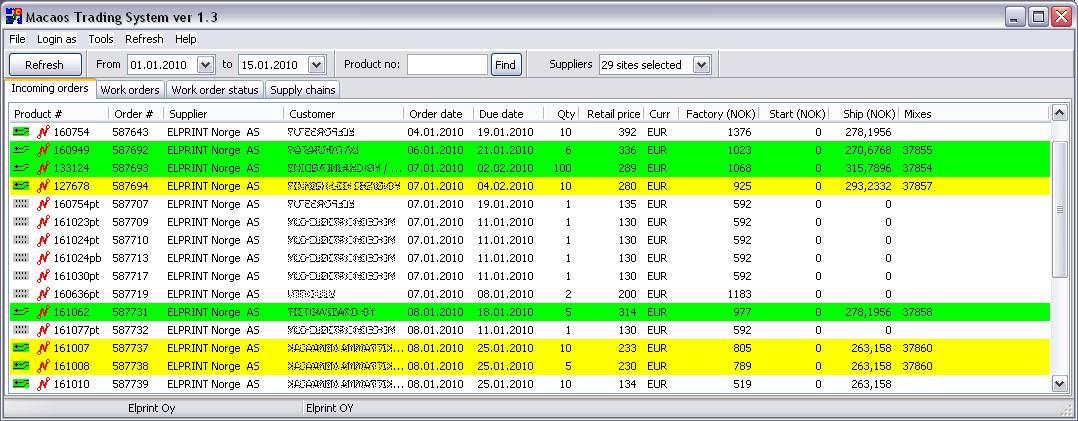
The incoming orders view lists orders which customers have placed through Macaos Enterprise, as well as orders entered directly into the system. Colors make it easy to see which orders need attention. Automatically generate an RFQ or Work order to the desired fabricator with just a few clicks.
Work orders
The Work orders view lists both active and inactive work orders in a specified time frame. It gives an overview of the participants and the logistics of each work order. It also gives easy access to all of the documents archived with each work order.
Supported documents include purchase orders, order confirmations, quality documentation, shipment tracking numbers and invoices. End user documents, such as shipment tracking and quality documentation are also made available to customers and end users through Macaos Enterprise.
Work order status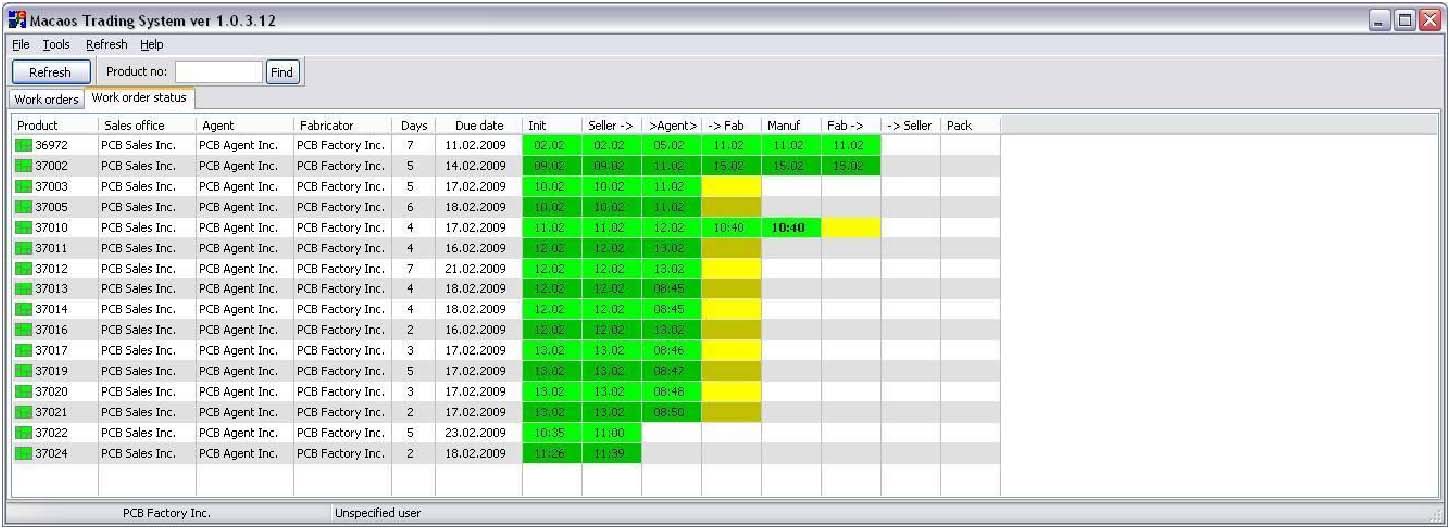
The Work orders status view displays an overview of active work orders and their progress through the various steps from order to shipment. Color-coded mileposts make it easy to see progress and to see which work orders require attention. Where appropriate, signing off for a milepost initiates adding a document to the archive.
Brokers
Brokers BruceSellers may send their work orders directly to a fabricator, or through a Broker. Brokers may make use of the Macaos PCB Factory Production Planning module to mix multiple orders together in order to maximize the use of production panels, thereby reducing fabrication costs. Work orders may be generated for mixes in the same manner as for incoming orders.
Fabricators
Fabricators BruceMacaos Convergence provides fabricators with an overview of their incoming work orders, and provides a communication channel for messages as well as for documents. In addition, Convergence provides a tool for managing the fabricator's pricing as it will be used in the Macaos Enterprise online quotation system.
Work order status
The Work orders status view displays an overview of active work orders and their progress through the various steps from order to shipment. Color-coded mileposts make it easy to see progress and to see which work orders require attention. Where appropriate, signing off for a milepost initiates adding a document to the archive.
Work orders
The Work orders view lists both active and inactive work orders in a specified time frame. It gives an overview of the participants and the logistics of each work order. It also gives easy access to all of the documents archived with each work order.
Supported documents include purchase orders, order confirmations, quality documentation, shipment tracking numbers and invoices. End user documents, such as shipment tracking and quality documentation are also made available to customers and end users through Macaos Enterprise.
Prices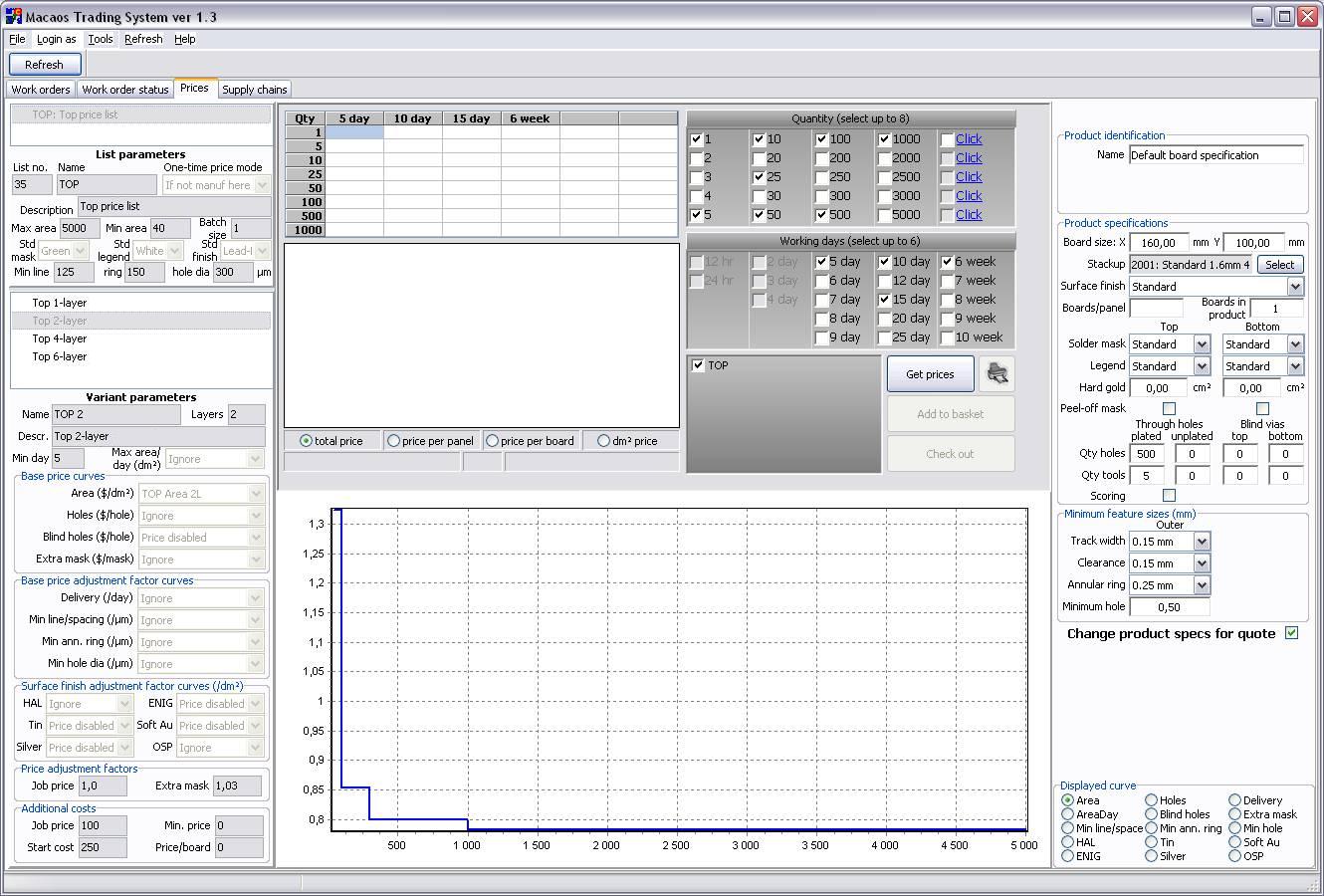
A fabricator may make a price list available for use in the Macaos Enterprise online quotation system. A price list is a set of parameters such as price per area, start cost, etc. The Prices view in Convergence allows a fabricator to manage and test the parameters in their price list.
In addition to listing price parameters and curves, a quotation module simulates online quotations as they would be obtained by customers using Macaos Enterprise. Product parameters may be specified and prices obtained for various quantities and delivery times, as necessary for testing the price list parameters. Prices displayed are the fabricator's price to the seller, and do not include shipping or any percentage that the seller may add to the customer price.
What's new in Convergence
What's new in Convergence BruceVersion 3.0
Version 3.0 is a major update from previous versions. Changes include:
- Colors–we have given each of the main views a color, to assist in navigating the system
- Each user should have their own login. Most operations are logged with the user’s ID.
- The paradigm for data access has been streamlined. In major views, data is fetched from the server when clicking the Refresh button. Searching or filtering will go much faster, while clicking the Refresh button may take a bit longer than in previous versions.
- Unused functionality has been removed; including mixing, pricing, and support for agents
- It is now possible to link multiple customer orders to a single work order.
Macaos Convergence Release Notes
Macaos Convergence Release Notes BruceLatest version: Macaos Convergence 3.0.10.268
Macaos Convergence 3.x
Macaos Convergence 3.x BruceMacaos Convergence 3.0
Build 3.0.14.272 (20-03-2024)
Tweaks:
- 0005234: [Production data] If PCB for PCBA is in wastebasket, warning message should show PCB product number
- 0005186: [Production data] Change error message when PCBA files do not contain component data
Fixes:
- 0005242: [Work orders] Error "FDMTCompanySearch: Field 'id' not found" when editing WO
- 0005190: [Production data] Layer mixup if there are no copper layers
Build 3.0.13.271 (03-11-2023)
Tweaks:
- 0005180: [Production data] If PCBA product has linked panel, allow to download panel data rather than single board data
- 0005079: [Production data] Changes to ASSY file output
- 0005172: [RFQs] On create WO, let user choose between closing all product RFQs or only order RFQs
- 0005166: [RFQs] Forward Quote needs to detect the destination country when selecting a freight price from a price list
- 0005083: [RFQs] Improved Forward quote to customer - price breakdown
Fixes:
- 0005076: [Incoming Orders] Orders in production checkbox is always un-checked on open
- 0005183: [RFQs] Can not close all RFQs in a group
- 0005178: [RFQs] Surface finish not correct in MC for Other surface
- 0005173: [RFQs] Forward quote to customer must pre-select a shipping price list
- 0005184: [Work orders] Sometimes the "linked customer orders" are duplicated
- 0005182: [Work orders] Links do not work properly if multiple tracking numbers
- 0005181: [Work orders] Warning of missing QA docs does not display when uploading invoice
Build 3.0.12.270 (17-10-2023)
Fixes:
- 0005164: [Other] Performance improvements
Build 3.0.11.269 (05-10-2023)
Fixes:
- 0005150: [Other] Custom layers not shown in viewer
- 0005163: [Production data] Copper bottom contains wrong layer data under certain circumstances
- 0005160: [Work orders] Do not allow to mark invoice as OK if no invoice uploaded
Build 3.0.10.268 (06-09-2023)
New features:
- 0005153: [Work orders] Add a hide option "Invoice OK"
- 0005154: [Work orders] Add a Date Range to possibly hide old work orders
Fixes:
- 0005157: [Production data] Can not download production data for RFQ for Assy w/o PCBs
- 0005148: [RFQs] RFQ for PCBA data load the wrong files in some cases
- 0005144: [RFQs] Forward quote: Show the exchange rate of the quote time when showing old quotes
- 0005152: [Work orders] Tree is not refreshed for all items when setting more WO's to invoice OK
- 0005097: [Work orders] Tree columns do not sort properly
Build 3.0.9.267 (06-07-2023)
fixes:
- 0005132: [Status] Can not download production data for certain products
Build 3.0.8.266 (05-07-2023)
Tweaks:
- 0005119: [Work orders] When marking invoice OK, ask if all relevant WOs should also be marked as OK
fixes:
- 0005131: [RFQs] ME Customer generated RFQs can't be seen in MC
- 0005127: [RFQs] Sometimes RFQ/Quotes are displayed twice
- 0005125: [RFQs] Cannot open OTS products in Quotation viewer
- 0005124: [RFQs] Incorrect footer in RFQ document
- 0005118: [RFQs] Error in OTS RFQs
- 0005117: [RFQs] Forward quote to customer grid gets incorrectly loaded if RFQ has previously been forwarded
- 0005116: [RFQs] Forward quote: PDF file is often empty
- 0005122: [Production data] Backdrilling not handled correctly
- 0005115: [Status] QA milepost gets signed with wrong userid
- 0005120: [Work orders] Hyperlinks not working in WO history for product
Build 3.0.7.265 (23-05-2023)
fixes:
- 0005106: [Other] Product options for PCBA products do not display correctly
- 0005107: [RFQs] Could not convert variant of type (Null) into type (Integer) when creating RFQ
- 0005105: [RFQs] Connectors cannot be opend in Quotation view
- 0005104: [RFQs] Forward quote: Copy of quotation should go to office rather than sender
- 0005100: [Work orders] Sending invoice files to Uni Economy does not always work
Build 3.0.6.264 (10-05-2023)
Fixes:
- 0005098: [RFQs] Cannot close group of RFQs
- 0005099: [Work orders] Uploaded invoice does not have visible filename
Build 3.0.5.263 (08-05-2023)
Tweaks:
- 0005095: [Other] Change highlight color in Orders, RFQs and WOs list
- 0005094: [RFQs] Forward quote: Prevent sending mail directly from quote viewer
- 0005093: [RFQs] Forward quote: It should not be absolutely necessary to view quote before Send and Close
Fixes:
- 0005090: [RFQs] Forward quote: Copy of quotation does not get sent to sales office
- 0005086: [Status] Dataset not in edit mode error when marking document OK
- 0005096: [Work orders] Date columns do not sort properly
Build 3.0.4.262 (27-04-2023)
Tweaks:
- 0005072: [Work orders] Only ask to close RFQs if necessary
- 0005078: [Work orders] Add more text options
- 0005077: [Work orders] Warn if WO due date is later than Order due date(s)
Fixes:
- 0005076: [Incoming Orders] Orders in production-checkbox is always un-checked on open
- 0005082: [RFQs] Problems with attachments when sending mail
- 0005069: [RFQs] Cannot input macaos id and retrieve customer info
- 0005080: [Status] 3 orders could not pack
Build 3.0.3.261 (20-04-2023)
Fixes:
- 0005045: [Production data] Component price estimator: choose currency prior to fetching parts list
- 0005068: [RFQs] Forward quote: Field replymail not found when sending quote by mail
- 0005067: [RFQs] RFQ document not uploaded when creating RFQ
Build 3.0.2.260 (19-04-2023)
Tweaks:
- 0005066: [RFQs] Show comments to viewer (requester or supplier) in main view
- 0005063: [RFQs] When creating WO from RFQ, ask if RFQs should be closed
Fixes:
- 0005061: [Other] Can not download/view certain products
- 0005064: [RFQs] Cannot send forwarded quote as email
- 0005060: [RFQs] Prices with decimals come in as zero when creating WO from RFQ
- 0005065: [Status] Can not sign for mileposts
- 0005062: [Status] Can not QA mechanical product
Build 3.0.1.259 (18-04-2023)
Fixes:
- 0005057: [Other] Extend default timeout
- 0005056: [RFQs] Forward quote: Can not view quotation
Build 3.0.0.258 (17-04-2023)
New features:
- This is a nearly complete rewrite of the application. The look and feel has been changed, and the data access paradigm has been streamlined. See What's new for more info.
- Each of the main views has been given a color, to assist in navigating the system
- Each user should have their own login credentials. This will improve system reliability.
- In most cases, major view data is only updated when clicking on the Refresh button. This will reduce search/filter times, but will increase Refresh time somewhat.
Tweaks:
- 0005040: [Other] Finer control of event notification
- 0005012: [Production data] Allow all route sizes in fresedim
- 0004906: [RFQs] Add product stackup and specifications columns to "Prod info"
- 0004961: [Work orders] Should be possible to ship to third party
- 0004918: [Work orders] It should be possible to link a WO to multiple incoming order positions
- Unused functionality has been removed. This includes support for mixing, pricing and agents.
- 0005024: [Production data] laser-cut diameter
- 0004974: [Work orders] Register a WO that is split in sales order, fails to register the qty chosen from MP popup
Macaos Convergence 2.x
Macaos Convergence 2.x BruceMacaos Convergence 2.2
Build 2.2.11.254 (12-12-2022)
Fixes:
- 0005011: [Production data] Access violation when downloading RFQ for assembly product
- 0005007: [Production data] In Assembly specifications.txt Conformal coating is not filled out
- 0005006: [RFQs] Forward quote: Price missing if only Fastest quoted
Build 2.2.10.252 (25-11-2022)
Fixes:
- 0005003: [Production data] Cannot download PCBA product with components on bottom but no bottom legend
- 0005000: [Production data] EP text not preserved when exporting changes (bruce)
Build 2.2.9.251 (08-11-2022)
Fixes:
- 0004995: [Production data] Manuf ID text should have PCB product number rather than PCBA product number
- 0004994: [Production data] Bottom assembly drawing shows mirrored top side
Build 2.2.8.250 (03-11-2022)
Tweaks:
- 0004991: [Production data] Change contents of PCBA production file
Build 2.2.7.249 (01-11-2022)
Tweaks:
- 0004990: [Production data] Use assy drawing layer (if it exists) in assy drawing
Fixes:
- 0004986: [Other] Invalid max markup value
Build 2.2.6.248 (04-10-2022)
Tweaks:
- 0004976: [Production data] Assy dwg PDF: draw soldermask openings in green
Fixes:
- 0004973: [Work orders] Function test is automatically added to all RFQ's and WO
Build 2.2.5.247 (06-09-2022)
Tweaks:
- 0004959: [Production data] Download package for PCBA
- 0004949: [RFQs] RFQ for PCBA products, should auto check Allow download for PCB+PCBA
Fixes:
- 0004946: [Production data] Ep
- dot text not inserted if Disallow manufacturer marking
- 0004967: [Production data] Access violation if product has no Drill Through layer
Build 2.2.4.246 (18-07-2022)
Tweaks:
- 0004942: [RFQs] Separate 1st run charge from setup charge
Fixes:
- 0004936: [Production data] Thickness in specifications.txt must have higher precision
- 0004939: [Status] Cannot download manufacturing data for mix
Build 2.2.3.245 (11-07-2022)
Fixes:
- 0004935: [Mixing] Cannot create PO for mix
Build 2.2.2.244 (28-06-2022)
Fixes:
- 0004933: [Production data] Download for RFQ generates AV if errors encountered
- 0004932: [Production data] Access violation when signing for SENT
- 0004928: [Production data] For MIT test fixtures Production data should not contain Gerber files
Build 2.2.1.242 (23-06-2022)
Fixes:
- 0004927: [Status] Unable to sign for SENT
- 0004926: [Status] Download changes button should not show if product has no changes
Build 2.2.0.240 (22-06-2022)
New features:
- 0004897: [Other] Support for PCBA product type
- 0004924: [Other] Add Tools|Create WO from product number
Tweaks:
- 0004898: [RFQs] Support for first-run charge in RFQ and Forward Quote
- 0004881: [Work orders] Dropdown list with tariff code alternatives in PO dialog
Fixes:
- 0004908: [Status] QA qty packed should not include items packed for other WOs
Macaos Convergence 2.1
Build 2.1.6.238 (03-03-2022)
Fixes:
- 0004866: [Other] Can not view film product
- 0004867: [Status] Cannot sign QA milepost for connector order
Build 2.1.5.237 (02-03-2022)
Tweaks:
- 0004863: [Production data] Add assembly comments to products
- 0004809: [RFQs] Specify depanelization by milliing
- 0004792: [RFQs] Specify if repeat order for RFQ for ASSY jobs
- 0004768: [RFQs] Forward quote - factory price in NOK should use current exchange rate
- 0004801: [Status] Pack/Ship: Add COC when packing
Fixes:
- 0004829: [Work orders] Tariff code not transferred from PO to Packing List
Build 2.1.4.236 (22-09-2021)
Fixes:
- 0004758: [Status] Extended product info missing from download pkg for PCBA
Build 2.1.3.233 (21-07-2021)
Fixes:
- 0004729: [RFQs] Prices in wrong grid columns if RFQ for Assy has target date
Build 2.1.2.232 (13-07-2021)
Tweaks:
- 0004714: [RFQs] Make it possible to change the number of days a quotation is valid
- 0004709: [RFQs] Show Prod Info check box to add product name, article and Customer columns
- 0004704: [RFQs] Forward quote extensions
Fixes:
- 0004713: [Production data] It should not be possible to sign ASSY orders for data sent if product is not signed for CAM
- 0004724: [Production data] Subj for EQ mails in PCBA order pkg not included in spec file
- 0004719: [Production data] MIT test jig to support 3D file in output
- 0004710: [Work orders] Tracking link does not work
- 0004684: [Work orders] Can not upload invoice for mech part work order
Build 2.1.1.231 (14-04-2021)
Fixes:
- 0004658: [RFQs] Mat'l spec (for Other mat'l) of mech part not shown in RFQ
- 0004640: [RFQs] Forward quote - ignore max markup if checked, but <= min markup
Build 2.1.0.230 (29-03-2021)
New features:
- 0004624: [Production data] Allow assy+PCB data to be downloaded as 2 separate products
- 0004617: [RFQs] It should be possible to view price/availability for Assy BOM
Tweaks:
- 0004564: [Production data] Include alternate MPNs in BOM for production
Fixes:
- 0004636: [RFQs] SQL error on forward quote to customer
Macaos Convergence 2.0
Build 2.0.59.229 (15-03-2021)
Fixes:
- 0004621: [Mixing] Mix|Update Manuf Price does not calculate properly
Build 2.0.59.228 (11-03-2021)
Fixes:
- 0004621: [Mixing] DB error on Mix|Update Manuf Price
- 0004583: [RFQs] Add unit weight to forward price to customer
Build 2.0.58.227 (09-03-2021)
Fixes:
- 0004614: [RFQs] Wrong qty/days in Create WO from RFQ
Build 2.0.57.226 (10-02-2021)
Tweaks:
- 0004565: [Viewer] Show angle in measurement display
- 0004307: [Viewer] Increase data resolution from 100 nm to 1 nm
Build 2.0.56.225 (18-12-2020)
Fixes:
- 0004547: [RFQs] Comments are not included in RFQs for mechanical parts
- 0004531: [RFQs] Cannot create WO for assy from RFQ
Build 2.0.55.224 (10-11-2020)
Fixes:
- 0004526: [MIF] DNP component property not saved to cache
- 0004517: [Production data] List of designators in BOM list is incorrect
- 0004525: [Production data] PnP file exported to xls might lose decimal sign
- 0004511: [RFQs] Components not loaded if Show Product chosen
Build 2.0.54.222 (20-10-2020)
Fixes:
- 0004507: [RFQs] Forward quote does not import RFQ for PCB+Assy correctly
- 0004508: [Other] Allow update without login
Build 2.0.53.221 (12-10-2020)
Fixes:
- 0004506: [Status] Problem downloading production data for assy WOs
Build 2.0.52.220 (05-10-2020)
New features:
- 0004499: [Work orders] It should be possible to make WO/RFQ for PCB+Assy
- 0004498: [Status] Allow Norway office to send incoming invoice to Uni Økonomi
- 0004496: [Status] Product viewer for Assy WOs should show component list and allow export of BOM/PnP data
Build 2.0.51.219 (28-08-2020)
Fixes:
- 0004469: [Production data] Set up production output for Assembly
- 0004468: [Production data] Improve output for Assembly RFQ and orders
Build 2.0.50.218 (19-08-2020)
Fixes:
- 0004460: [Other] Cannot view pallet products
- 0004459: [Viewer] Thermal aperture does not display properly
Build 2.0.49.217 (18-08-2020)
Fixes:
- 0004456: [Production data] Parsing error in rounded rectangle aperture
- 0004455: [Production data] Extra files (images/pdf, etc) were not included in manufacturer download
- 0004449: [Production data] Product number in filenames and zip file not always consistent
Build 2.0.48.216 (23-07-2020)
New features:
- 0004444: [RFQs] Show component list in RFQ for assembly viewer
- 0004442: [RFQs] Forward quote to customer - for assembly
Tweaks:
- 0004428: [Other] Comments are shortened after generating a PDF
Fixes:
- 0004430: [RFQs] Start cost doesn't display properly in forwarded quote
Build 2.0.47.215 (18-06-2020)
New features:
- 0003967: [RFQs] Make a check-list for RFQs
- 0000000: [Production data] Gerber 2019.06 compliant output
Tweaks:
- 0004419: [RFQs] Forward quote: allow reduced delivery time
Fixes:
- 0004409: [RFQs] Forward quote: Changing currency should not change min/max markup
- 0004418: [RFQs] Forward quote does not import RFQ for assembly correctly
Build 2.0.46.214 (22-11-2019)
Tweaks:
- 0004329: [Status] Preserve sort column on page refresh
- 0004342: [Work orders] Make it possible to upload .xlsx .docx files as order confirmations and other documents
Fixes:
- 0004309: [Other] Block usage for old versions
- 0004367: [Production data] Update zip functionallity
- 0004327: [RFQs] Bugs/changes in forward quote to customer
- 0004363: [RFQs] Forward quote does not pass order options
Build 2.0.45.213 (15-08-2019)
Fixes:
- 0004304: [Production data] Error when downloading drill files for single sided boards
- 0004305: [Status] Mech parts not signed for CAM can't be downloaded, even though signed for send data
Build 2.0.44.212 (12-08-2019)
Fixes:
- 0004296: [RFQs] When creating and RFQ based on customer created RFQ, IPC class 3 is ignored
Build 2.0.43.210 (09-07-2019)
Fixes:
- 0004291: [RFQs] Notification mails do not get sent
Build 2.0.42.209 (01-07-2019)
Fixes:
- 0004286: [RFQs] Problem sending RFQ notification to multiple addresses
Build 2.0.41.208 (26-06-2019)
Fixes:
- 0004282: [RFQs] Cannot notify of RFQ when multiple notify adresses
- 0004281: [RFQs] Cannot view RFQ for mix
Build 2.0.40.207 (24-06-2019)
New features:
- 0004263: [RFQs] Hide tooling charge in Forward Quote to Customer
- 0004277: [RFQs] Create RFQ for assembly from incoming order
- 0004278: [Work orders] Create WO for assembly
- 0004086: [Work orders] When deleting WO ask to send a cancellation email to fabricator
Tweaks:
- 0004060: [Incoming Orders] Exclude fully delivered orders from Incoming Orders list
- 0004254: [Work orders] Comments get truncated in PO
Fixes:
- 0004276: [RFQs] Cannot create RFQ without product
Build 2.0.39.206 (24-04-2019)
Tweaks:
- 0004242: [Other] Warn Elprint China if user does not update program
- 0004219: [Other] Clear cache on change login
- 0004226: [RFQs] Add button to clear search memory
- 0004225: [RFQs] Add shortcut to create new RFQ
- 0004224: [Viewer] Show flex layers slightly wider in rigid-flex stackup
- 0004167: [Viewer] Add minimum feature functions to view mode menu
Fixes:
- 0004200: [Production data] Description text does not include definition of UL mark layers
- 0004240: [RFQs] Long comments are truncated in supplier quotations
Build 2.0.38.205 (13-02-2019)
Tweaks:
- 0004187: [RFQs] Show RFQs from ME to Offline Supplier with bold text
Build 2.0.37.204 (05-02-2019)
Fixes:
- 0004171: [Production data] Errors occured when signing for data
- 0004170: [Production data] Description of UL-mark - Layers missing from description.txt
- 0004150: [Work orders] Work orders can't reopen in some cases
Build 2.0.36.203 (22-11-2018)
Tweaks:
- 0004111: [Incoming Orders] When creating a WO, warn if a work order for that order already exists
- 0004109: [Production data] Make description.txt depend on actual files in the package and not a general description
- 0004061: [Work orders] Improved search for old WOs for CONN-products
Fixes:
- 0004132: [Work orders] Can not delete PO or mix after update of database
- 0004107: [Production data] For test fixtures, information about protective cover is not passed to the manufacturer
- 0004108: [Production data] For Depanel products, info about ESD paint was not passed to manufacturer
Build 2.0.35.202 (29-10-2018)
Tweaks:
- 0004069: [Incoming Orders] Set color blue to indicate RFQ sent after sending RFQ
- 0004089: [Work orders] Information about options should be included in PO
Fixes:
- 0004084: [RFQs] Cannot enter Quotaton viewer for mech parts
- 0004083: [RFQs] Comments for RFQs to mechparts are not included in the RFQ pdf
Build 2.0.34.201 (11-10-2018)
Fixes:
- 0004070: [Other] Access violation when viewing mix
Build 2.0.33.200 (09-10-2018)
Tweaks:
- 0004023: [Mixing] Add phone number to Mix info popup
- 0004037: [RFQs] RFQs for 3D products (incl depanel fixtures), auto-check Allow Download
- 0004058: [Work orders] When creating a WO, set the shipping price to 0 no matter what
- 0003768: [Work orders] Preselect "DHL" as shipping method when creating PO
Fixes:
- 0004024: [Production data] It is not possible to download product data for 3D parts
- 0003995: [Status] Print mix summary gives a SQL error
Build 2.0.32.199 (12-06-2018)
Fixes:
- 0003963: [Viewer] Older stackup material descriptions fail to load
- 0003950: [Viewer] 1-layer MBB stackup does not load properly
Build 2.0.31.198 (07-05-2018)
Tweaks:
- 0003947: [RFQs] Add Forward quote for customer to 3D parts
Fixes:
- 0003937: [RFQs] Error with calculation of max markup
- 0003885: [RFQs] Problem locating older RFQs
- 0003948: [Viewer] Viewer does not show product info
Build 2.0.30.197 (12-04-2018)
Fixes:
- 0003945: [Other] 1-layer MBB stackup does not show properly
- 0003933: [RFQs] Show Product in context menu does not load mixes properly
Build 2.0.29.196 (22-03-2018)
Tweaks:
- 0003922: [Production data] Change via filling file name to follow the selected IPC type
- 0003920: [RFQs] Enlarge viewer window for RFQ for mech part
Fixes:
- 0003927: [Incoming Orders] When placing an order for a Mech Part it says "Unsupported product type"
- 0003921: [Incoming Orders] Orders with RFQ not shown unless date range checked
- 0003931: [Other] Product viewer does not respond to keyboard shortcuts
Build 2.0.28.194 (07-03-2018)
New features:
- 0003845: [RFQs] Panel optimizer in create RFQ dialog
Tweaks:
- 0003904: [Incoming Orders] Indicate if Incoming order has an RFQ created
- 0003775: [Other] Contact phone number should be visible anywhere shipping address is visible
- 0003905: [RFQs] Show Allow product data download in create RFQ dialog for mech parts
Fixes:
- 0003848: [RFQs] Not possible to set only MLT in create RFQ dialog
Build 2.0.27.193 (05-03-2018)
Tweaks:
- 0003908: [Other] Warn more insistently about available updates
- 0003911: [RFQs] Download product as MIF
Fixes:
- 0003884: [Status] RFQ Status takes very long time to refresh
Build 2.0.26.192 (08-02-2018)
Tweaks:
- 0003839: [Other] Make it possible to open quote-pdfs simultaneously
- 0003851: [Work orders] Allow upload of invoices before CoC reports
Fixes:
- 0003878: [Other] Stackup does not show in product viewer
Build 2.0.25.189 (07-02-2018)
Fixes:
- 0003806: [RFQs] Forward quote: Allow negative seller's one-time cost (to reduce total one-time)
- 0003809: [RFQs] Creating RFQ from mech part product gets wrong order type
Build 2.0.24.187 (19-10-2017)
Tweaks:
- 0003776: [Other] Should be possible to copy shipment details to clipboard
Fixes:
- 0003794: [Work orders] Can not generate POs for mech product orders
Build 2.0.23.186 (05-09-2017)
Fixes:
- 0003772: [RFQs] Mix data is missing from RFQ for mix
Build 2.0.22.185 (04-09-2017)
Fixes:
- 0003769: [Other] AV when trying to make RFQ or PO from product with special material
Build 2.0.21.184 (31-08-2017)
New features:
- 0003530: [RFQs] Possibility for "Minimum lead time" in stead of actual number of days
Tweaks:
- 0003759: [Production data] Expanded checks and allow download of 3D plastic products
- 0003755: [RFQs] MBB boards with x021 stackup don't say they are alu boards
- 0003768: [Work orders] Preselect "DHL" as shipping method when creating PO
Fixes:
- 0003758: [RFQs] Create RFQ based on existing RFQ will not set the same IPC class
Build 2.0.20.182 (22-06-2017)
Tweaks:
- 0003740: [Work orders] Add support for mechanical part products
Fixes:
- 0003664: [Incoming Orders] Program hangs when finding older product orders
Build 2.0.19.181 (05-04-2017)
Fixes:
- 0003684: [RFQs] Forward quote factory start price shows in wrong currency
- 0003685: [RFQs] Some users report that program crashes/disappears when trying to view RFQ
Build 2.0.18.180 (30-03-2017)
New features:
- 0003683: [RFQs] Copy detailed quote info to clipboard
Tweaks:
- 0003679: [Work orders] Enlarge Qty spin edit in Create work order form
- 0003627: [RFQs] Forward quote should be updated to use new price engine
Fixes:
- 0003664: [Incoming Orders] Program hangs if search for product number not in the list
- 0003642: [Incoming Orders] Stencil products are hardcoded to Musen as manufacturer
- 0003641: [Incoming Orders] Preset currency
- 0003659: [Mixing] Fetch correct exchange rate to Mix Calculator
- 0003663: [RFQs] IPC class 2+ is not included when making RFQ from product
- 0003656: [Work orders] Display error with new line
Build 2.0.17.179 (24-02-2017)
New features:
- 0003599: [RFQs] Upload engineering drawing to connector RFQ
Tweaks:
- 0003602: [Other] Preselect currency for each company
- 0003595: [RFQs] On RFQ pdfs the text is misleading in case of panels
- 0003587: [RFQs] Need to be able to specify DAP or EXW on forwarded quote
- 0003586: [RFQs] Forward quote dialog is too tall for 768 pixel monitor
Fixes:
- 0003597: [RFQs] RFQ for connector
- picture shows in background of RFQ frame
Build 2.0.16.178 (07-12-2016)
Fixes:
- 0003571: [Production data] Datecode text missing from the downloaded files for production
Build 2.0.15.177 (06-12-2016)
Tweaks:
- 0003535: [Other] Notification emails to suppliers should contain product nu in subject
Fixes:
- 0003566: [Production data] Allow merging of hires colors
- 0003560: [Production data] Update to latest version of download module
- 0003490: [Status] QA checklist for test fixtures is wrong
Build 2.0.14.176 (06-09-2016)
Fixes:
- 0003477: [Status] Cannot sign for shipped work orders
Build 2.0.13.175 (05-09-2016)
Fixes:
- 0003476: [Status] Downloaded files are not processed properly
Build 2.0.12.174 (02-09-2016)
Tweaks:
- 0003465: [RFQs] Forward quote should not be enabled for fabricators
Fixes:
- 0003474: [RFQs] Product parameters are ignored on create RFQ without product
Build 2.0.11.173 (24-08-2016)
Tweaks:
- 0003461: [Status] Add support for test fixture products
Build 2.0.10.172 (18-08-2016)
Tweaks:
- 0003458: [RFQs] Include picture of product in RFQ and PO for OTS products
- 0003435: [RFQs] On RFQ tab, show the customer in requester column when viewed as office
- 0003459: [Status] Add support for "off-the-shelf" products
Fixes:
- 0003456: [Other] Error if login dialog open for more than 60 seconds
Build 2.0.9.171 (18-04-2016)
Tweaks:
- 0003356: [Production data] Add no x-outs to specifications text
Fixes:
- 0003361: [Status] Panel Builder: Insure that routing goes clockwise on outer contour
Build 2.0.8.169 (05-04-2016)
Tweaks:
- 0003354: [Status] Panel Builder: Routing and tab removal output
Build 2.0.7.168 (16-03-2016)
Tweaks:
- 0003324: [Status] Tweaks and fixes to Panel Builder module
- 0003325: [Work orders] Nominal thickness of 1080 prepreg changed to 70µm
Build 2.0.6.167 (04-03-2016)
New features:
- 0003306: [Status] Add Panel Builder module
Tweaks:
- 0003302: [Incoming Orders] Change default view/loaded items in Incomming orders
- 0003307: [RFQs] Use DHL China Norge curve for shipping in Forward Quote
- 0003292: [Work orders] Disallow manuf mark and No Cu shave should be read-only
Build 2.0.5.165 (15-02-2016)
Tweaks:
- 0003178: [Status] Additional info on packing list
- 0003271: [Status] If searched WO when signing, repeat search after sign
- 0003269: [Work orders] Support for performance class 2+
- 0003270: [Incoming Orders] Hide active orders
- 0003246: [Work orders] Add "cancel" possibility to price options custom dlg in Create WO from Quotation
Fixes:
- 0003254: [Work orders] DAP not passed on to PO even though chosen in WO
- 0003268: [Other] Shipped orders should not show red date on shipped orders
Build 2.0.4.163 (06-01-2016)
Tweaks:
- 0003177: [RFQs] Forward quote to customer should send email copy office
Fixes:
- 0003220: [Other] Show details check box should not be visible to manufacturer
Build 2.0.3.162 (19-11-2015)
Tweaks:
- 0003208: [Status] Improved messages if unable to download production data
Build 2.0.3.161 (16-11-2015)
Tweaks:
- 0003193: [Other] Add Beveled Edge and No Cu Shave as product specifications
Fixes:
- 0003194: [Production data] Shows messages for used for debugging when downloading files
- 0003191: [Production data] Error in downloading changed production files
- 0003190: [Production data] Some files with non standard file names missing from zip-files
Build 2.0.2.159 (12-11-2015)
Tweaks:
- 0003179: [Other] Add Ctrl+mouse click in any cell to copy contents to clip board
Fixes:
- 0003175: [Production data] Error in signing for mixes. Always denies manu download
Build 2.0.1.158 (04-11-2015)
Tweaks:
- 0003173: [Work orders] Show all product specs in Create Work Order dialog
Fixes:
- 0003172: [Production data] Downloading and approving file for manu - download gives false error if UL-mark is defined
- 0003174: [RFQs] Access violation on Forward Quote to ME user
- 0003171: [RFQs] IPC class 3 incorrectly selected for some products
- 0003170: [RFQs] Area not specified on Create RFQ from product
- 0003169: [RFQs] Access violation on Create RFQ without product
Build 2.0.0.157 (03-11-2015)
New features:
- 0003164: [Other] Extended product specifications
- 0003163: [Other] Support for order options
Tweaks:
- 0003126: [Other] Give intuitive filename for PO, Invoice, QA etc.
Fixes:
- 0003156: [RFQs] Forward quote: One-time prices do not update when changing currency
Macaos Convergence 1.x
Macaos Convergence 1.x BruceMacaos Convergence 1.11
Build 1.11.8.154 (13-08-2015)
Fixes:
- 0003087: [RFQ] Stackup thicknesses wrong if 1-layer lam thick<Cu thick
- 0003102: [General] Compatible with extended product type IDs
Build 1.11.7.153 (13-05-2015)
New features:
- 0003036: [Work orders] Sort Work orders to invoice dialog by product number
Tweaks:
- 0003063: [RFQs] RFQs do not support prices in SEK
Fixes:
- 0003064: [RFQs] Download Assembly Info button should not show if not an Assembly RFQ
- 0003062: [RFQs] Cannot create WO from RFQ for stencil product
- 0003048: [RFQs] Forward quote: Very large quantities not displayed properly
- 0003035: [RFQs] Quoter comment gets truncated
Build 1.11.6.152 (26-02-2015)
New features:
- 0003020: [RFQs] When forwarding quote to customer, send copy to sales office
- 0003002: [RFQs] Make checkbox for repeat order for RFQ
- 0003004: [Status] Show in Pack/Ship module and Ship Details dlg if shipment is EXW
Build 1.11.5.151 (10-02-2015)
Fixes:
- 0003005: [Other] Out of bounds error when loading product 194601 into viewer
Build 1.11.4.150 (05-02-2015)
Fixes:
- 0003000: [RFQs] Unable to view RFQ for mix due to access violation
Build 1.11.3.149 (04-02-2015)
New features:
- 0002983: [RFQs] Generate RFQ and WO for Assembly
Tweaks:
- 0002994: [RFQs] Forward quote: Automatically set order options if specified in product comment
Fixes:
- 0002995: [Work orders] Uncheck the Hide closed/finished items when searching for work orders
Build 1.11.2.148 (07-01-2015)
Tweaks:
- 0002984: [Other] Remember state of Hide closed/finished check box
- 0002985: [Work orders] Close WO (if still open) when marking invoice OK
Fixes:
- 0002982: [Production data] Ep factory prefix is wrong in some cases
- 0002977: [RFQs] Wrong surface finish in quote
Build 1.11.1.147 (22-12-2014)
Tweaks:
- 0002975: [RFQs] Forward quote: Eltest should default to true
Fixes:
- 0002974: [RFQs] Forward quote: wrong exchange rate used for Freight/Macaos price
Build 1.11.0.146 (11-12-2014)
New features:
- 0002949: [RFQs] Major upgrade of Forward Quote to Customer module
- 0002962: [Other] Load any product in price view
Tweaks:
- 0002957: [Production data] Add EQ subject line to specifications.txt
Fixes:
- 0002956: [Production data] Gerber X2 commands are not removed for Gerberfile only containing polygons
Macaos Convergence 1.10
Build 1.10.20.144 (12-11-2014)
Tweaks:
- 0002947: [RFQs] RFQ PDF should refer to stackup PDF for custom stackups
- 0002946: [RFQs] Show price/dm² as hint in price grid in quote viewer
- 0002935: [Other] Remember user name when closing the program
Fixes:
- 0002948: [RFQs] Memory leak in quote viewer panel optimizer
- 0002945: [RFQs] Prod specs group boxes improperly placed in product quotation viewer
- 0002938: [RFQs] Comment field truncates text at 500 chars
- 0002925: [Work orders] Multiline address does not print properly in PO pdf
Build 1.10.19.143 (24-09-2014)
Tweaks:
- 0002903: [Other] Add our order ref and boards/panel to packing list
- 0002886: [Other] Filter RFQ and WO supplier lists by product type
- 0002901: [Production data] Add pnp, drill, notation, soldermask and copper files in production files for paste products
Fixes:
- 0002906: [Production data] Error in Gerber output for Mif text
- 0002908: [RFQs] Must be possible to create RFQs for stencil products
Build 1.10.18.142 (03-09-2014)
Tweaks:
- 0002855: [Other] Add timer to check for update every 24 hrs
- 0002874: [Status] Warn if closing work order when not last milepost
- 0002851: [Status] Signing for mix data send, does not include all checks
- 0002872: [Work orders] SQL error when viewing WO history
Build 1.10.17.140 (21-08-2014)
Tweaks:
- 0002845: [Status] Updated Gerber reader/writer to Gerber revision J3
Fixes:
- 0002830: [Viewer] Pick and Place data is not correctly cached in some cases
- 0002842: [Viewer] Graphical error when displaying corner tabs on sides with zero frame width
Build 1.10.16.139 (22-07-2014)
Tweaks:
- 0002799: [RFQs] Add possibility to disable Gerber X2 when downloading files for RFQ
Fixes:
- 0002793: [Status] Remember state of GerberX2 check box when downloading
Build 1.10.15.138 (26-06-2014)
Tweaks:
- 0002791: [Status] Allow download of Gerber files without X2 Attributes
Fixes:
- 0002792: [Status] Traces in some boards in mix missing
Build 1.10.14.136 (24-06-2014)
New features:
- 0002765: [Other] Enable multiple logins
- 0002763: [Status] Show list of missing QA documents
- 0002784: [Work orders] Add Tariff numbers to PO and papers for shipment
Tweaks:
- 0002782: [Other] Support for Gerber files with RS-274X2 file attributes
- 0002775: [RFQs] When holding mouse over the comment, show the entire comment as a hint
Fixes:
- 0002759: [RFQs] Un-check "Use dates on search" doesn't work
Build 1.10.13.135 (19-05-2014)
Fixes:
- 0002750: [Other] "Unexpected Class ID encountered: CTMifPoint" when viewing new mixes
Build 1.10.13.134 (28-04-2014)
Fixes:
- 0002758: [Other] Access violation if clicking Get Prices before clicking Refresh prices
Build 1.10.12.133 (24-04-2014)
Fixes:
- 0002749: [Production data] Update download system to disregard @OC commands
- 0002754: [Status] Cannot rotate or mirror view in QA dialog
Build 1.10.11.132 (15-04-2014)
New features:
- 0002728: [RFQs] Forward quote: Double-click to search for user
- 0002744: [RFQs] Forward quote: Add markup/day curve
- 0002745: [RFQs] Forward quote: Show original quote
- 0002732: [Other] Add price editor module for fabricators to manage their online price list
Build 1.10.10.130 (02-04-2014)
Fixes:
- 0002726: [RFQs] Forward quote: Can not modify retail start cost; add minimum markup
- 0002727: [RFQs] Forward quote: Should be able to disable output prices by blanking upper right cells
- 0002729: [RFQs] Forward quote: Prices do not update if no factory price available
- 0002730: [RFQs] Forward quote: Remove "Quote no.:" when pushing quote to database
Build 1.10.9.127 (27-03-2014)
Fixes:
- 0002714: [RFQs] Minor fix to Forward quote to ME customer
Build 1.10.9.126 (25-03-2014)
New features:
- 0002630: [Work Orders] Add checkbox for Repeat order
- 0002714: [RFQs] Add more flexibility to specifying retail prices when forwarding quote to customer
- 0002685: [RFQs] Allow choosing order from which to create WO from RFQ that is not linked to an order
Fixes:
- 0002667: [Production data] Signing for product data should not be possible if product is not signed for CAM
Build 1.10.8.125 (14-01-2014)
Tweaks:
- 0002560: [RFQs] Show non-standard properties more clearly
- 0002539: [Work orders] Notify supplier by e-mail when a work order is created
Fixes:
- 0002540: [Work orders] Make POs for Elprint China as Agent WOs visible to buyer
Build 1.10.7.124 (08-01-2014)
Fixes:
- 0002613: [Production data] Change from error to warning for small slots/routed tracks
- 0002614: [Production data] Fix compatibility with MySql 5.1 on new database server
- 0002623: [Production data] Unexplained error message "38" on download
Build 1.10.6.123 (30-12-2013)
Tweaks:
- 0002615: [Work orders] Check box to include/exclude date range when searching
Fixes:
- 0002620: [Status] Download module updated for compatibility with new database server
- 0002543: [Status] Download: It's not possible to download mixes with 0-layers
- 0002544: [Status] Download: Empty showMessage box pops up for stencil products
Build 1.10.5.122 (03-10-2013)
Fixes:
- 0002522: [Work orders] Error in output of mixes
Build 1.10.5.121 (01-10-2013)
Fixes:
- 0002461: [Mixing] If all mixes on a date are deleted then none of them are visible
- 0002518: [Status] Improved support for global products
- 0002483: [RFQs] No indication of RFQ creation
- 0002493: [Work orders] Cannot upload OC with space character in path/filename
Build 1.10.4.120 (13-08-2013)
Fixes:
- 0002451: [RFQs] Access violation in quotation module
- 0002450: [Status] RFQ info does not show for mixes in unchecked list of Status view
- 0002449: [Work orders] Problems uploading invoice and QA docs
Build 1.10.3.119 (09-08-2013)
New features:
- 0002447: [Mixing] Show deleted mixes and allow undeleting
- 0002446: [RFQs] RFQ viewer for mixes should display hole counts and minimum features
Fixes:
- 0002448: [Work orders] Cannot open invoice file with space character at end of filename
Build 1.10.2.118 (07-08-2013)
New features:
- 0002315: [RFQs] Show detailed price breakdown for prices in Forward Quote To ME dialog
Fixes:
- 0002316: [RFQs] When creating an RFQ in MC, the "No x-outs allowed" checkbox is gone
- 0002317: [RFQs] Often when searching for RFQ's nothing is found
- 0002343: [RFQs] Unable to create WO from RFQ
- 0002417: [RFQs] RMB as currency is not fully supported
- 0002433: [RFQs] Remove "X rfq's created succesfully"
- 0002418: [Work orders] Do not show "Send response to quoters .." if only one RFQ was made
Build 1.10.1.117 (30-04-2013)
New features:
- 0002284: [RFQs] Use parameters from existing price list when forwarding quotation to customer
- 0002205: [RFQs] Quote viewer should show IPC class in red text if not class 2
Fixes:
- 0002266: [RFQs] RFQ recipient list fails if no "regular" recipient is chosen
- 0002233: [Status] All orders should be shipped direct to customer in pack/ship
- 0002282: [Work orders] access violation on attempt to create stencil WO from incoming orders
- 0002218: [Other] Internal invoicing list is built up wrong
Build 1.10.0.115 (28-12-2012)
New features:
- 0002077: [RFQs] Duplicate RFQ
- 0002044: [RFQs] Customer RFQ's from ME should be sent to the sales office, for forwarding to desired suppliersRFQ to
- 0002147: [Status] Additional info with bar codes required on shipment docs
- 0002080: [Status] Additional information requested for outside package label
- 0002121: [Work orders] View all pack list info in Shipment Details
- 0002045: [Work orders] Change "Save to archive" to "Save and close" on "Purchase Order" form
- 0002039: [Work orders] Sort suppliers by priority
Fixes:
- 0002108: [Incoming Orders] Customer RFQ does not contain info about IPC class 3, if checked
- 0002079: [Incoming Orders] Remove freight from ME-orders
- 0002126: [RFQs] Download of data is not possible
- 0002109: [RFQs] Creating RFQ from mixes med in MixDemo are missing size, stackup and surface
- 0002107: [RFQs] Local settings causes date format to be wrong
- 0002106: [RFQs] Check pCardInfo for info when creating RFQ for mixes
- 0002111: [Status] Downloading product data should sign for recieved data
- 0002157: [Work orders] Cannot delete work order
Macaos Convergence 1.9
Build 1.9.1.113 (23-10-2012)
Fixes:
- 0002034: [Incoming Orders] Change default stencil fabricator
- 0002036: [Work orders] Update default stencil prices
- 0002104: [RFQs] Cannot create RFQ for mix generated by Fusion
- 0002105: [RFQs] RFQs to chinese suppliers should be owned by sales office rather than by china office
Build 1.9.1.113 (05-09-2012)
Fixes:
- 0002031: [Status] Unable to download product data for mix
- 0002030: [RFQs] Problem creating RFQs
Build 1.9.0.111 (04-09-2012)
New features:
- 0002005: [General] Copy product number to clipboard on Ctrl+click in (almost) any list
- 0002020: [RFQs] Let sales offices send RFQs directly to chinese suppliers
- 0001927: [RFQs] Forward quotation to customer
- 0001925: [RFQs] Allow download of files for (some) RFQ's
Fixes:
- 0002027: [RFQs] When creating an RFQ from an RFQ, the delivery date is lost
- 0002009: [RFQs] RFQs with surface HASL (Non RoHS) show as (Undefined finish)
- 0002007: [RFQs] When creating an RFQ from incoming orders, do not check the "Waiting" factory
- 0002004: [RFQs] When toggling quotes OK, the color of one-line quotes is not changed until you update
- 0001957: [RFQs] Quotations do not contain info about holes
- 0001948: [RFQs] Remove default values for Days and Qty when creating a new RFQ
- 0001928: [Work orders] Do not allow signing for send (data by seller) unless there is a PO
Macaos Convergence 1.8
Build 1.8.3.109 (18-04-2012)
Fixes:
- 0001917: [Status] Packinglist columns not alligned properly
Build 1.8.2.108 (30-03-2012)
Fixes:
- 0001900: [Work orders] Remove the need to make a comment if price is changed when making WO
Build 1.8.1.107 (09-03-2012)
Fixes:
- 0001882: [Other] Add support to mix viewer for mixes published in MIFv3 format
- 0001858: [Other] Add number of panels to raw material optimizer
- 0001874: [Status] Download: Etch/Buildup-files for stencils are missing from zip file
Build 1.8.0.106 (24-02-2012)
New features:
- 0001837: [RFQs] Production panel optimizer with viewer in RFQ quote editor
- 0001838: [RFQs] Raw material sheet optimizer with viewer in RFQ quote editor
- 0001839: [RFQs] Price calculator for optimizer in RFQ quote editor
- 0001834: [Status] QA checklist must indicate that board has aluminium
- 0001826: [Status] Need a mechanism for passing shipment comments to pack/ship
Fixes:
- 0001845: [RFQs] Cannot create RFQ for product with stackup 1015 aluminium
Macaos Convergence 1.7
Build 1.7.5.103 (19-01-2012)
New features:
- 0001822: [Status] Function to change ship to address after packing
- 0001422: [Status] Add yellow/green colors to Pack/Ship module to show complete/incomplete
- 0001821: [Other] Need to be able to fulfill orders from local stock
Fixes:
- 0001818: [RFQs] Prevent supplier from changing quotation price after an RFQ has been closed
- 0001806: [RFQs] Cannot forward an RFQ for a mix
- 0001805: [RFQs] RFQs for mixes do not display in correct order in list
- 0001819: [Other] Outgoing shipments should show unfulfilled orders if today/next 3 days/next 7 days is chosen
Build 1.7.4.101 (23-12-2011)
New features:
- 0001767: [RFQs] Show RFQ for a mix in mix viewer
- 0001697: [Status] Receive milepost: For re-orders, display text describing changes from previous order
- 0001792: [Work orders] Add RMB as valid currency for placing orders
- 0001785: [Other] Right-click to show mix info in Outgoing Shipments
Fixes:
- 0001745: [RFQs] Error when displaying quote forwarded to ME customer
- 0001727: [RFQs] Need to have more characters for product comments
- 0001769: [Status] Stencil products do not show in Status view when logged in as Running
- 0001743: [Status] Download: Due to change in MIF, changed notation files was not exported
- 0001772: [Other] When searching for product number, don't show messagedlg "..try with expanded date range"
- 0001771: [Other] Change default start date to always be one month prior to current date
Build 1.7.3.100 (28-10-2011)
New features:
- 0001719: [RFQs] Access to documentation files when viewing RFQ product
- 0001698: [Status] Download only changed files for reorders
- 0001716: [Work orders] Search for WO or PO number
Fixes:
- 0001720: [Status] Eliminate spaces from tracking numbers
Build 1.7.2.98 (15-08-2011)
New features:
- 0001671: [RFQs] Send response to quoters after RFQ becomes order
- 0001628: [RFQs] When making RFQ from product/free spec, use days rather than date
Fixes:
- 0001651: [Other] Number of orders in delivery precision does not match number of orders in outgoing shipments
- 0001652: [RFQs] Cannot create RFQ from RFQ if there are multiple quantities
- 0001664: [Work orders] Ignore deleted work orders when searching by product outside of date range
- 0001650: [Work orders] Production site in Convergence should also be transferred to order in Perception
- 0001638: [Work orders] Searching for stencil fails
Build 1.7.1.97 (01-07-2011)
New features:
- 0001642: [Other] Menu item for uploading supplier certification documents
Fixes:
- 0001641: [RFQs] Sort incoming and outgoing RFQs with same product number together
- 0001639: [RFQs] Work order created from RFQ not properly linked to incoming order
- 0001604: [RFQs] Quotation for RFQ generated from price module has too many digits in hard gold area
- 0001640: [Work orders] Make dropdown lists in Create work order wider
Build 1.7.0.95 (08-06-2011)
New features:
- 0001635: [Incoming Orders] Open "Send" milepost for signing after creating work order
- 0001634: [Incoming Orders] Close RFQs when creating work order
- 0001623: [RFQs] Create WO directly from RFQ
- 0001475: [RFQs] Panel optimizer module for generating quotation
- 0001631: [Other] Show delivery precision
Fixes:
- 0001619: [Mixing] Create WO from MixList does not remove order from mix list
- 0001618: [RFQs] RFQs take a long time to generate
- 0001630: [Other] Outgoing shipments list too slow
Macaos Convergence 1.6
Build 1.6.5.94 (29-04-2011)
New features:
- 0001600: [Status] Print package content label for each product in packlist
- 0001593: [Status] Make provision for slower shipments in Pack/Ship module
- 0001577: [Mixing] Function to mark boards on a mix as waste, so that they reappear on the mix list
Fixes:
- 0001597: [Status] Packing: DHL tracking numbers get UPS tracking URL
- 0001592: [Other] Mix viewer gets access violation
- 0001602: [Mixing] Production site sometimes not reset on Remove from Mixlist
Build 1.6.4.92 (08-04-2011)
New features:
- 0001567: [RFQs] Show requester info for customer created RFQs
- 0001553: [RFQs] Mark customer created RFQs with a Macaos C in the parent line
- 0001565: [Work orders] View tracking info from Shipment Info dialog
- 0001564: [Other] Support for internal invoicing for Elprint China as agent
Fixes:
- 0001569: [Incoming Orders] When creating workorder, agent should not default to MT
- 0001573: [Mixing] Remove from MixList generates an error message
- 0001566: [Mixing] Problem recalculating mix prices
- 0001568: [RFQs] Price in hint text does not show correctly when not in USD
- 0001554: [Status] Dowload: Bug in downloading of stencils
Build 1.6.3.89 (30-03-2011)
New features:
- 0001552: [Mixing] Add freight prices to product list in mix calculator
Fixes:
- 0001550: [Status] Download: Extra files are not added to mix-zip files
- 0001551: [Status] Download: Comments for stencil products are not added to specifications.txt
Build 1.6.2.88 (28-03-2011)
New features:
- 0001540: [Mixing] Add stackup and board area to mixlist
- 0001542: [Status] Generate proforma invoice for UPS export
Fixes:
- 0001528: [RFQs] Cannot unmark group of RFQs
- 0001541: [Status] Some changes needed for XML export to UPS
- 0001548: [Work orders] Unable to generate internal invoice for orders where Elprint China is agent
- 0001527: [Work orders] Insure that WO is saved with valid delivery address/contact person
Build 1.6.1.86 (14-03-2011)
New features:
- 0001525: [RFQs] Add currency RMB to quotation viewer
Fixes:
- 0001526: [Other] RFQ page is missing on login
Build 1.6.0.85 (11-03-2011)
New features:
- 0001515: [RFQs] Make it possible for agents to create an RFQ from an RFQ
- 0001512: [RFQs] Differentiate between incoming and outgoing RFQs (for agents)
- 0001474: [RFQs] Send mail on receipt of RFQ
- 0001524: [Other] Support for chinese user manual
- 0001523: [Other] Export shipment data to UPS
Fixes:
- 0001501: [RFQs] It's not possible to open more than one quotation at a time
- 0001517: [Status] Download: Bug in creating soldermask opening for products without soldermask on mixes
- 0001511: [Status] Seller cannot sign for sent if purchased through agent
- 0001514: [Work orders] Hide price related information from factory floor users
- 0001516: [Other] Shipments do not appear in list if position is spread over multiple work orders
- 0001513: [Other] Suppliers are duplicated in dropdown checklist
Macaos Convergence 1.5
Build 1.5.9.84 (25-02-2011)
Fixes:
- 0001480: [Status] Packing: Add mix number to packing list for mix
- 0001479: [Status] Download: Invalid D-codes for apertures exported to contour file
Build 1.5.8.82 (17-02-2011)
New features:
- 0001468: [Status] Allow deletion of extra boards when packing
- 0001452: [Other] Reload list after search where product is not found
Fixes:
- 0001470: [Work orders] Hide price, PO, OC and invoice info from external party when an agent is used
- 0001469: [Incoming Orders] Cannot convert null error when creating work order
- 0001465: [Mixing] Delete mix does not always work
- 0001467: [Other] Multi-product panels and mixes do not display properly in viewer
- 0001466: [Status] Shipment information sometimes missing from work order
Build 1.5.7.81 (18-01-2011)
Fixes:
- 0001445: [RFQs] Product comments missing from RFQ when created from product
- 0001414: [RFQs] Link to Quote document missing if first quotation cell is empty
- 0001447: [Status] Shipments direct to customer from mix are registered as sent to sales office
- 0001446: [Status] Transfer mix to vacuum stock does not always work as expected
- 0001444: [Status] Download. Output product numbers of original products in case of multi-product panels
- 0001421: [Status] When signing Manuf with QA (milepost 17) do not show MoveToStock check box
- 0001448: [Work orders] Prevent user from entering tracking number in WorkOrder if they should use Pack/Ship module
- 0001409: [Work orders] Search for tracking number fails if date range is too small
Build 1.5.6.79 (25-11-2010)
New features:
- 0001391: [RFQs] Allow delete of all RFQs in a group
- 0001397: [Work orders] Add nordic currencies to currency list
- 0001375: [Work orders] Ability to filter closed items from lists
- 0001368: [Status] Pack/ship module with automatic QA
Fixes:
- 0001393: [RFQs] Quotations with No Offer should not have a link, since there is no document to view
- 0001396: [RFQs] Forward quote to customer
- 0001403: [RFQs] Quotes for single layer boards incorrectly report 0 as copper thickness
- 0001382: [Status] Download: Mixing of new (hi-res) silk colors
- 0001383: [Status] Download: Mixing of surface fails if no surface (and no copper) mixed with any other surface
- 0001384: [Status] Download: Rotation of rectangle apts fails in some cases
Build 1.5.5.75 (01-11-2010)
New features:
- 0001362: [RFQs] Allow multiple qtys/dates when generating RFQ for an order
- 0001345: [Other] User-definable notification popup interval
Fixes:
- 0001353: [Incoming Orders] Disallow creating WO if order does not have valid shipping address
- 0001346: [Incoming Orders] Need to be able to specify same day shipment of stencils when creating WO/PO
- 0001361: [RFQs] Product and order comments not displayed on Quote viewer
- 0001349: [RFQs] Incorrect copper thickness in quotation for 1-layer board
- 0001348: [RFQs] Prices display incorrectly when multiple qtys and days
- 0001358: [Work orders] UL requirement not included in PO
- 0001344: [Work orders] Some info missing from purchase order
- 0001360: [Status] Unable to complete pack/ship if lost contact with server while packing
- 0001328: [Status] Add check for text that extends contour and/or objects in notation/soldermask before download
Build 1.5.4.73 (01-10-2010)
New features:
- 0001334: [Other] Add overview of orders awaiting shipment
- 0001335: [Other] Module for getting price quotes from mix suppliers
Fixes:
- 0001342: [Status] Unable to download production data for some products
- 0001340: [Status] Unable to pack some orders
- 0001337: [Status] Do not refresh list after cancelling the milepost sign dialog
- 0001333: [Status] ÆØÅ print as chinese characters on first-time print of labels
- 0001332: [RFQs] Peel-off, scoring and hard gold missing from auto-generated quote
- 0001338: [Work orders] Cards/pnl incorrectly parsed into PO
Build 1.5.3.71 (15-09-2010)
New features:
- 0001325: [RFQs] Add UL-Certified fabricator requirement to RFQs and POs
- 0001318: [RFQs] Look up exchange rate when forwarding RFQ
Fixes:
- 0001329: [Status] Part of mix ID text missing when downloading files in China
- 0001324: [Status] Error (List index 5 out of bounds) when packing some shipments
- 0001322: [Status] Need to check downloaded files for exceptions when loading into MIF
- 0001319: [Status] Tracking numbers sometimes missing from customer order
- 0001327: [Prices] Updated price viewer
Build 1.5.2.70 (01-09-2010)
New features:
- 0001313: [Status] Add support for download of production data for mixes
Build 1.5.1.69 (19-08-2010)
New features:
- 0001302: [RFQs] Add function to respond to RFQ with "No offer"
- 0001301: [RFQs] Show RFQs in a tree hierarchy
- 0001300: [Work orders] Add method to accept a PO from the unanswered POs list
Fixes:
- 0001303: [RFQs] Buildup not shown for custom stackups
- 0001304: [Status] Cannot download stencil product data with product number < 100000
- 0001305: [Work orders] Force due date to be later than work order date
Build 1.5.0.67 (06-08-2010)
New features:
- 0001291: [RFQs] Highlight best quote
- 0001290: [RFQs] Add support for RFQs generated from Enterprise
- 0001287: [RFQs] Generate quotation in RFQ product viewer
- 0001295: [Incoming Orders] Raise a notification for incoming orders which have not been processed
- 0001289: [Mixing] Need to be able to delete a mix
- 0001297: [Other] Add product list to mix viewer
- 0001288: [Other] Cache product data locally to improve product viewer performance
Fixes:
- 0001294: [RFQs] Search for RFQ does not work
- 0001293: [Incoming Orders] Incorrect prices when double orders
- 0001296: [Other] Mix production sites sometimes duplicated in site checklist
- 0001292: [Other] Unable to download product data for stencil products
Macaos Convergence 1.4
Build 1.4.3.65 (20-07-2010)
New features:
- 0001286: [RFQs] Add quote viewer to product viewer
Fixes:
- 0001284: [Work orders] Search for tracking number does not work
- 0001285: [Mixing] Cannot update mix prices
Build 1.4.2.64 (24-06-2010)
New features:
- 0001273: [Incoming Orders] Support for work orders for solder paste stencils
- 0001104: [Work orders] Add Product/Mix viewer
- 0001274: [Status] Download product data directly from Receive milepost
- 0001278: [Other] Allow uploading text documents and spreadsheets as Quotation, Order confirmation or Invoice
- 0001276: [Other] Automatic acceptance of POs when signing Receive
- 0001258: [Other] Show only requested records on search
Fixes:
- 0001277: [Status] Product viewer not accessible from Status view
- 0001257: [Other] Internal invoice only works once
Build 1.4.1.52 (02-06-2010)
New features:
- 0001239: [RFQs] Send RFQ to multiple recipients
Build 1.4.0.50 (28-05-2010)
New features:
- 0001238: [Work orders] Add WO# to Status view
- 0001216: [Work orders] Expanded quality control milepost
- 0001215: [Work orders] Expanded packing and shipping milepost
Fixes:
- 0001240: [RFQs] Links in RFQ view don't work
Macaos Convergence 1.3
Build 1.3.5.47 (09-04-2010)
New features:
- 0001187: [Work orders] Phone number on address label
- 0001190: [Other] Add quantity to Status view
Fixes:
- 0001189: [RFQs] Problems with product viewer
- 0001188: [Work orders] Att in wrong position on PO
- 0001186: [Work orders] æøå are not printable in China
Build 1.3.4.46 (16-03-2010)
New features:
- 0001185: [Other] Product specs shown in product viewer
Fixes:
- 0001184: [Mixing] Partially mixed order does not appear in mix list
- 0001183: [Work orders] Specify company/address/att in PO ship/invoice addresses
- 0001182: [Work orders] Mangled product numbers in upload invoice checklist
- 0001181: [Work orders] Article bar code on labels is owner article rather than partner
Build 1.3.3.44 (09-03-2010)
New features:
- 0001177: [Work orders] Show expanded product details for work orders
- 0001169: [Work orders] Print labels and packing list from product details
- 0001168: [Work orders] Disallow uploading invoice if QA documents have not been uploaded
- 0001176: [Mixing] Change frame of mix
- 0001167: [Other] Sort lists with most recent item first rather than last
Build 1.3.2.41 (15-02-2010)
New features:
- 0001153: [RFQs] Generate RFQs without having a pre-defined product
- 0001154: [Other] Stackup viewer in product viewer
Build 1.3.1.40 (08-02-2010)
New features:
- 0001129: [Work orders] Pop up a list of unconfirmed RFQs and POs
- 0001105: [Incoming Orders] Generate RFQ from order or mix
- 0001045: [Other] Generate RFQ from product
Fixes:
- 0001135: [Incoming Orders] "Waiting" orders not shown in incoming list
- 0001133: [Incoming Orders] Product links do not always work
- 0001130: [Incoming Orders] Unable to select self as supplier when creating work order
Build 1.3.0.35 (15-01-2010)
New features:
- 0001116: [Work orders] List undelivered products on mix
- 0001098: [Work orders] Changed column display to show/hide groups of columns
- 0001084: [Other] Pricing management module for fabricators
Macaos Convergence 1.2
Build 1.2.0.33 (17-12-2009)
New features:
- 0001109: [Mixing] Move order from mixlist to separate fabrication
- 0001077: [Work orders] Show "Mark as" info in PO
- 0001071: [Work orders] Search for tracking number
- 0001047: [Work orders] Better search for products
- 0001044: [Other] Synchronize AWB/Track n' trace numbers between programs, and support for more shippers
Fixes:
- 0001112: [Work orders] Wrong billing address on PO when Elprint is agent
- 0001046: [Other] Upload of invoices is not logical
Build 1.2.6.27 (20-08-2009)
New features:
- [Work orders] Added contact phone number to PO
Fixes:
- [Work orders] Fixed problems with Elprint as Agent
- [Work orders] Fixed problem with editing WO if fabricator changed
Build 1.2.1.22 (09-07-2009)
New features:
- [Work orders] Added upload of QA documents from WO view
Fixes:
- [Incoming orders] Fixed incorrect order quantity
Build 1.2.0.21 (22-06-2009)
New features:
- [Work orders] View/print purchase order for work order
Macaos Convergence 1.1
Build 1.1.0.20 (05-06-2009)
New features:
- [Work orders] OK status for Order confirmations and Invoices
Fixes:
- [Work orders] Prevent uploading non-zip QA documentation
Macaos Convergence 1.0
Build 1.0 (24-03-2009)
- Initial release